

Installation
Requirements
Magento 2.4.x — tested on 2.4.9, compatible with previous 2.4.* releases. PHP 8.1–8.5. Works with both the default Luma theme and the Hyvä theme — the module runs entirely in the admin and writes standard catalog attributes, so your storefront renders the improved content with no template changes. Depends on the free codingrow/module-core module, installed automatically. Requires an API key from at least one AI provider for the improve/rewrite step (Anthropic, OpenAI, Google or OpenRouter) and, for translation, either a machine-translation key (DeepL) or an LLM used as the translator. All AI and translation usage is billed to you directly by the provider — Codingrow never marks it up.
Setup steps
- Add the credentials you'll receive by email to
auth.jsonin your Magento project root:{ "http-basic": { "repo.codingrow.com": { "username": "...", "password": "..." } } } composer config repositories.codingrow composer https://repo.codingrow.comcomposer require codingrow/module-ai-babel-enchanterbin/magento module:enable Codingrow_BabelEnchanterbin/magento setup:upgrade && bin/magento setup:di:compile && bin/magento cache:flush(setup:di:compileis required on a production deployment; you can skip it on a developer setup)- Paste your license key into Admin → Stores → Configuration → Codingrow → AI Babel Enchanter → License → License Key, save, then flush the cache.
Configuration
Stores → Configuration → Codingrow → AI Babel Enchanter.
| Setting | What it does | Default | Notes |
|---|---|---|---|
| License Key | The license key issued for this domain. | — | Accepts a single-module key or a Codingrow subscription key. Without a valid license the module does not run. |
| Enable | Master switch for the module. | No | Requires a valid license and at least one provider API key. |
| Enhancement provider | Provider, model and API key that rewrite and improve the text (the improve/rewrite engine). | — | Use Load models next to the Model field instead of typing an id. |
| Translation provider | How target languages are produced: a machine-translation service (DeepL) or an LLM used as the translator, with its model and key. | — | Translate with the same LLM as the improve step, or with a dedicated MT key for lower per-character cost. |
| SEO options | Toggles for what gets generated: meta title, meta description, meta keywords, URL key. | — | Turn off anything you don't want the module to touch. |
| Resilience | Circuit-breaker: auto-retry on transient failures, cooldown hours before retrying, pause after N consecutive errors. | — | Protects a long run when the provider is out of credit or rate-limiting. |
Uninstallation
Set Enable to No and save to stop all processing immediately — your catalog content stays exactly as it is. If you want to revert to the original text first, run a rollback (see the User guide). To remove the module entirely: bin/magento module:disable Codingrow_BabelEnchanter then composer remove codingrow/module-ai-babel-enchanter.
Providers & cost
Choosing providers
AI Babel Enchanter has two independent provider slots: one for the improve/rewrite step (an LLM) and one for translation (an LLM or a dedicated machine-translation service such as DeepL). You bring your own keys, and all usage is billed to you directly by the provider you pick — Codingrow never marks it up. Pick the improve model for quality, and translate with either the same LLM or a cheaper per-character MT key.
Anthropic (Claude models)
- Sign in at console.anthropic.com.
- Go to console.anthropic.com/settings/keys.
- Click Create Key, name it (e.g. "AI Babel Enchanter"), and copy the value.
- Paste it into the provider slot with Provider set to Anthropic, then use Load models.
OpenAI (GPT models)
- Sign in at platform.openai.com.
- Go to platform.openai.com/api-keys.
- Click Create new secret key, name it, and copy it immediately — it is shown only once.
- Paste it into the provider slot with Provider set to OpenAI, then use Load models.
Google (Gemini models)
- Sign in at aistudio.google.com with a Google account.
- Go to aistudio.google.com/app/apikey.
- Click Create API key, choose or create a Google Cloud project, and copy the key.
- Paste it into the provider slot with Provider set to Google, then use Load models.
OpenRouter (one key, many providers' models)
- Sign in at openrouter.ai.
- Go to openrouter.ai/keys.
- Click Create Key, name it, and copy the value.
- Paste it into the provider slot with Provider set to OpenRouter, then use Load models.
DeepL (machine translation)
- Sign in at deepl.com/pro-api.
- Open Account → API keys and copy your Authentication Key.
- Paste it into the Translation provider slot with the translator set to DeepL.
DeepL is priced per character (about €20 per 1M characters), usually cheaper than an LLM for straight translation. You can also skip DeepL entirely and translate with the same LLM as the improve step.
Load models — no model id to type
After the API key is in place, save the section and click Load models under the Model field: the module calls the provider's own model-list endpoint with your key and fills a dropdown with every model your key can actually use — pick from the list instead of typing an id. A manual text input remains as a fallback for a model id that isn't in the list yet. A link right below the field always points to the correct key page for whichever provider is currently selected.
Estimating the cost of a full-catalog run
A full pass has two cost drivers that add up per product: improve (LLM tokens, priced per million) and translate (characters, priced per million, times the number of target languages). Use the calculator below to size a run before you launch it — it is a purely indicative estimate; your real numbers depend on content length and the models you choose.
Full-catalog run cost calculator
Estimate what one full pass over your catalog costs. Two cost drivers add up per product: improve (LLM tokens, priced per million) and translate (characters, priced per million, multiplied by the number of target languages). Everything is billed to you directly by the AI/translation provider — this is a purely indicative estimate.
| Improve model | ~ improve / product | Full-catalog improve ~ |
|---|---|---|
| Gemini 2.x Flash | ~€0.0004 | ~€2 |
| OpenAI gpt-4o-mini | ~€0.0006 | ~€3 |
| Claude Haiku 4.5 | ~€0.004 | ~€20 |
| Claude Sonnet 4.5 | ~€0.015 | ~€75 |
User guide
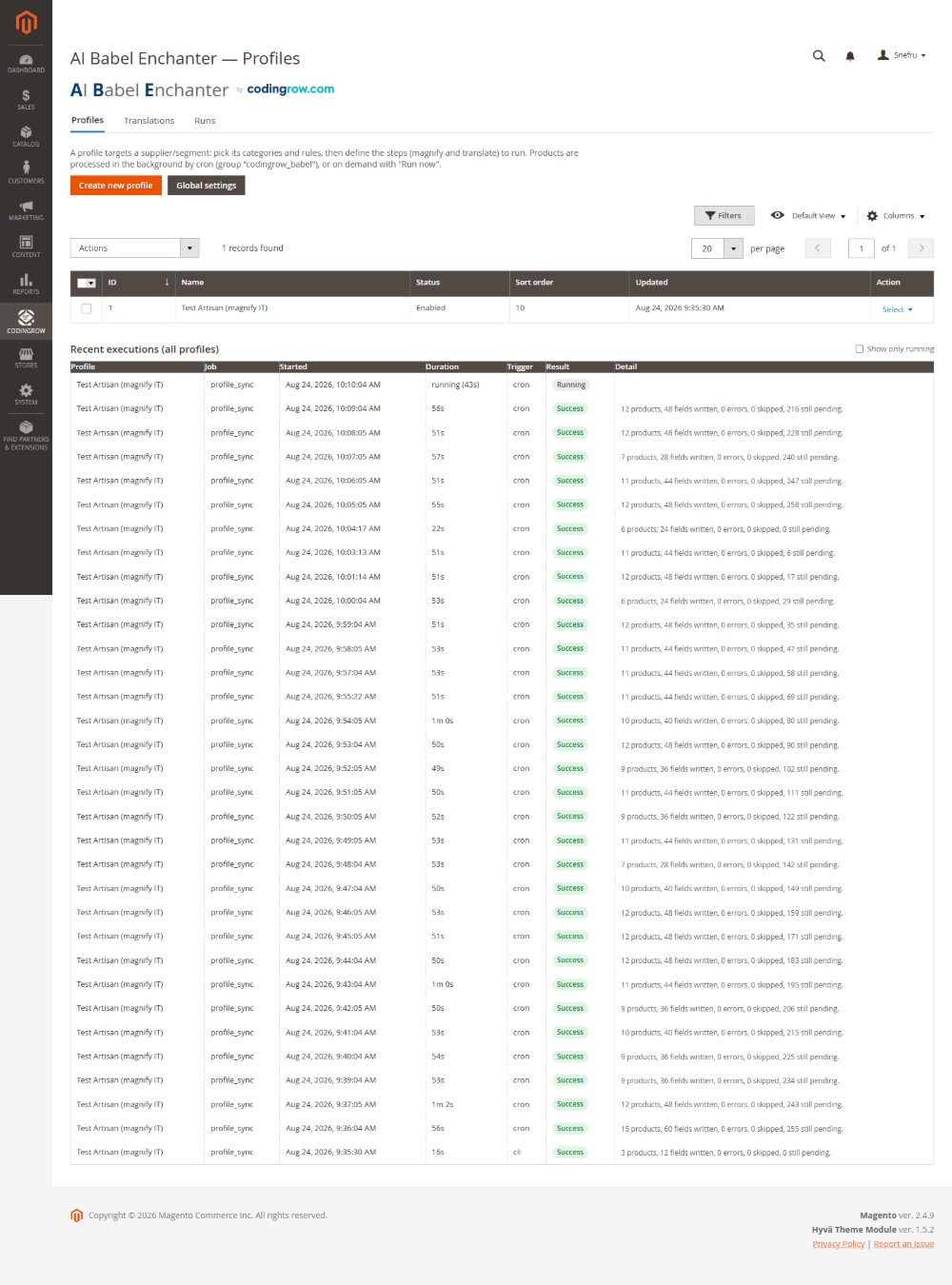
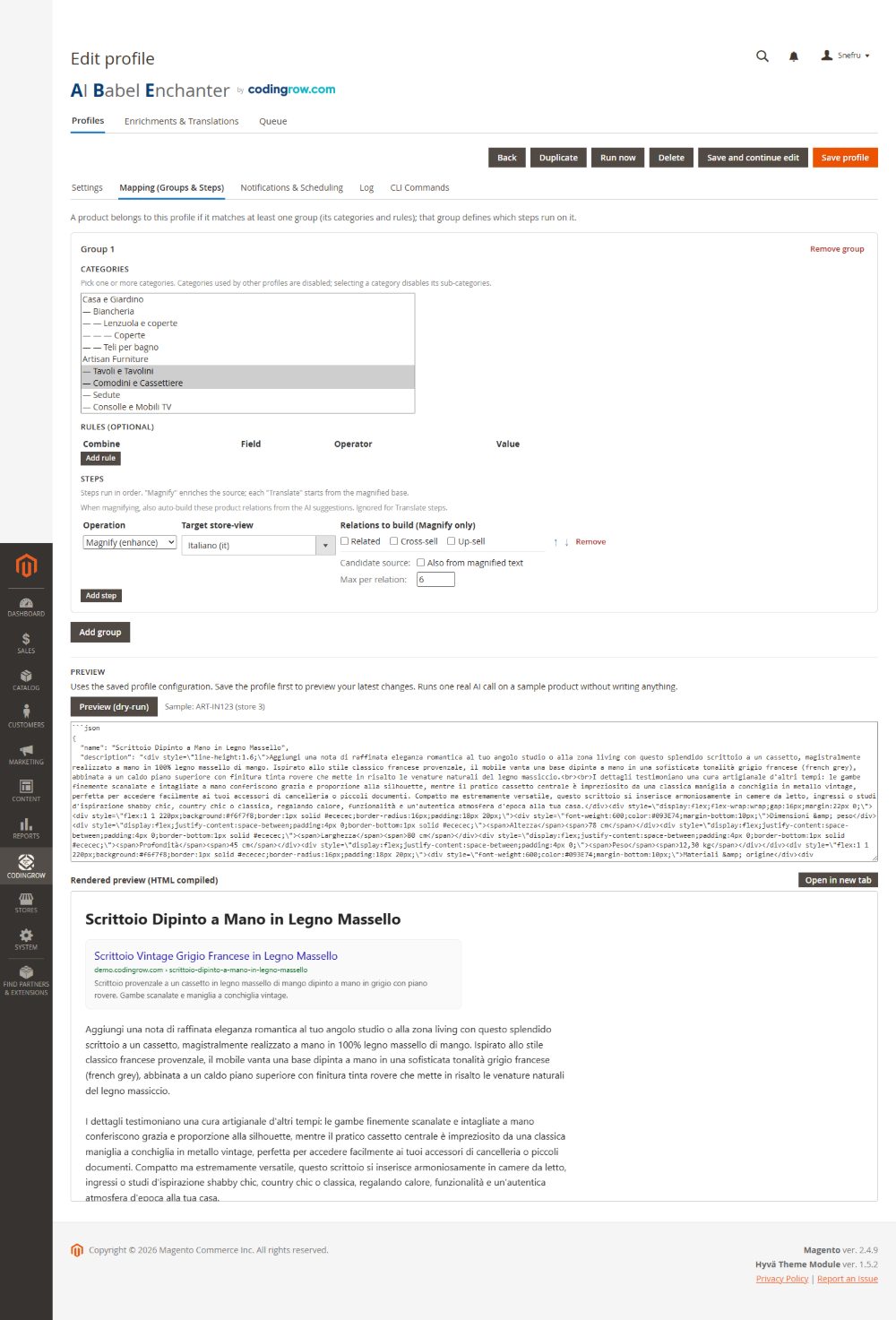
Profiles and persona prompt
Everything the module does is organized into profiles. A profile is a reusable configuration you run against a slice of the catalog: which attributes it may touch, the pipeline of steps to apply, an optional exclusive category so the profile only ever operates on products in that category, and a persona prompt — free-text instructions that set the tone of voice and rules for the rewrite. Profiles are anti-revert: a product already processed by a profile is skipped on the next run unless you reset it, so re-running is safe.
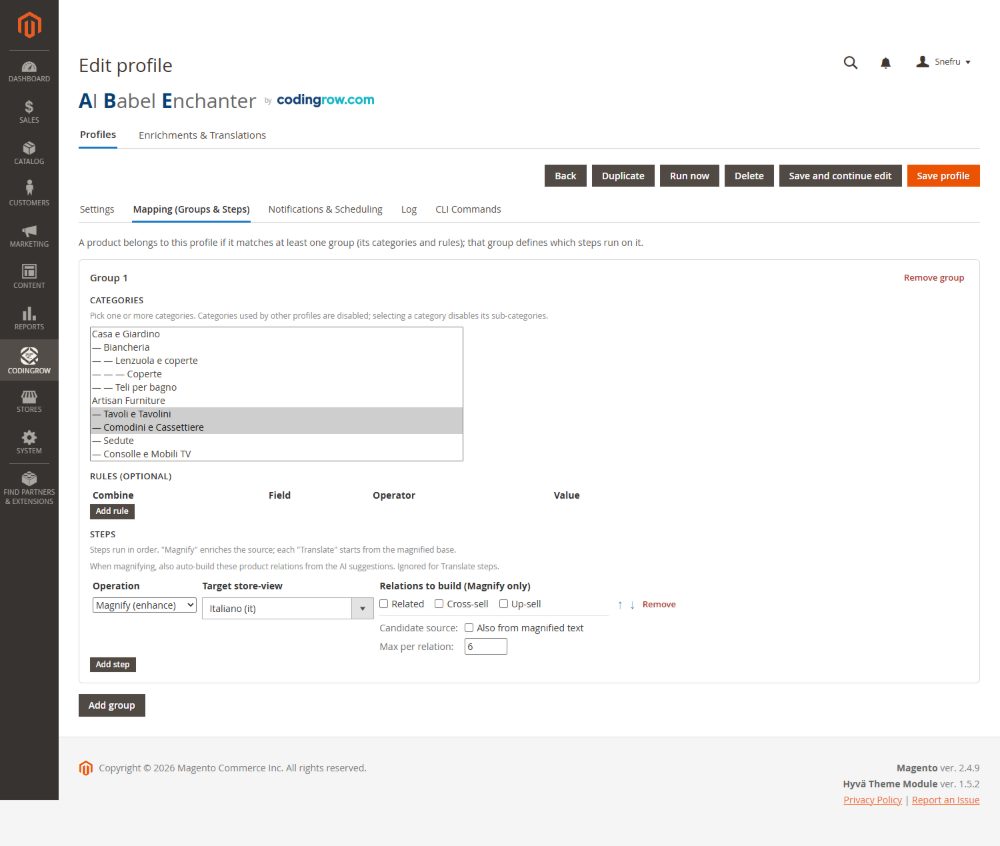
Groups and steps (the pipeline)
Inside a profile you define groups of steps that run in order. The two core step types are improve (rewrite/enhance the source text with the enhancement provider) and translate (produce the target-language versions). The normal pipeline is improve → translate: the source language is rewritten first, then the improved text is what gets translated, so every store view inherits the better copy instead of translating the old text. Grouping lets you scope different steps to different attributes and run them as one operation.
AI — Models (the credential pool)
Register every AI once in the AI — Models tab and reuse it everywhere. Each row is one credential: a custom name, the provider (Anthropic, OpenAI, Google/Gemini, OpenRouter or DeepL), the API key (stored encrypted), the model — type it or click Load models to pick only the models your key can actually use, each annotated with its response speed — a capability (translate / enhancement / both), a default, a fallback order and an enabled flag.
Add as many as you like: if one key dies (out of credit, rate-limited, an auth error) the module marks it cooling and fails over to the next credential in the chain, across providers, so a long run survives a dead key. The model and prompt are then chosen per step in the profile — magnify with a top-tier model and translate low-value titles with a cheap fast one, in one pipeline.
Max tokens (per credential) is the cap on the tokens a model may generate — a limit, not a target, so you pay only for what is produced. Too low and the copy is cut short; with thinking models it can even return nothing. The default of 4000 covers description + short description + title + meta. Extended thinking is off by default (it does not improve sales copy), and you can set an optional per-AI price to feed the cost estimate.
AI Compare
Open a profile's AI Compare tab, tick the models to compare and pick a few sample products. Run comparison magnifies each sample with each model (a dry-run — nothing is written) into a matrix: one column per model, one row per product, each cell showing the generated title with a reference, the generation time, an indicative € cost (from the real API token counts) and a Preview that opens the fully rendered result.
A judge — the model you choose in the dropdown, ideally your most capable one — scores every output on language quality, formatting, contextualized measures, premium register, JSON validity and SEO, and picks a winner; the verdict adds average time and average cost per model. Choose All models judge and every model returns its own verdict, one table each. A live timer and skeleton show the judge working, a Stop button interrupts, and the last comparison is saved on the profile so it reappears — with a timestamp — without re-running.
How tokens work (and what mis-setting them causes)
Every magnify or translate step is one call to an AI model. The model reads your persona prompt, the product's source fields and — when it also generates the title — a small sample of sibling titles: that is the input. It then writes a single JSON object with the rewritten fields: that is the output. The provider bills you for both, but output tokens cost several times more than input, so the length of the generated copy is what drives cost.
Max tokens caps only the output a model may produce in one call. It is a limit, not a target: if the copy ends naturally sooner you pay only for what was written, so a generous cap never costs more — it only prevents good output from being cut off. The default of 4000 comfortably covers a rich description plus short description, title and meta description together.
What a too-low cap causes. If the output would be longer than the cap, the response is truncated mid-sentence and the JSON never closes — the module cannot parse it. Some recent models also do hidden reasoning before writing: with a tight cap they can spend the whole budget thinking and return nothing at all. In either case Babel does not silently keep the original text — it marks that product failed with the real reason in the queue, so you can raise the cap and retry. If products ever come back unusually short or “stuck in the source language”, the token cap is the first thing to check.
Extended thinking is off by default, on purpose. For catalog sales copy it does not improve the result — the same text comes out — while it burns tokens and time and risks the empty-response trap above. Leave it off for generation; the AI Compare judge enables it only where reasoning genuinely helps, and falls back gracefully when the chosen model does not support it.
In practice: keep Max tokens at 4000 (or a little higher for very long descriptions), watch the queue for failures with a clear reason instead of silent bad output, and let the cost estimate — fed by the real token counts the API returns — tell you what each run will actually cost before you launch it.
The product’s objective characteristics
On many catalogues the measurements are in no attribute at all: they sit inside the name. Wallpaper Roll 10 m, Extension Lead 5 m. A person reads that fine; the shop does not: a customer asking for ten metres is offered a page set to one piece, because no field says how long one piece is.
While Babel works on a product, it writes that product’s measurable facts into the Product characteristics (Babel) attribute on the product page, which you read and correct.
unita_vendita: confezione
copertura_pezzo: 2.22 m2
pezzi_confezione: 8
spessore: 8 mm
materiale: laminate
tipologia: floating floor (dedotto)
unita_vendita is never deduced. It is a commercial term: it says what the price refers to. A line other than pezzo is written only when all three hold — it was not deduced, the number that makes the arithmetic possible is there (pezzi_confezione for a pack, copertura_pezzo for metres), and the proof is in the product’s own data, checked by the module and not taken on trust from the AI. If nothing says it the line is simply absent, and that means the price is for one piece: the safe side.
The arithmetic is done by copertura_pezzo — how much ONE piece covers — which is a measurement and can be worked out from the product. A pack of laminate covering 2.22 m² carries unita_vendita: confezione and copertura_pezzo: 2.22 m2, and a request for thirty square metres becomes fourteen packs. Without the pair it became thirty packs: more than twice the spend.
The (dedotto) marker is the boundary. A line ending that way was written by nobody: the AI deduced it. It helps the assistant understand and search, but no quantity is ever worked out from it. To confirm a value you delete that word; what is wrong you correct, what does not belong you remove. It is your catalogue.
On a product with variants each carries its own part: the parent holds what is true of every variant (the selling unit, the material, the type), each variant holds what sets it apart (its own size, its own diameter). Variants are only processed when what changes is a measurement: if only the colour changes, the variant would have nothing of its own to say. A grouped product or a bundle has no measurements of its own — it is a list of articles, each with theirs — and on virtual and downloadable products nothing is written at all: a course has no size.
It does not rewrite your texts: it is a separate, small call with a memory of its own. For items already processed there is the Write characteristics button on the profile page, or bin/magento babel:params --profile=3. On a real catalogue: 38 parent items and 116 variants gone through, the selling unit on 34 of the 38 parents — it belongs to the parent and never to the variant, because how a thing is sold does not change between the 80 and the 100.
On a variant the field is often empty, and that is the right outcome: what sets that variant apart is already in a Magento attribute (its weight, the size it varies on), and writing it here as well would make two copies destined to drift apart — with the variant winning over the parent. On that catalogue 97 of the 116 variants carry a line of their own, the other 19 had nothing to add. And the rules are applied to what is already written too: a line left by an older version that breaks today’s format is removed on the next pass, while a line you corrected by hand is never touched.
Product types and how each one is handled
A configurable product is not a single item, a grouped one is not a parcel, and a virtual or downloadable product is not shipped. The module works out the type on its own and hands the AI a description of the structure, which changes what the text says and what it must not say.
Where to switch it on. The profile's Mapping tab, on the individual step: Product structure context. It is off by default: switching it on changes what the AI receives and therefore regenerates that profile's pages on the next run. Switch it on before a fresh run, not halfway through one.
- Configurable — receives the choice axis with its storefront label (for example size: 80, 100), the options, and the attributes that actually differ between the children, worked out by comparing them. There is nothing to configure by hand: the module picks up a configurable's attributes on its own. Prices, special prices, costs and tiers are deliberately left out, because they change and a text that quotes one ages badly. The resulting text describes the range; a heading must never carry the value of a single option (for example Pipe 1m 100 when 100 is one of the sizes).
- Bundle — receives the option titles, which ones are required and the items selectable in each, so the text can explain how the product is put together.
- Grouped — receives the list of associated items, so the text can say they are bought together and what each one is for.
- Virtual — receives only the type, which is enough: the AI is forbidden to mention shipping, delivery, packaging and weight. Without that rule the model writes fast shipping even for an extended warranty.
- Downloadable — receives the number of files and whether a sample exists: the text explains the digital delivery, and shipping stays off limits.
Variants are not processed. Next to it sits Skip variants, on by default at group level: a product that appears as the child of a configurable is kept out of the queue. It has no page a customer can open, so enriching it is spend with no return; in a catalogue built on variants they are most of the queue. Switch it off if you sell your variants as standalone items.
Narrowing the targets. On the same step, Product types and Visibility restrict the queue to what you actually want to work on — only configurables, say, or only products visible in catalog and search.
Cross-sell, related and up-sell (AI relations)
Three independent toggles let a profile propose cross-sell, related and up-sell products using the AI. The model only ever suggests real SKUs from your catalog — it cannot invent a product that doesn't exist — and the suggestions are written into Magento's native cross-sell/related/up-sell links, so they appear in the standard storefront blocks. Turn on only the relation types you want the module to manage.
Dry-run preview (and rendered)
Before anything is written, run a profile in dry-run: the module generates the proposed content for a sample of products and shows it side by side with the current text, including a rendered preview so you see how the improved description will actually look on the page — not just raw text. Nothing is saved in dry-run; it's there to validate the persona prompt and the pipeline before you commit to a full run.
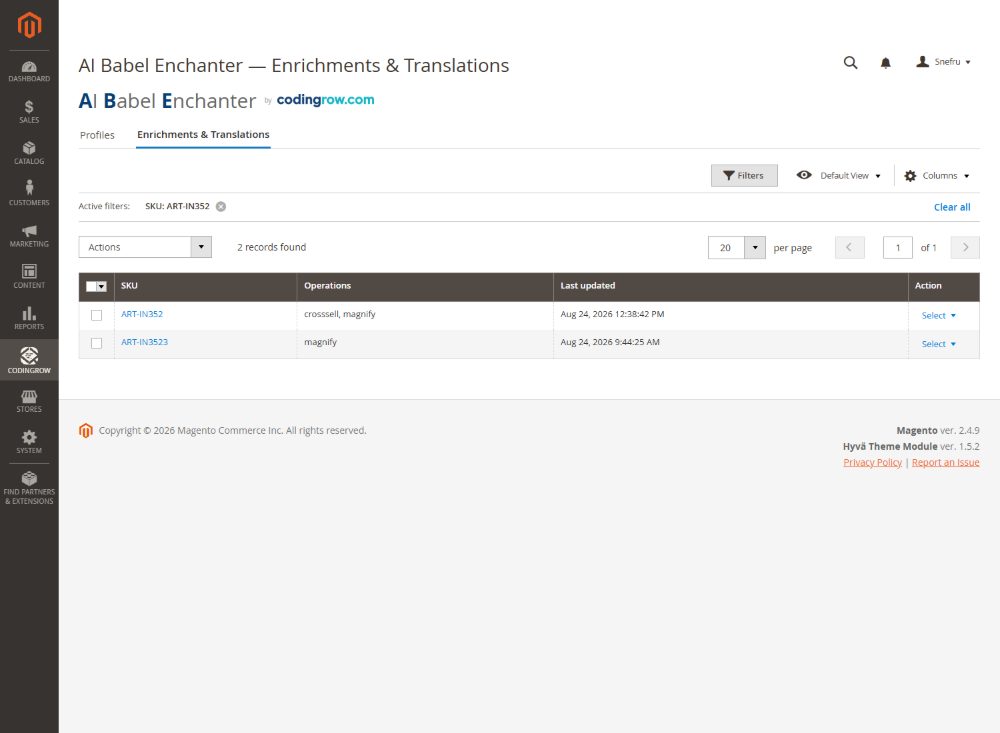
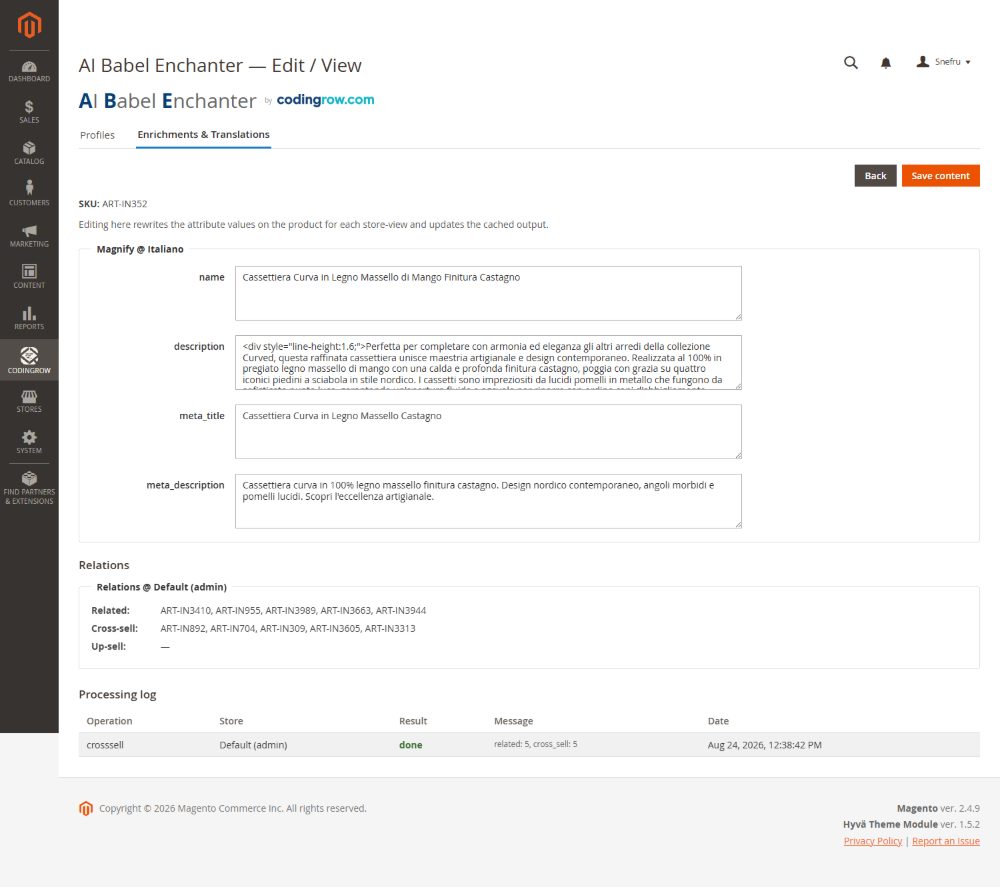
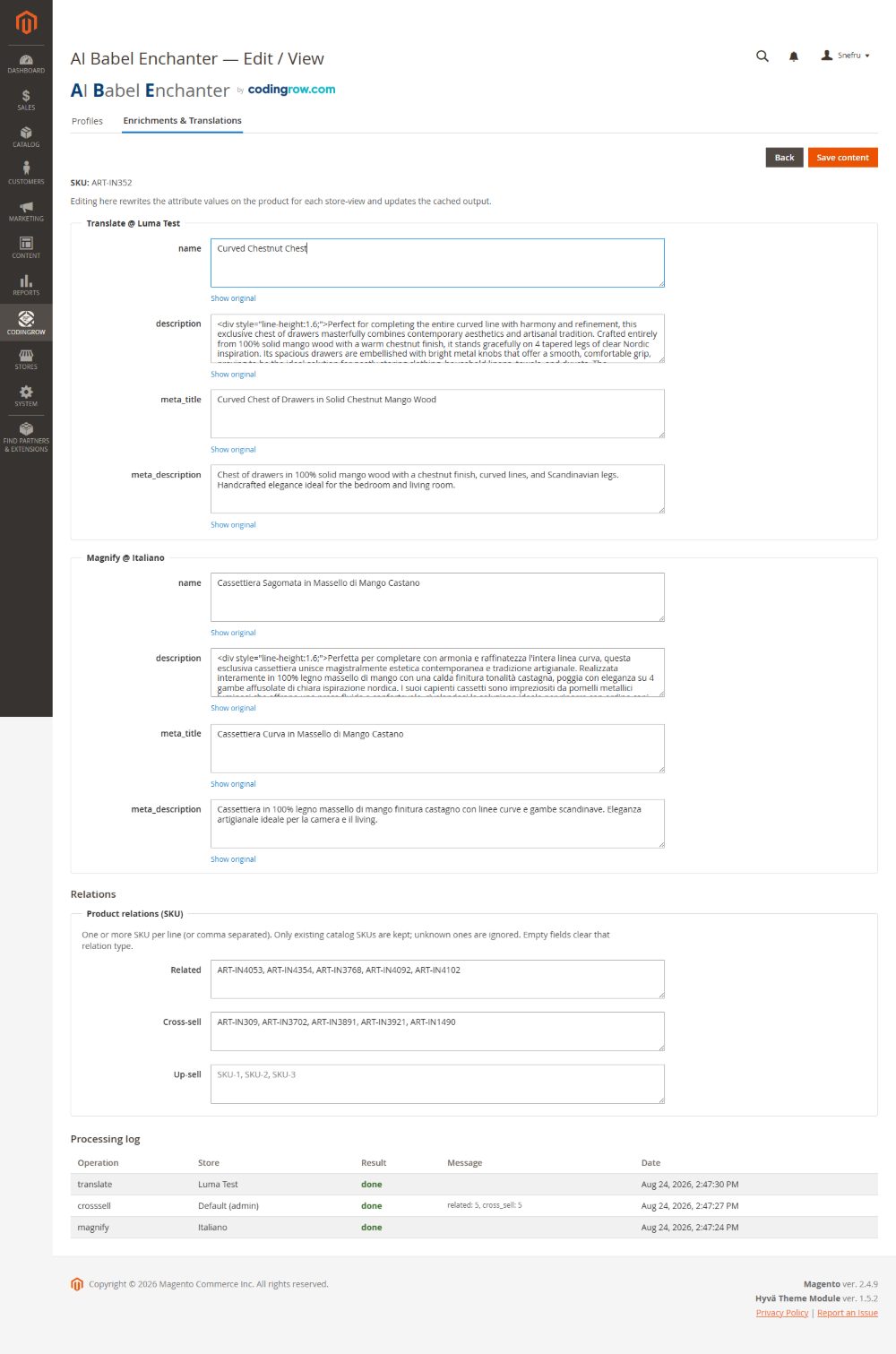
The "Enrichments & Translations" grid
The "Enrichments & Translations" tab is the working grid: every generated field for every product and language, paginated and filterable. You can edit any generated value inline before or after it is applied — the AI output is a starting point, not a lock — and each row keeps a link back to the original text, so you can restore the original for that field with one action if you don't like the result. This is the human-in-the-loop layer over the automated pipeline.
Texts you declare final
Sooner or later there is a product whose description you write yourself: the flagship item, the one the owner cares about, the one where the AI copy was good but not right. You fix it by hand, and from that moment you want one guarantee — nobody rewrites this again. That guarantee is the Final checkbox, new in v3.4.0.
Open Enrichments & Translations, open a product, and under every field there is a checkbox labelled “Final — never regenerate this text”. Tick it and that one field is declared yours.
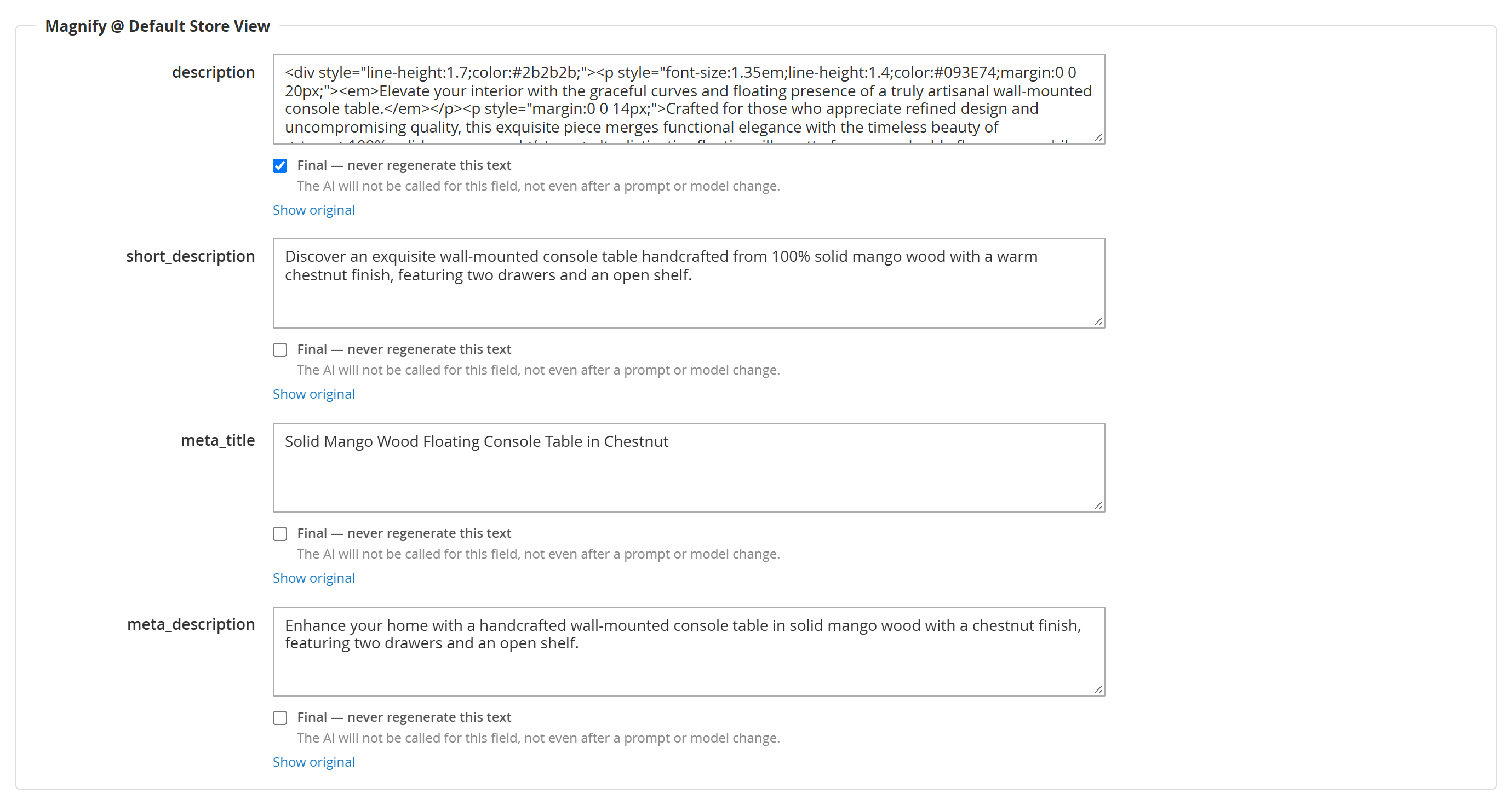
What “final” means, precisely. For that field, on that product, in that store view:
- the AI is never called for it again — not on the next run, not after you change the persona prompt, not after you switch model, not after a cache flush, not when you press Apply to already processed. It costs nothing, for ever. And if every field of a product is declared final, the AI call for that product is not made at all;
- if the value disappears from the product — an importer overwrote it, someone restored the original, a migration wiped it — the background check puts your declared text back, again at no cost;
- it wins over the module's own automatic rules. The meta title, for example, is normally forced to follow the product name, always; declare the meta title final and your text wins even over that;
- it applies to that one field only. The other fields of the same product keep being generated normally. Declaring the description final does not freeze the meta title, and it does not take the product out of the profile.
Editing in the grid ticks it for you. As soon as you type into a field in the grid, its Final checkbox ticks itself. It is the behaviour the interface implies — you went in and corrected that text, so the correction is the whole point — and before v3.4.0 it did not happen: a hand-corrected text survived until the next prompt change and was then silently regenerated over the top. If you want a corrected text to be regenerated later, untick the box before saving.
The one thing to remember: a final field is the only thing in the module that survives a change of persona prompt or model. Everything else is rebuilt from the saved result, and the saved result is filed under a key that includes the whole prompt — change the prompt and none of the saved results can be reused.
Texts that come back by themselves
Here is a failure that used to pass unnoticed. A product that has been processed never re-enters the queue on its own — on purpose, so that re-running a profile is cheap and safe. The side effect: if something overwrites a generated text after the product was processed, that product is never looked at again. The storefront keeps showing the overwritten text, the queue says done, the history still holds the generated copy, and no error is raised anywhere. We found it on a real catalogue: 318 products showing English titles and descriptions in an Italian shop, for weeks, with the Italian text still sitting in the module's own history.
v3.4.0 closes this. A background check runs hourly and asks one question per saved result, reading only the database and never calling an AI to ask it: is the text I wrote still on the product? When the answer is no, the product goes back into the queue with the cheapest treatment that fits:
| What the check finds on a product | What it does | What it costs |
|---|---|---|
| at least one of the missing fields is declared final | puts your declared text straight back | nothing, always |
| the fields changed, but the source text is unchanged | reuses the saved result — no AI call | nothing |
| the fields changed and the source text really changed | regenerates them: this is genuinely new product material | a paid AI call — subject to the cap |
It works in slices, and this matters. Each run examines 500 saved results and remembers where it stopped, carrying on from there an hour later. The comparison costs two queries per row, so sweeping a large catalogue every single hour would be a burden nobody asked for. The whole catalogue is still covered — just spread over time. On a big catalogue that means a text which went missing may wait hours, and on a very large one a couple of days, before the check reaches it. It is not stuck; it has not got there yet. If you need an answer now, bin/magento babel:reapply looks at whatever you point it at, immediately.
You control it under Stores → Configuration → Codingrow → AI Babel Enchanter → Keeping the texts in place:
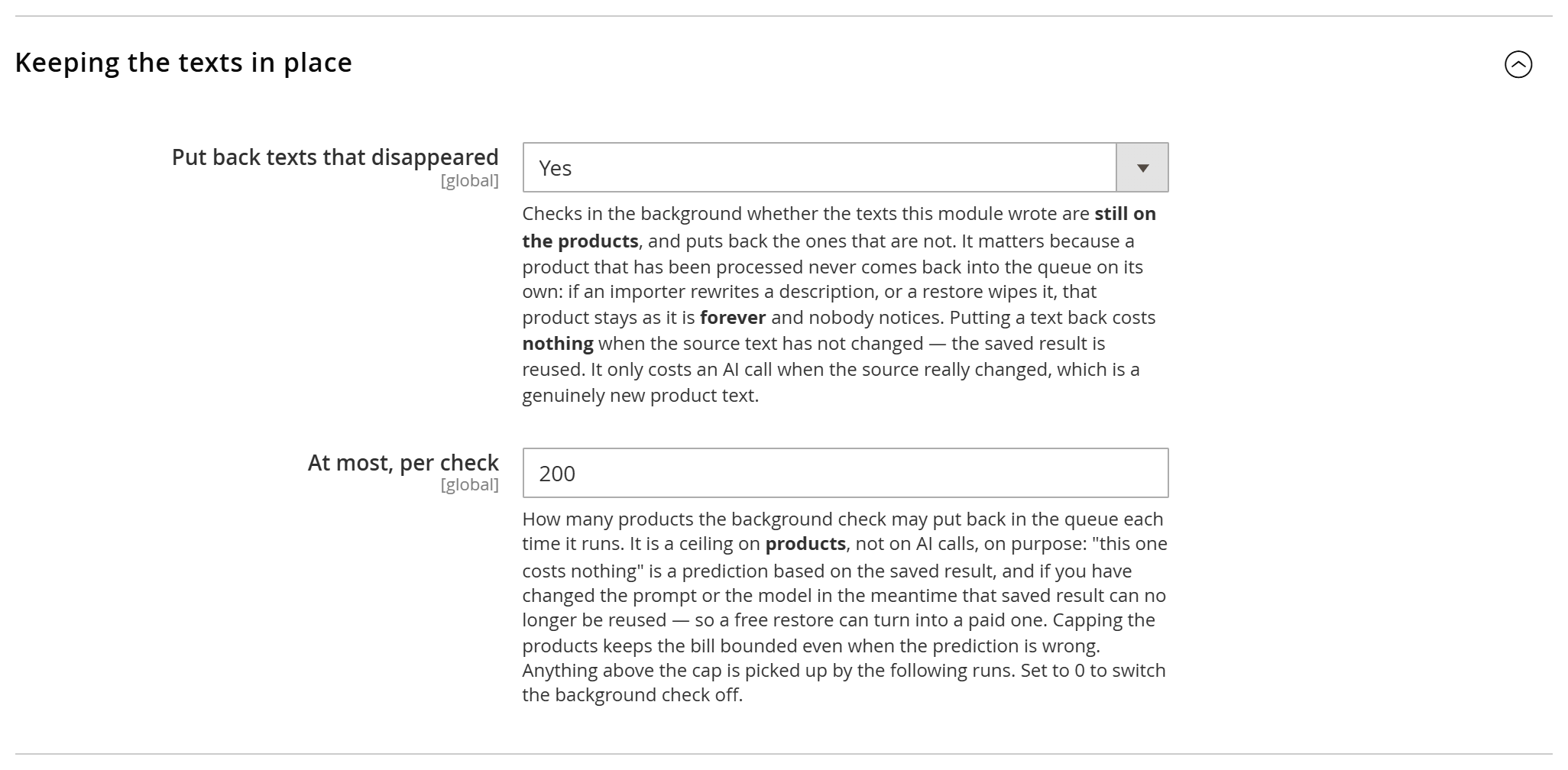
- Put back texts that disappeared — Yes by default. Set it to No and nothing is ever put back automatically; you keep the
babel:reapplycommand for manual passes. - At most, per check — 200 by default. Anything above the cap is picked up by the following runs. Set it to 0 to switch the background check off.
Why the cap counts products and not AI calls. “This one costs nothing” is a prediction based on the saved result. If you changed the prompt or the model in the meantime, that saved result can no longer be reused and a restore that looked free turns into a paid one. Capping products keeps the bill bounded even when the prediction is wrong. Free restores are processed first, so the cheap work always gets done before the cap is reached.
What it does not do, and what it does. It never touches prices, stock, images or any attribute outside the ones the profile manages, and it never enrols a product that was never processed. But be clear on the part that surprises people: it puts the product back in the queue, and the run then rewrites every field that profile manages. So if you had corrected one of those fields on the product page, that correction is replaced. That is not a bug, it is the two-channel rule: a correction you want kept belongs in the grid, or gets the Final tick.
From the command line, bin/magento babel:reapply reports only and writes nothing unless you pass --confirm — the safe way to see the state of a catalogue before deciding. Add --only-free for the restores that cost nothing, --profile and --limit to narrow the pass.
Applying a new prompt to the products already done
Profiles are deliberately anti-revert: a product already processed is not processed again, which is what makes re-running a profile safe and cheap. The flip side is that when you improve the persona prompt, the improvement only reaches products processed from that moment on — everything already done keeps the old copy. Until v3.4.0 the only way to include them was babel:run --force from the command line.
Now the profile page has a button for it.

Apply to already processed puts the products marked done, partial and skipped back into the queue for that profile. The confirmation states the cost in plain words before anything happens: “Products whose source text has not changed are reused at no cost. The others are rewritten by the AI, which your provider bills you for, so after changing the persona or the instructions expect the whole profile to be rewritten.”
That last clause is not boilerplate. Every magnified result is filed under a key that includes the provider, the model and the entire system prompt. Change the persona, change the template, change the model, and not one magnify result in the catalogue can be reused — and the translations follow, because what they translate has just changed. So pressing this button after a prompt change means “regenerate this whole profile, and pay for it”. Before a prompt change, on an untouched catalogue, the same button is nearly free.
Use it when you have improved the prompt and want the old products brought up to the new standard; when you have added an attribute to a group and want it filled in everywhere; when you have fixed a mapping mistake. Do not use it when you only want to repair texts that went missing — that is the background check above, and it is far cheaper.
Fields declared Final are not regenerated by this button either.
If your catalogue is imported
If products arrive in Magento from a supplier feed, an ERP, a PIM or any scheduled import, that importer and Babel write to the same fields. Whether the two coexist peacefully depends on how the importer is configured and on how many store views you have — and when they do not coexist, the symptom is not an error message: it is your paid-for copy quietly disappearing while every screen still reports success.
The acceptance test takes one minute: enrich one product, run the import without changing anything in the feed, reload the product. If Babel's text is still there, that importer is compatible. If the supplier text is back, it is not — and no Babel setting fixes that.
Rollback
Every value the module writes is reversible. Beyond per-row restore original in the grid, the babel:rollback CLI command reverts content in bulk — by profile, by product, or the whole run — back to the text that was in place before the module touched it. Because the original is always preserved, a full-catalog run is never a one-way door.
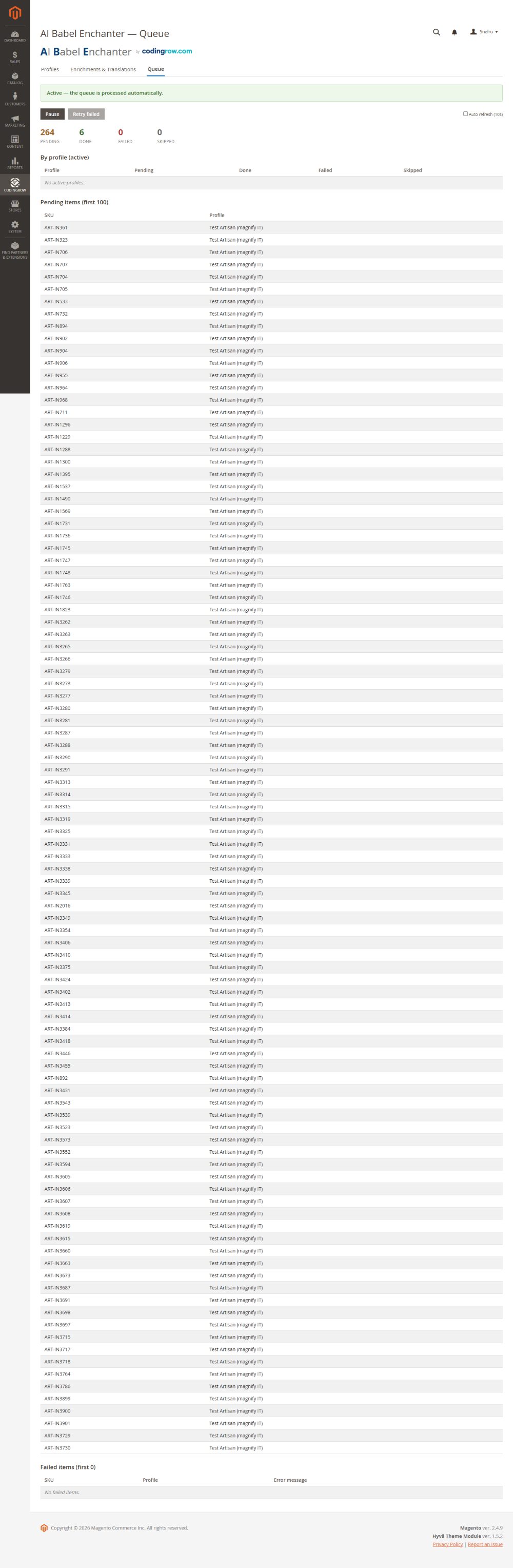
Queue and credit circuit-breaker
Long runs are processed through a queue you can watch, pause and resume. The built-in circuit-breaker (configured under Resilience) protects the run: on repeated provider errors — most often the provider running out of credit or rate-limiting — it pauses after N errors, waits the configured cooldown, and can auto-retry transient failures instead of failing the whole batch. When you top up credit or the limit resets, resume the queue and it continues where it stopped.
Merchant listings: returns and shipping
Google reads a return policy and shipping details from the product page to show them in its free merchant listings, and Search Console reports them as missing when they are absent. Neither can be derived from the catalogue — they are commercial terms — so they are declared in configuration, under Merchant listings (returns and shipping). Both blocks are off by default and require the product structured data to be on.
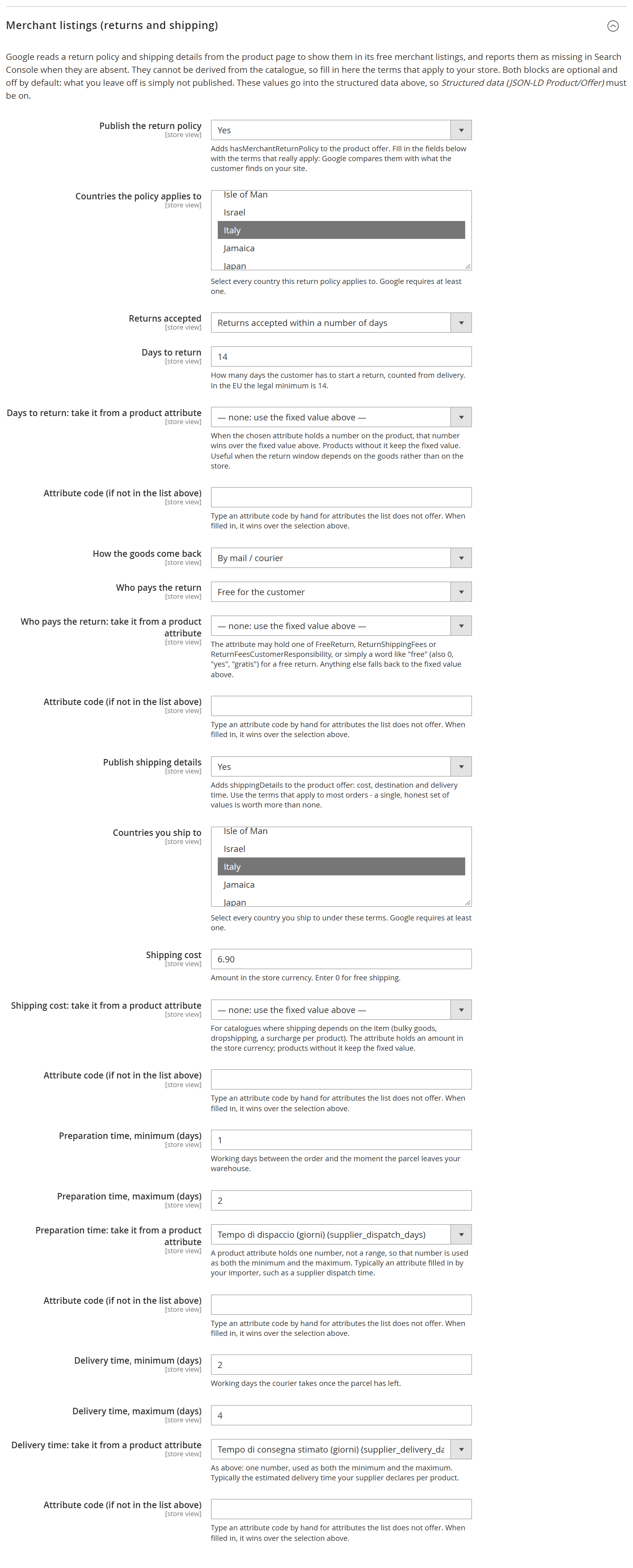
- Return policy →
hasMerchantReturnPolicy: countries (picked from Magento's own list), return window, days, how the goods come back, who pays and the fee when there is one. - Shipping details →
shippingDetails: countries you ship to, cost (0for free shipping), preparation and delivery time in working days.
Two rules are deliberate. A block whose required fields are incomplete is dropped whole rather than published half-true: Google compares what you declare with what the customer finds on your site, so a wrong declaration is worth less than a missing one. And "returns not accepted" publishes neither a return method nor who pays — there is no return to describe.
The offer also carries validFrom, the date the published price is valid from — the start of the special price when there is one, otherwise the product's creation date. That one needs no configuration.
These terms are rarely the same for the whole catalogue: preparation and delivery times differ between your own warehouse and dropshipping, shipping depends on how bulky the item is, the return window on what is being sold. And the figure usually already exists on the product, in an attribute your importer or your team fills in. So each of those fields can be pointed at a product attribute — the list includes your custom ones — with a box to type a code the list does not offer. Where the product carries a value it wins; where it does not, the fixed value stands; and a value that is not a number falls back to the fixed one instead of publishing nonsense.
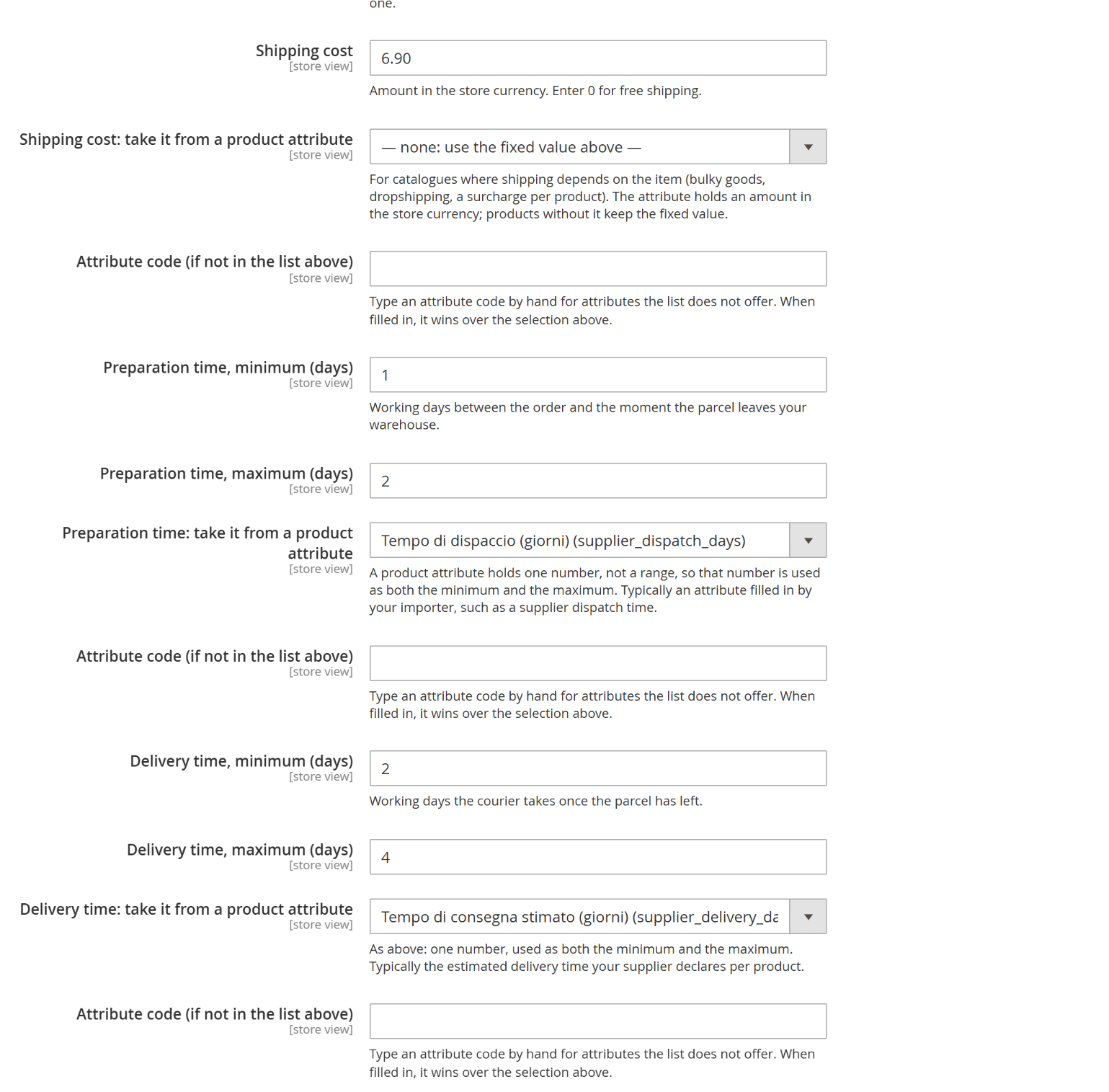
Each figure can come from a product attribute, chosen from the catalogue's own list: here the preparation and delivery times are taken from the attributes an importer fills in.
Command line (CLI)
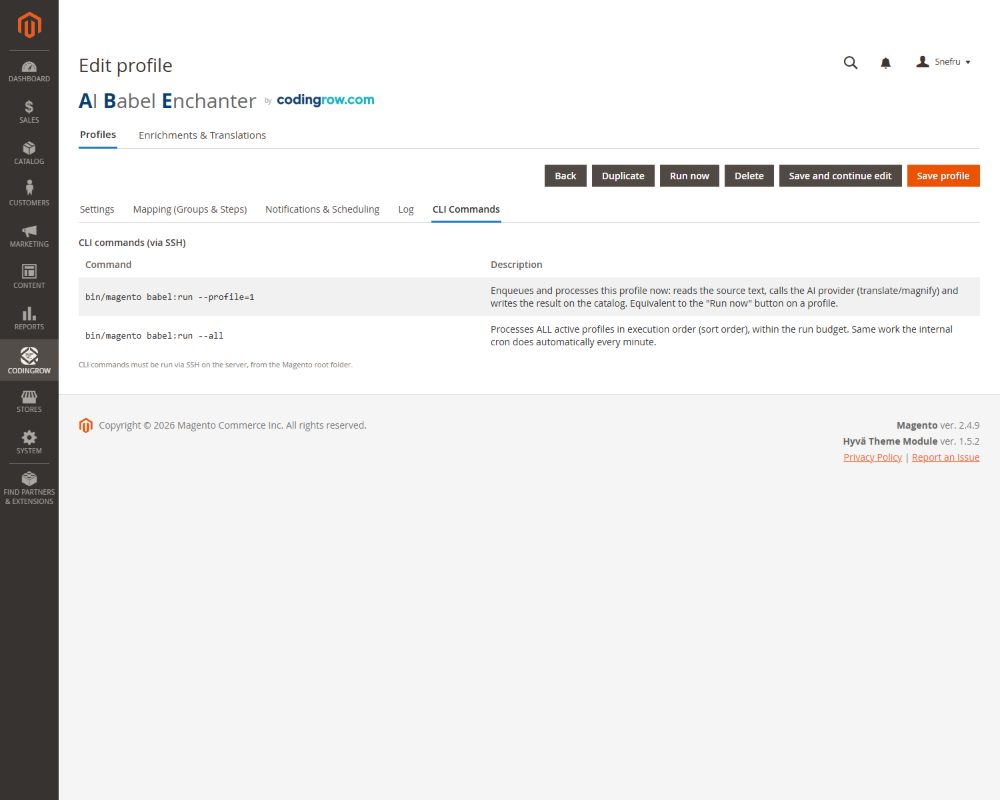
Everything can be driven from the CLI for scheduling and large runs.
| Command | What it does |
|---|---|
bin/magento babel:run | Runs a profile (improve/translate pipeline) over its target products — the standard way to launch a full-catalog pass. |
bin/magento babel:rollback | Reverts generated content back to the original text, scoped by profile, product, or the entire run. |
bin/magento babel:queue | Inspects and controls the processing queue: status, pause, resume. |