

Instalación
Requisitos
Magento 2.4.x — probado en 2.4.9, compatible con versiones 2.4.* anteriores. PHP 8.1–8.5. Funciona tanto con el tema predeterminado Luma como con el tema Hyvä — el módulo se ejecuta enteramente en el admin y escribe atributos de catálogo estándar, por lo que tu storefront muestra el contenido mejorado sin cambios en las plantillas. Depende del módulo gratuito codingrow/module-core, instalado automáticamente. Requiere una clave API de al menos un proveedor de IA para el paso de mejora/reescritura (Anthropic, OpenAI, Google u OpenRouter) y, para la traducción, una clave de traducción automática (DeepL) o un LLM usado como traductor. Todo el uso de IA y traducción te lo factura directamente el proveedor — Codingrow nunca aplica recargo.
Pasos de instalación
- Añade las credenciales que recibirás por email al archivo
auth.jsonen la raíz de tu proyecto Magento:{ "http-basic": { "repo.codingrow.com": { "username": "...", "password": "..." } } } composer config repositories.codingrow composer https://repo.codingrow.comcomposer require codingrow/module-ai-babel-enchanterbin/magento module:enable Codingrow_BabelEnchanterbin/magento setup:upgrade && bin/magento setup:di:compile && bin/magento cache:flush(setup:di:compilees obligatorio en un despliegue de producción; puedes omitirlo en un entorno de desarrollo)- Pega tu clave de licencia en Admin → Stores → Configuration → Codingrow → AI Babel Enchanter → License → License Key, guarda y luego vacía la caché.
Configuración
Stores → Configuration → Codingrow → AI Babel Enchanter.
| Ajuste | Qué hace | Predeterminado | Notas |
|---|---|---|---|
| License Key | La clave de licencia emitida para este dominio. | — | Acepta una clave de módulo único o una clave de suscripción Codingrow. Sin una licencia válida el módulo no funciona. |
| Enable | Interruptor principal del módulo. | No | Requiere una licencia válida y al menos una clave API de un proveedor. |
| Enhancement provider | Proveedor, modelo y clave API que reescriben y mejoran el texto (el motor de mejora/reescritura). | — | Usa Load models junto al campo Model en lugar de escribir un id. |
| Translation provider | Cómo se producen los idiomas de destino: un servicio de traducción automática (DeepL) o un LLM usado como traductor, con su modelo y su clave. | — | Traduce con el mismo LLM del paso de mejora, o con una clave MT dedicada para un menor coste por carácter. |
| SEO options | Interruptores para lo que se genera: meta title, meta description, meta keywords, URL key. | — | Desactiva todo lo que no quieras que el módulo toque. |
| Resilience | Circuit breaker: reintento automático ante fallos transitorios, horas de cooldown antes de reintentar, pausa tras N errores consecutivos. | — | Protege una ejecución larga cuando el proveedor se queda sin crédito o aplica rate limit. |
Desinstalación
Pon Enable en No y guarda para detener de inmediato todo el procesamiento — el contenido de tu catálogo permanece exactamente como está. Si primero quieres volver al texto original, ejecuta un rollback (consulta la Guía de usuario). Para eliminar el módulo por completo: bin/magento module:disable Codingrow_BabelEnchanter luego composer remove codingrow/module-ai-babel-enchanter.
Proveedores & coste
Elegir proveedores
AI Babel Enchanter tiene dos slots de proveedor independientes: uno para el paso de mejora/reescritura (un LLM) y otro para la traducción (un LLM o un servicio dedicado de traducción automática como DeepL). Tú traes tus claves y todo el uso te lo factura directamente el proveedor que elijas — Codingrow nunca aplica recargo. Elige el modelo de mejora por su calidad y traduce con el mismo LLM o con una clave MT más barata por carácter.
Anthropic (modelos Claude)
- Inicia sesión en console.anthropic.com.
- Ve a console.anthropic.com/settings/keys.
- Haz clic en Create Key, ponle un nombre (p. ej. "AI Babel Enchanter") y copia el valor.
- Pégalo en el slot de proveedor con Provider en Anthropic, luego usa Load models.
OpenAI (modelos GPT)
- Inicia sesión en platform.openai.com.
- Ve a platform.openai.com/api-keys.
- Haz clic en Create new secret key, ponle un nombre y cópiala de inmediato — solo se muestra una vez.
- Pégala en el slot de proveedor con Provider en OpenAI, luego usa Load models.
Google (modelos Gemini)
- Inicia sesión en aistudio.google.com con una cuenta de Google.
- Ve a aistudio.google.com/app/apikey.
- Haz clic en Create API key, elige o crea un proyecto de Google Cloud y copia la clave.
- Pégala en el slot de proveedor con Provider en Google, luego usa Load models.
OpenRouter (una clave, los modelos de muchos proveedores)
- Inicia sesión en openrouter.ai.
- Ve a openrouter.ai/keys.
- Haz clic en Create Key, ponle un nombre y copia el valor.
- Pégalo en el slot de proveedor con Provider en OpenRouter, luego usa Load models.
DeepL (traducción automática)
- Inicia sesión en deepl.com/pro-api.
- Abre Account → API keys y copia tu Authentication Key.
- Pégala en el slot Translation provider con el traductor en DeepL.
DeepL se cobra por carácter (unos €20 por 1M de caracteres), normalmente más barato que un LLM para la traducción directa. También puedes omitir DeepL por completo y traducir con el mismo LLM del paso de mejora.
Load models — sin id de modelo que escribir
Una vez puesta la clave API, guarda la sección y haz clic en Load models bajo el campo Model: el módulo llama al endpoint de lista de modelos del proveedor con tu clave y rellena un desplegable con todos los modelos que tu clave puede usar realmente — elige de la lista en lugar de escribir un id. Queda un campo de texto manual como respaldo para un id de modelo que aún no esté en la lista. Un enlace justo debajo del campo apunta siempre a la página de claves correcta del proveedor seleccionado.
Estimar el coste de una ejecución sobre todo el catálogo
Una pasada completa tiene dos factores de coste que se suman por producto: mejora (tokens LLM, con precio por millón) y traducción (caracteres, con precio por millón, multiplicados por el número de idiomas de destino). Usa la calculadora de abajo para dimensionar una ejecución antes de lanzarla — es una estimación puramente orientativa; tus cifras reales dependen de la longitud del contenido y de los modelos que elijas.
Full-catalog run cost calculator
Estimate what one full pass over your catalog costs. Two cost drivers add up per product: improve (LLM tokens, priced per million) and translate (characters, priced per million, multiplied by the number of target languages). Everything is billed to you directly by the AI/translation provider — this is a purely indicative estimate.
| Improve model | ~ improve / product | Full-catalog improve ~ |
|---|---|---|
| Gemini 2.x Flash | ~€0.0004 | ~€2 |
| OpenAI gpt-4o-mini | ~€0.0006 | ~€3 |
| Claude Haiku 4.5 | ~€0.004 | ~€20 |
| Claude Sonnet 4.5 | ~€0.015 | ~€75 |
Guía de usuario
Perfiles y persona prompt
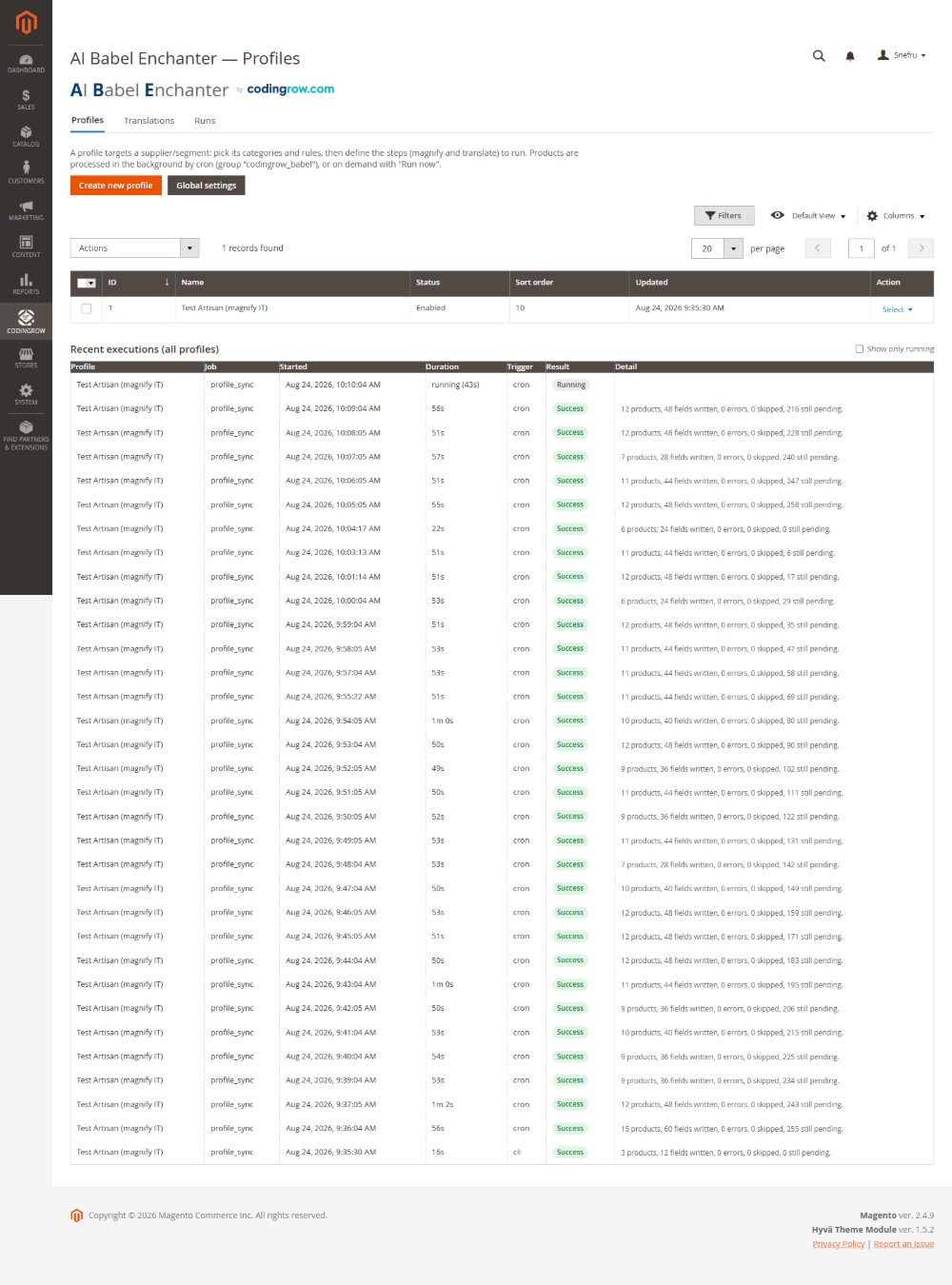
Todo lo que hace el módulo se organiza en perfiles. Un perfil es una configuración reutilizable que ejecutas sobre una parte del catálogo: qué atributos puede tocar, la pipeline de pasos a aplicar, una categoría exclusiva opcional para que el perfil solo opere sobre productos de esa categoría, y un persona prompt — instrucciones en texto libre que fijan el tono de voz y las reglas de la reescritura. Los perfiles son anti-revert: un producto ya procesado por un perfil se omite en la siguiente ejecución a menos que lo reinicies, así que reejecutar es seguro.
Grupos y pasos (la pipeline)
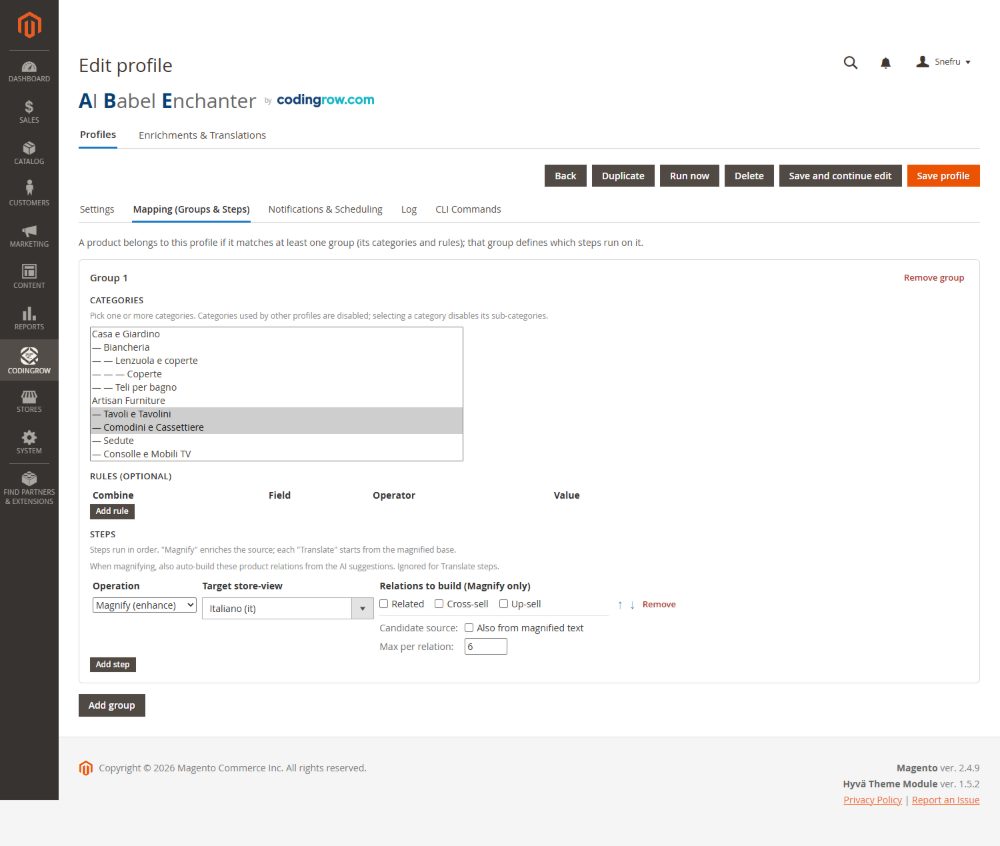
Dentro de un perfil defines grupos de pasos que se ejecutan en orden. Los dos tipos de paso principales son improve (reescribir/enriquecer el texto de origen con el proveedor de mejora) y translate (producir las versiones en el idioma de destino). La pipeline normal es improve → translate: primero se reescribe el idioma de origen, y luego es el texto mejorado el que se traduce, así cada store view hereda el mejor contenido en vez de traducir el texto antiguo. Agrupar te permite aplicar pasos distintos a atributos distintos y ejecutarlos como una sola operación.
AI — Models (el pool de credenciales)
Registra cada IA una sola vez en la pestaña AI — Models y reutilízala en todas partes. Cada fila es una credencial: un nombre personalizado, el proveedor (Anthropic, OpenAI, Google/Gemini, OpenRouter o DeepL), la clave API (almacenada cifrada), el modelo — escríbelo o haz clic en Load models para elegir solo los modelos que tu clave puede usar realmente, cada uno anotado con su velocidad de respuesta — una capacidad (translate / enhancement / both), un predeterminado, un orden de fallback y un indicador de activación.
Añade tantas como quieras: si una clave se agota (sin crédito, en rate limit, un error de autenticación) el módulo la marca en cooldown y pasa a la siguiente credencial de la cadena, entre proveedores, de modo que una ejecución larga sobrevive a una clave muerta. El modelo y el prompt se eligen luego por paso en el perfil — mejora con un modelo de primer nivel y traduce los títulos de bajo valor con uno barato y rápido, en una sola pipeline.
Max tokens (por credencial) es el tope de tokens que un modelo puede generar — un límite, no un objetivo, así que pagas solo por lo que se produce. Demasiado bajo y el texto se corta; con los modelos de razonamiento puede incluso no devolver nada. El predeterminado de 4000 cubre descripción + descripción corta + título + meta. Extended thinking está desactivado por defecto (no mejora los textos de venta) y puedes fijar un precio opcional por IA para alimentar la estimación de coste.
AI Compare
Abre la pestaña AI Compare de un perfil, marca los modelos a comparar y elige unos cuantos productos de muestra. Run comparison mejora cada muestra con cada modelo (un dry-run — no se escribe nada) en una matriz: una columna por modelo, una fila por producto, cada celda muestra el título generado con una referencia, el tiempo de generación, un coste € indicativo (a partir de los recuentos reales de tokens de la API) y un Preview que abre el resultado completamente renderizado.
Un juez — el modelo que eliges en el desplegable, idealmente el más capaz — puntúa cada salida por calidad lingüística, formato, medidas contextualizadas, registro premium, validez del JSON y SEO, y elige un ganador; el veredicto añade tiempo medio y coste medio por modelo. Elige All models judge y cada modelo devuelve su propio veredicto, una tabla cada uno. Un temporizador en vivo y un skeleton muestran al juez trabajando, un botón Stop interrumpe, y la última comparación se guarda en el perfil para que reaparezca — con una marca de tiempo — sin volver a ejecutar.
Cómo funcionan los tokens (y qué provoca configurarlos mal)
Cada paso de magnify o translate es una llamada a un modelo de IA. El modelo lee tu prompt de persona, los campos de origen del producto y — cuando también genera el título — una pequeña muestra de títulos afines: eso es el input. Luego escribe un único objeto JSON con los campos reescritos: eso es el output. El proveedor te factura ambos, pero los tokens de salida cuestan varias veces más que los de entrada, así que la longitud del texto generado es lo que determina el coste.
Max tokens limita solo la salida que un modelo puede producir en una llamada. Es un límite, no un objetivo: si el texto termina antes de forma natural pagas solo por lo escrito, así que un límite generoso nunca cuesta más — solo evita que una buena salida se corte. El valor predeterminado de 4000 cubre holgadamente una descripción rica más short description, título y meta description juntos.
Qué provoca un límite demasiado bajo. Si la salida fuera más larga que el límite, la respuesta se trunca a mitad de frase y el JSON no se cierra nunca — el módulo no puede interpretarlo. Algunos modelos recientes también hacen un razonamiento oculto antes de escribir: con un límite ajustado pueden gastar todo el presupuesto pensando y devolver absolutamente nada. En cualquier caso Babel no conserva en silencio el texto original — marca ese producto como fallido con el motivo real en la cola, para que puedas subir el límite y reintentar. Si los productos vuelven inusualmente cortos o “atascados en el idioma de origen”, el límite de tokens es lo primero que hay que revisar.
Extended thinking está desactivado por defecto, a propósito. Para los textos de venta del catálogo no mejora el resultado — sale el mismo texto — mientras consume tokens y tiempo y arriesga la trampa de la respuesta vacía anterior. Déjalo desactivado para la generación; el juez de AI Compare lo activa solo donde el razonamiento ayuda de verdad, y recurre con elegancia a una alternativa cuando el modelo elegido no lo admite.
En la práctica: mantén Max tokens en 4000 (o un poco más para descripciones muy largas), vigila la cola en busca de fallos con un motivo claro en lugar de una mala salida silenciosa, y deja que la estimación de coste — alimentada por los recuentos reales de tokens que devuelve la API — te diga cuánto costará realmente cada ejecución antes de lanzarla.
Las características objetivas del producto
En muchos catálogos las medidas no están en ningún atributo: están dentro del nombre. Rollo de Papel Pintado 10 m, Alargador Eléctrico 5 m. Una persona lo lee sin problema, la tienda no: quien pide diez metros recibe una ficha de una pieza, porque ningún campo dice cuánto mide una pieza.
Mientras trabaja un artículo, Babel anota sus datos medibles en el atributo Product characteristics (Babel) de la ficha de producto, que tú lees y corriges.
unita_vendita: confezione
copertura_pezzo: 2.22 m2
pezzi_confezione: 8
spessore: 8 mm
materiale: laminado
tipologia: suelo flotante (dedotto)
unita_vendita no se deduce nunca. Es un término comercial: dice a qué se refiere el precio. Una línea distinta de pezzo se escribe solo si se cumplen las tres — no es deducida, está el número que hace posible el cálculo (pezzi_confezione para el paquete, copertura_pezzo para los metros) y la prueba está en los datos del producto, comprobada por el módulo y no dada por buena porque lo diga la IA. Si nada lo dice, la línea simplemente no está, y eso significa que el precio es por pieza: el lado seguro.
El cálculo lo hace copertura_pezzo — cuánto cubre UNA pieza — que es una medida y se obtiene del producto. Un paquete de laminado que cubre 2,22 m² lleva unita_vendita: confezione y copertura_pezzo: 2.22 m2, y una petición de treinta metros cuadrados se convierte en catorce paquetes. Sin la pareja eran treinta paquetes: más del doble del gasto.
El marcador (dedotto) es la frontera. Una línea que acaba así no la ha escrito nadie: la IA la ha deducido. Sirve para entender y buscar, pero de ahí nunca se saca una cantidad. Para confirmar un dato se borra esa palabra; lo que está mal se corrige, lo que no viene al caso se quita. El catálogo es tuyo.
En un producto con variantes cada uno lleva su parte: el padre lo que vale para todas (la unidad de venta, el material, el tipo), cada variante lo que la distingue (su medida, su diámetro). Las variantes se procesan solo cuando lo que cambia es una medida: si solo cambia el color, la variante no tendría nada propio que decir. Un agrupado o un bundle no tienen medidas propias — son una lista de artículos, cada uno con las suyas — y en virtuales y descargables no se escribe nada: un curso no se mide.
No reescribe tus textos: es una llamada aparte, pequeña, con su propia memoria. Para los artículos ya procesados está el botón Anotar características en la página del perfil, o bin/magento babel:params --profile=3. En un catálogo real: 38 artículos padre y 116 variantes repasados, la unidad de venta en 34 de los 38 padres — es del padre y nunca de la variante, porque cómo se vende una cosa no cambia entre el 80 y el 100.
En una variante el campo suele estar vacío, y es el resultado correcto: lo que la distingue ya está en un atributo de Magento (su peso, la medida en la que varía), y escribirlo también aquí haría dos copias destinadas a divergir — con la variante ganando al padre. En ese catálogo 97 de las 116 variantes llevan una línea propia, las otras 19 no tenían nada que añadir. Y las reglas valen también sobre lo que ya está escrito: una línea dejada por una versión anterior que incumple el formato de hoy se quita en la pasada siguiente, mientras que una línea que tú has corregido a mano no se toca.
Tipos de producto y tratamiento diferenciado
Un producto configurable no es un artículo único, un agrupado no es un paquete, y un producto virtual o descargable no se envía. El módulo reconoce el tipo por sí mismo y entrega a la IA una descripción de la estructura, que cambia lo que el texto dice y lo que no debe decir.
Dónde se activa. Pestaña Mapping del perfil, en el paso concreto: Contexto de estructura del producto. Está desactivado por defecto: activarlo cambia lo que recibe la IA y, por tanto, regenera las fichas de ese perfil en la siguiente pasada. Actívalo antes de una pasada nueva, no a mitad de una en curso.
- Configurable — recibe el eje de elección con su etiqueta en el idioma de la tienda (por ejemplo medida: 80, 100), las opciones y los atributos que de verdad difieren entre los hijos, averiguados comparándolos. No hay nada que configurar a mano: los atributos de un configurable los detecta el módulo solo. Precios, precios especiales, costes y tramos quedan fuera a propósito, porque cambian y un texto que los cita envejece mal. El texto resultante describe la gama; un encabezado nunca debe llevar el valor de una sola opción (por ejemplo Tubo 1m 100 cuando 100 es una de las medidas).
- Pack — recibe los títulos de las opciones, cuáles son obligatorias y los artículos seleccionables en cada una, para que el texto pueda explicar cómo se compone el producto.
- Agrupado — recibe la lista de artículos asociados, para que el texto diga que se compran juntos y para qué sirve cada uno.
- Virtual — recibe solo el tipo, y basta: a la IA se le prohíbe mencionar envío, entrega, embalaje y peso. Sin esa regla el modelo escribe envío rápido incluso para una garantía ampliada.
- Descargable — recibe el número de archivos y si existe una muestra: el texto explica la entrega digital, y el envío sigue prohibido.
Las variantes no se trabajan. Al lado está Omitir variantes, activado por defecto a nivel de grupo: un producto que aparece como hijo de un configurable queda fuera de la cola. No tiene una página que el cliente pueda abrir, así que enriquecerla es gasto sin retorno; en un catálogo construido sobre variantes son la mayor parte de la cola. Quien vende las variantes como artículos propios lo desactiva.
Acotar los objetivos. En el mismo paso, Tipos de producto y Visibilidad restringen la cola a lo que de verdad quieres trabajar — por ejemplo solo los configurables, o solo los productos visibles en catálogo y búsqueda.
Cross-sell, relacionados y up-sell (relaciones con IA)
Tres interruptores independientes permiten a un perfil proponer productos cross-sell, relacionados y up-sell usando la IA. El modelo solo sugiere SKU reales de tu catálogo — no puede inventar un producto inexistente — y las sugerencias se escriben en los enlaces nativos cross-sell/relacionados/up-sell de Magento, así que aparecen en los bloques estándar del storefront. Activa solo los tipos de relación que quieras que gestione el módulo.
Previsualización en dry-run (y renderizada)
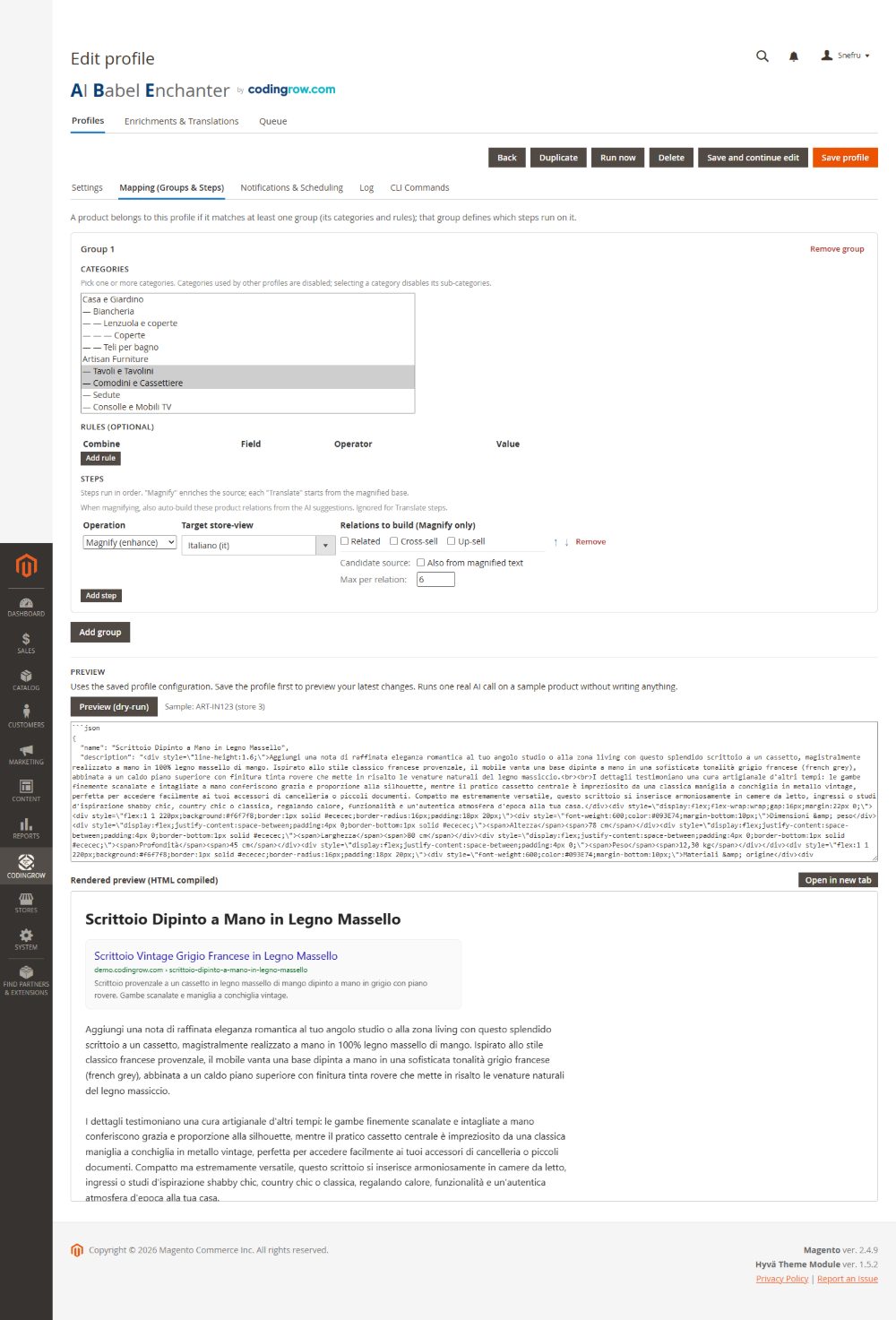
Antes de que se escriba nada, ejecuta un perfil en dry-run: el módulo genera el contenido propuesto para una muestra de productos y lo muestra junto al texto actual, incluida una previsualización renderizada para que veas cómo se verá realmente la descripción mejorada en la página — no solo el texto en bruto. En dry-run no se guarda nada; sirve para validar el persona prompt y la pipeline antes de comprometerte con una ejecución completa.
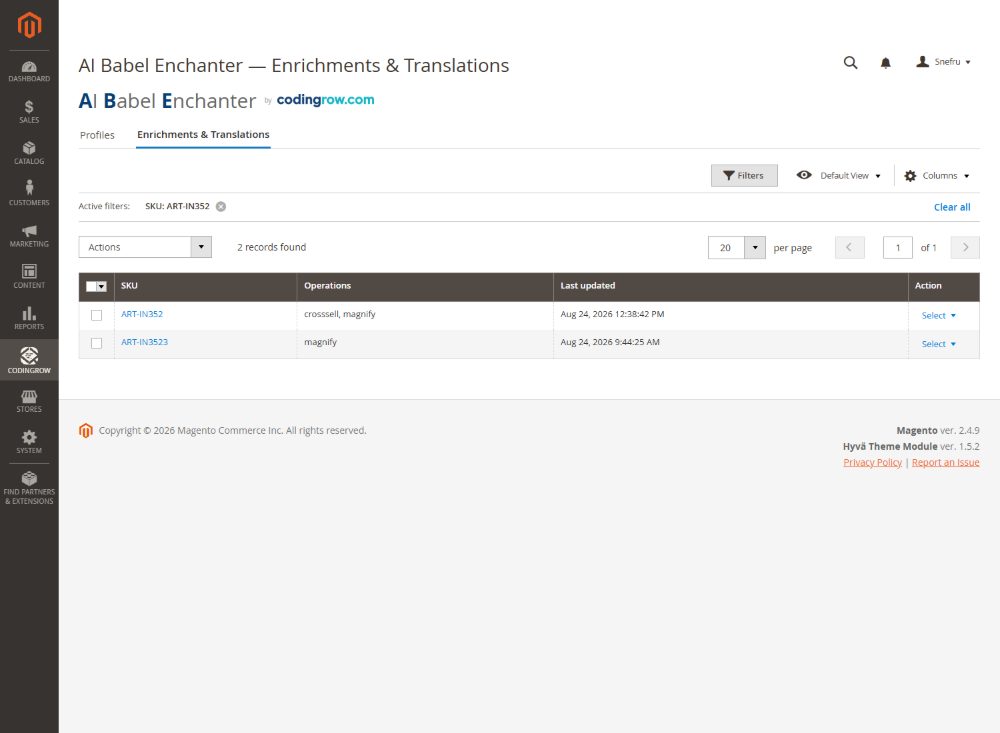
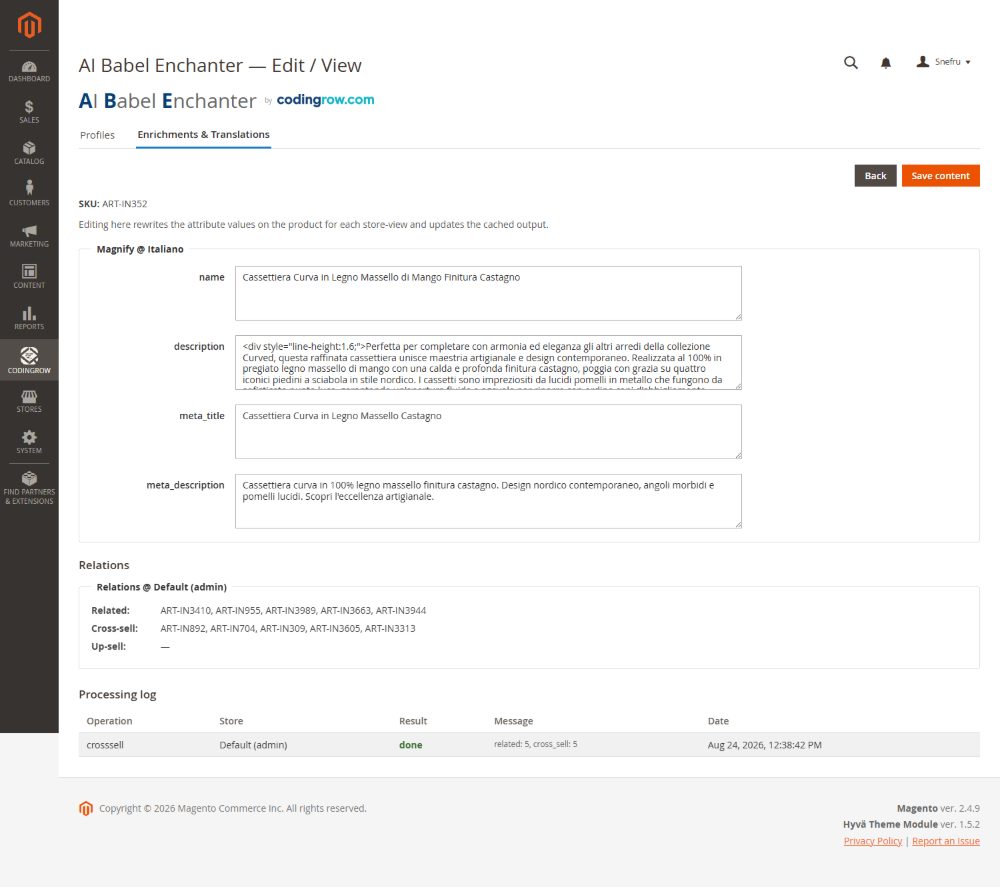
La cuadrícula "Enrichments & Translations"
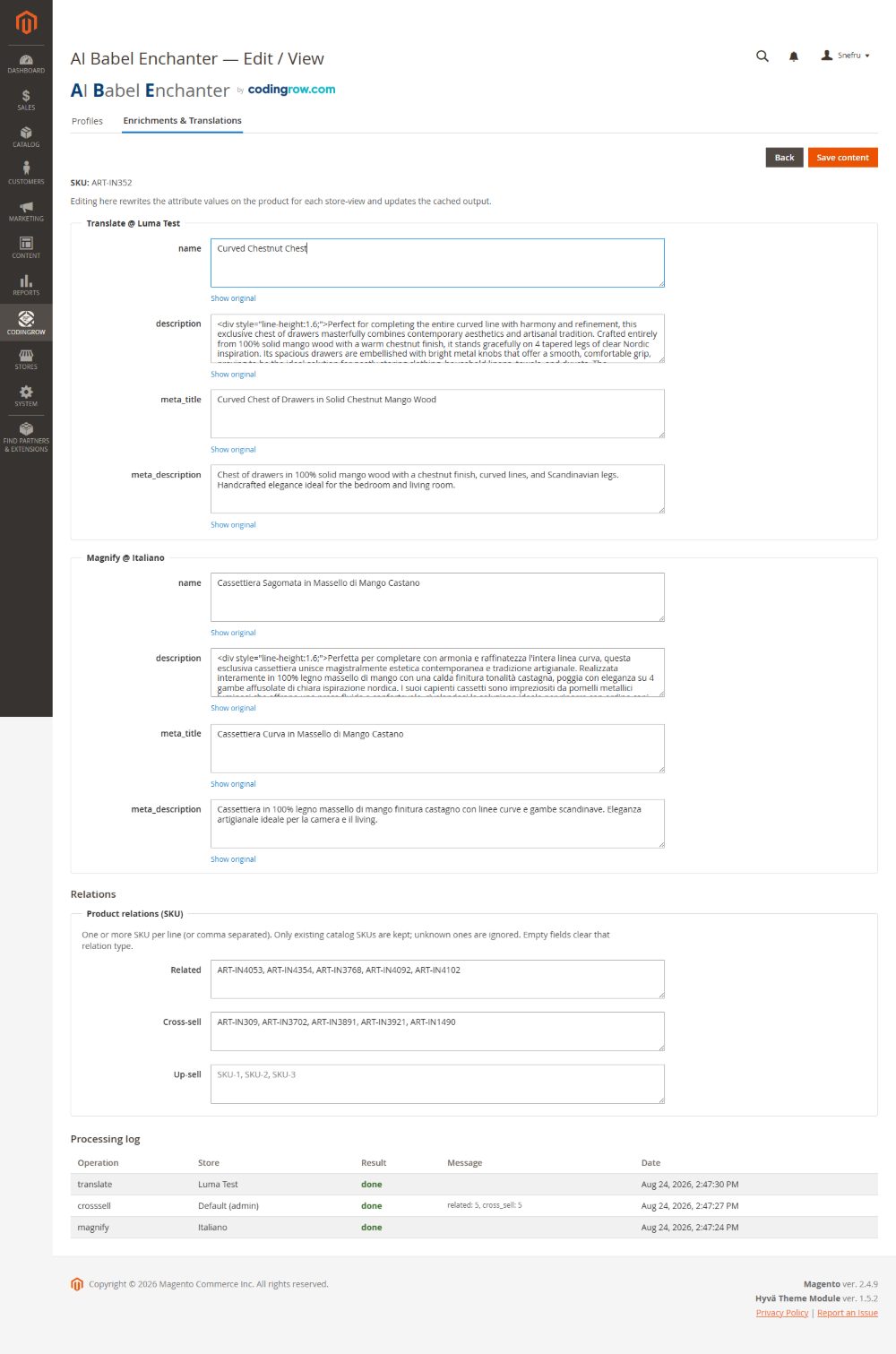
La pestaña "Enrichments & Translations" es la cuadrícula de trabajo: cada campo generado para cada producto e idioma, paginada y filtrable. Puedes editar inline cualquier valor generado antes o después de aplicarlo — la salida de la IA es un punto de partida, no un candado — y cada fila conserva un enlace al texto original, de modo que puedes restaurar el original de ese campo con una acción si el resultado no te gusta. Es la capa human-in-the-loop sobre la pipeline automatizada.
Textos que declaras definitivos
Tarde o temprano aparece un producto cuya descripción escribes tú: el artículo estrella, el que le importa al dueño, aquel en el que el texto de la IA era bueno pero no el adecuado. Lo corriges a mano y, desde ese momento, quieres una garantía — que nadie vuelva a reescribirlo. Esa garantía es la casilla Final, nueva en la v3.4.0.
Abre Enrichments & Translations, abre un producto y, debajo de cada campo, hay una casilla con la etiqueta “Final — never regenerate this text”. Márcala y ese campo queda declarado tuyo.
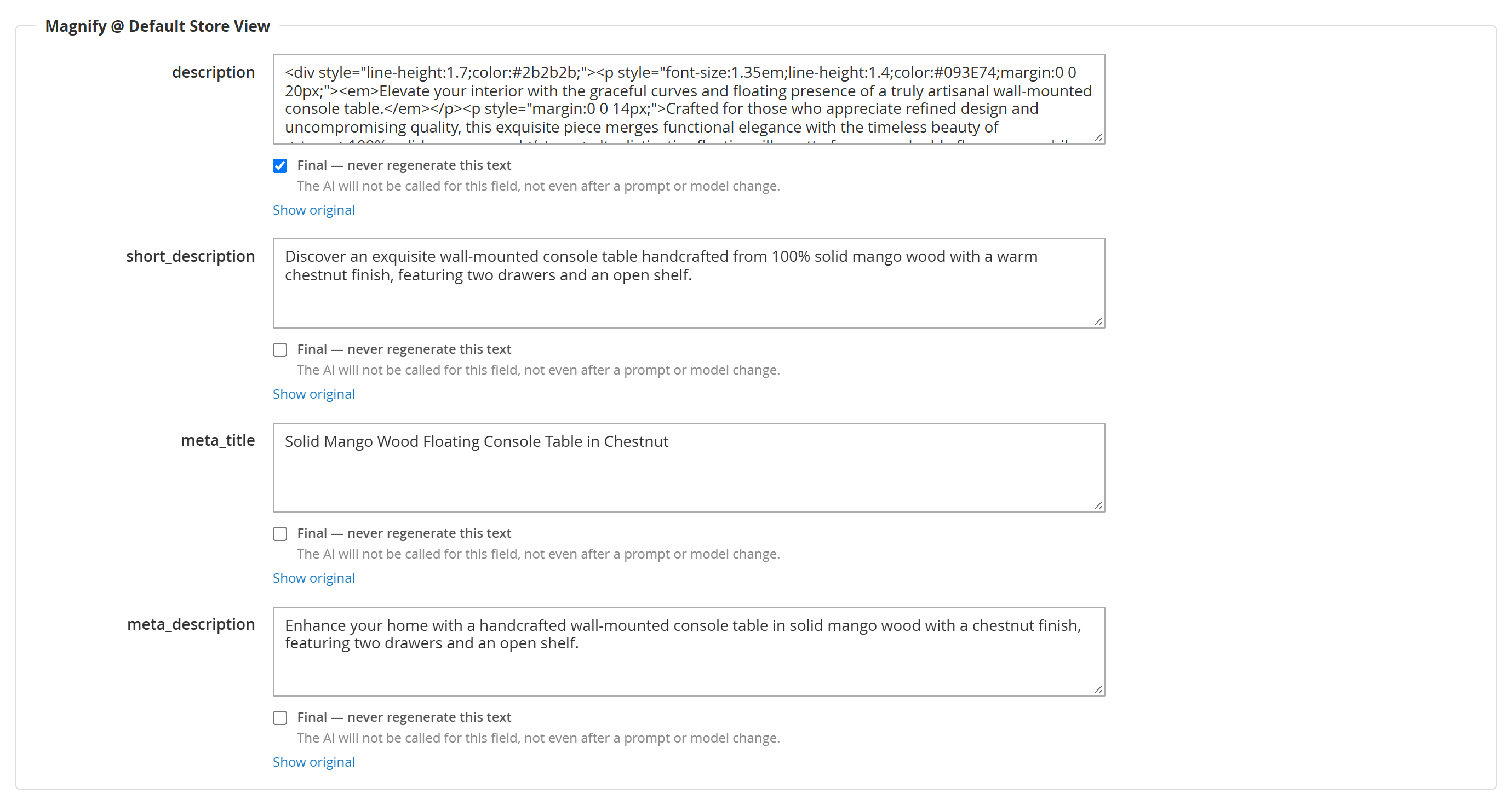
Qué significa “final”, exactamente. Para ese campo, en ese producto, en esa vista de tienda:
- nunca se vuelve a llamar a la IA para él — ni en la siguiente ejecución, ni después de cambiar el prompt de persona, ni después de cambiar de modelo, ni tras un vaciado de caché, ni cuando pulsas Apply to already processed. No cuesta nada, nunca. Y si todos los campos de un producto están declarados finales, la llamada a la IA para ese producto no se hace en absoluto;
- si el valor desaparece del producto — lo ha sobrescrito un importador, alguien ha restaurado el original, una migración lo ha borrado — la comprobación en segundo plano vuelve a poner el texto que declaraste, de nuevo sin coste alguno;
- gana frente a las reglas automáticas del propio módulo. El meta title, por ejemplo, normalmente se fuerza a seguir siempre el nombre del producto; declara final el meta title y gana tu texto incluso frente a eso;
- se aplica solo a ese campo. Los demás campos del mismo producto se siguen generando con normalidad. Declarar final la descripción no congela el meta title y no saca el producto del perfil.
Editar en la rejilla la marca por ti. En cuanto escribes en un campo de la rejilla, su casilla Final se marca sola. Es el comportamiento que la interfaz da a entender — has entrado a corregir ese texto, así que la corrección es justamente el objetivo — y antes de la v3.4.0 no ocurría: un texto corregido a mano sobrevivía hasta el siguiente cambio de prompt y entonces se regeneraba encima, en silencio. Si quieres que un texto corregido se regenere más adelante, desmarca la casilla antes de guardar.
Lo único que hay que recordar: un campo final es lo único del módulo que sobrevive a un cambio de prompt de persona o de modelo. Todo lo demás se reconstruye a partir del resultado guardado, y el resultado guardado se archiva bajo una clave que incluye el prompt entero — cambia el prompt y ninguno de los resultados guardados se puede reutilizar.
Textos que vuelven solos
He aquí un fallo que antes pasaba inadvertido. Un producto ya procesado nunca vuelve a entrar en la cola por sí solo — a propósito, para que volver a ejecutar un perfil sea barato y seguro. El efecto colateral: si algo sobrescribe un texto generado después de que el producto se procesara, ese producto no se vuelve a mirar nunca. El escaparate sigue mostrando el texto sobrescrito, la cola dice done, el historial sigue guardando el texto generado y no salta ningún error en ninguna parte. Lo encontramos en un catálogo real: 318 productos mostrando títulos y descripciones en inglés en una tienda italiana, durante semanas, con el texto italiano todavía guardado en el propio historial del módulo.
La v3.4.0 cierra esto. Una comprobación en segundo plano se ejecuta cada hora y hace una sola pregunta por cada resultado guardado, leyendo solo la base de datos y sin llamar nunca a una IA para responderla: ¿sigue estando en el producto el texto que escribí? Cuando la respuesta es no, el producto vuelve a la cola con el tratamiento más barato que encaje:
| Qué encuentra la comprobación en un producto | Qué hace | Qué cuesta |
|---|---|---|
| al menos uno de los campos que faltan está declarado final | vuelve a poner directamente el texto que declaraste | nada, siempre |
| los campos han cambiado, pero el texto de origen no ha cambiado | reutiliza el resultado guardado — sin llamada a la IA | nada |
| los campos han cambiado y el texto de origen ha cambiado de verdad | los regenera: esto es material de producto genuinamente nuevo | una llamada de pago a la IA — sujeta al tope |
Funciona por tandas, y esto importa. Cada ejecución examina 500 resultados guardados y recuerda dónde se quedó, para continuar desde ahí una hora después. La comparación cuesta dos consultas por fila, así que barrer un catálogo grande cada hora sería una carga que nadie ha pedido. El catálogo entero se cubre igualmente — solo que repartido en el tiempo. En un catálogo grande eso significa que un texto que ha desaparecido puede esperar horas, y en uno muy grande un par de días, antes de que la comprobación llegue a él. No está bloqueado: aún no ha llegado. Si necesitas una respuesta ya, bin/magento babel:reapply mira lo que tú le indiques, al instante.
Lo controlas en Stores → Configuration → Codingrow → AI Babel Enchanter → Keeping the texts in place:
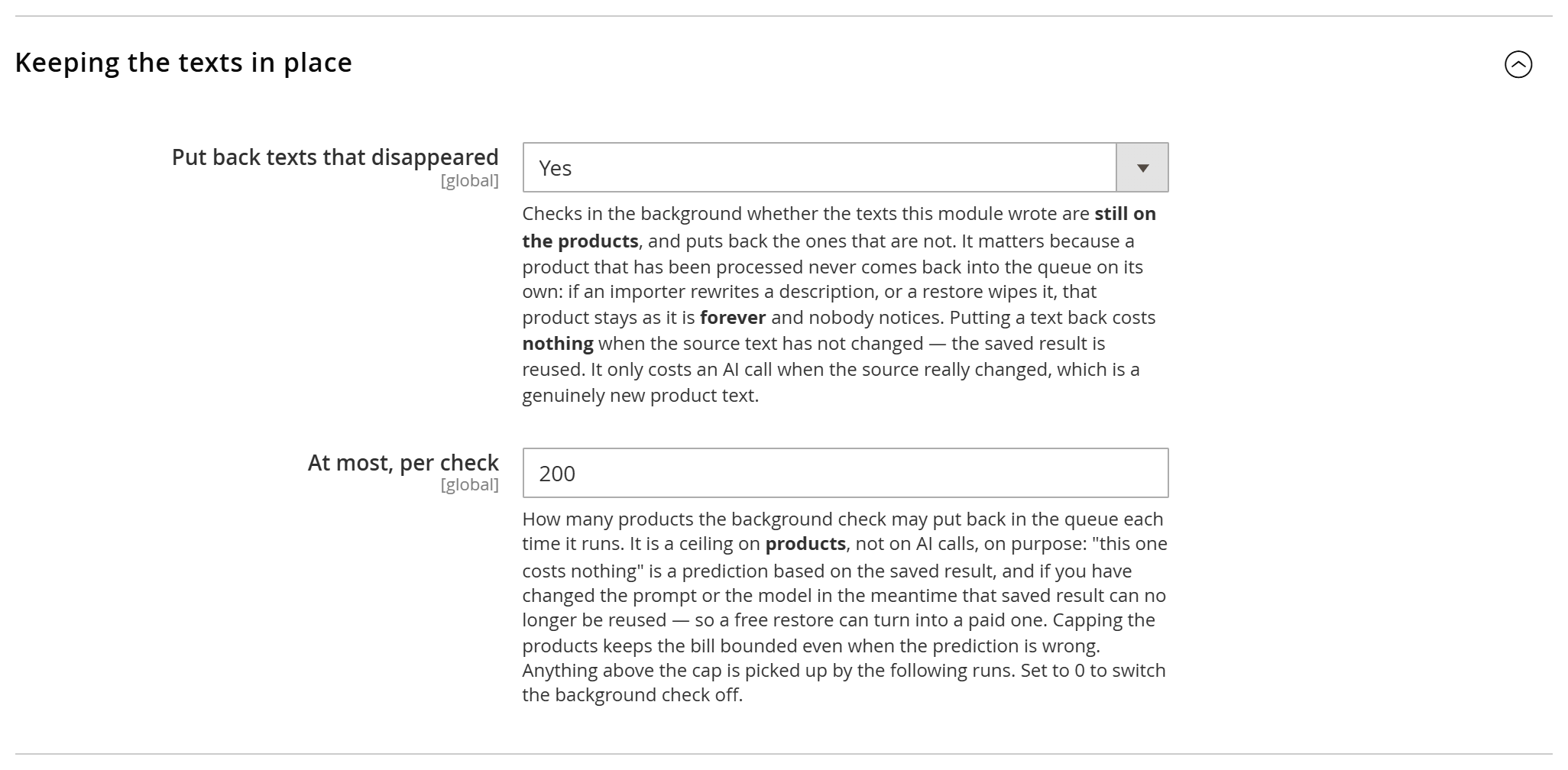
- Put back texts that disappeared — Yes por defecto. Ponlo en No y no se restaurará nunca nada de forma automática; te queda el comando
babel:reapplypara las pasadas manuales. - At most, per check — 200 por defecto. Todo lo que supere el tope lo recogen las ejecuciones siguientes. Ponlo a 0 para desactivar la comprobación en segundo plano.
Por qué el tope cuenta productos y no llamadas a la IA. “Este no cuesta nada” es una predicción basada en el resultado guardado. Si mientras tanto has cambiado el prompt o el modelo, ese resultado guardado ya no se puede reutilizar y una restauración que parecía gratuita se convierte en una de pago. Poner el tope a los productos mantiene la factura acotada incluso cuando la predicción falla. Las restauraciones gratuitas se procesan primero, así que el trabajo barato siempre se hace antes de alcanzar el tope.
Lo que no hace, y lo que sí hace. No toca nunca precios, existencias, imágenes ni ningún atributo fuera de los que gestiona el perfil, y no da de alta nunca un producto que no se haya procesado. Pero que quede clara la parte que sorprende a la gente: vuelve a poner en la cola el producto, y la ejecución reescribe entonces todos los campos que gestiona ese perfil. Así que, si habías corregido uno de esos campos en la ficha de producto, esa corrección se sustituye. No es un fallo, es la regla de los dos canales: una corrección que quieras conservar va en la rejilla, o lleva la marca Final.
Desde la línea de comandos, bin/magento babel:reapply solo informa y no escribe nada salvo que le pases --confirm — la forma segura de ver el estado de un catálogo antes de decidir. Añade --only-free para las restauraciones que no cuestan nada, y --profile y --limit para acotar la pasada.
Aplicar un prompt nuevo a los productos ya hechos
Los perfiles están hechos a propósito para no rehacer trabajo: un producto ya procesado no se vuelve a procesar, y eso es lo que hace que volver a ejecutar un perfil sea seguro y barato. La otra cara es que, cuando mejoras el prompt de persona, la mejora solo alcanza a los productos procesados a partir de ese momento — todo lo ya hecho conserva el texto antiguo. Hasta la v3.4.0, la única manera de incluirlos era babel:run --force desde la línea de comandos.
Ahora la página del perfil tiene un botón para eso.

Apply to already processed devuelve a la cola de ese perfil los productos marcados como done, partial y skipped. La confirmación expone el coste con palabras claras antes de que ocurra nada: “Los productos cuyo texto de origen no ha cambiado se reutilizan sin coste. Los demás los reescribe la IA, y eso te lo factura tu proveedor, así que después de cambiar la persona o las instrucciones cuenta con que se reescriba el perfil entero.”
Esa última frase no es palabrería. Todo resultado de enriquecimiento se archiva bajo una clave que incluye el proveedor, el modelo y el prompt de sistema entero. Cambia la persona, cambia la plantilla, cambia el modelo y no se puede reutilizar ni un solo resultado de enriquecimiento del catálogo — y las traducciones van detrás, porque lo que traducen acaba de cambiar. Así que pulsar este botón después de cambiar el prompt significa “regenera este perfil entero, y págalo”. Antes de cambiar el prompt, sobre un catálogo intacto, ese mismo botón es casi gratis.
Úsalo cuando hayas mejorado el prompt y quieras poner los productos antiguos al nuevo nivel; cuando hayas añadido un atributo a un grupo y quieras rellenarlo en todas partes; cuando hayas corregido un error de mapeo. No lo uses cuando solo quieras reparar textos que han desaparecido — de eso se encarga la comprobación en segundo plano de más arriba, y sale mucho más barato.
Los campos declarados Final tampoco los regenera este botón.
Si tu catálogo se importa
Si los productos llegan a Magento desde un feed de proveedor, un ERP, un PIM o cualquier importación programada, ese importador y Babel escriben en los mismos campos. Que ambos convivan en paz depende de cómo esté configurado el importador y de cuántas vistas de tienda tengas — y cuando no conviven, el síntoma no es un mensaje de error: es tu texto, por el que has pagado, desapareciendo en silencio mientras todas las pantallas siguen informando de que todo ha ido bien.
La prueba de aceptación lleva un minuto: enriquece un producto, ejecuta la importación sin cambiar nada en el feed y recarga el producto. Si el texto de Babel sigue ahí, ese importador es compatible. Si ha vuelto el texto del proveedor, no lo es — y no hay ajuste de Babel que lo arregle.
Rollback
Cada valor que escribe el módulo es reversible. Además del restaurar original por fila en la cuadrícula, el comando CLI babel:rollback revierte el contenido en bloque — por perfil, por producto o de toda la ejecución — al texto que había antes de que el módulo lo tocara. Como el original siempre se conserva, una ejecución sobre todo el catálogo nunca es una puerta de un solo sentido.
Queue y circuit breaker de créditos
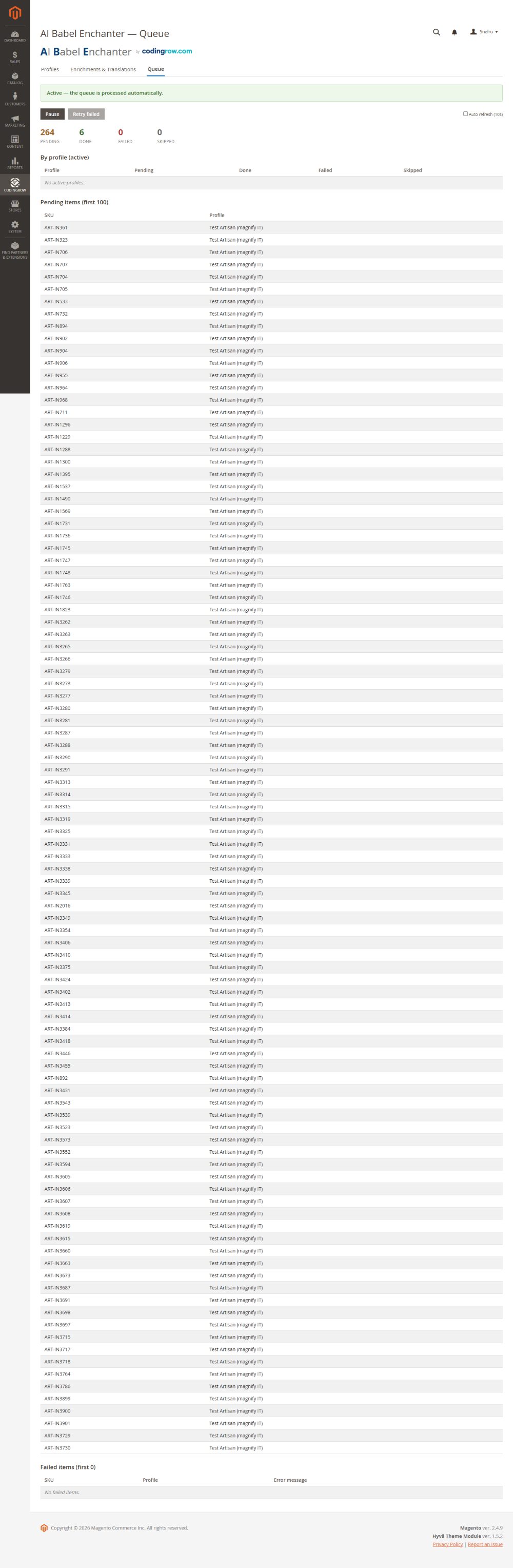
Las ejecuciones largas se procesan mediante una cola que puedes observar, pausar y reanudar. El circuit breaker integrado (configurado en Resilience) protege la ejecución: ante errores repetidos del proveedor — casi siempre el proveedor sin crédito o en rate limit — se pausa tras N errores, espera el cooldown configurado y puede reintentar automáticamente los fallos transitorios en vez de hacer fallar todo el lote. Cuando recargas crédito o el límite se restablece, reanuda la cola y continúa donde se detuvo.
Fichas de comerciante: devoluciones y envío
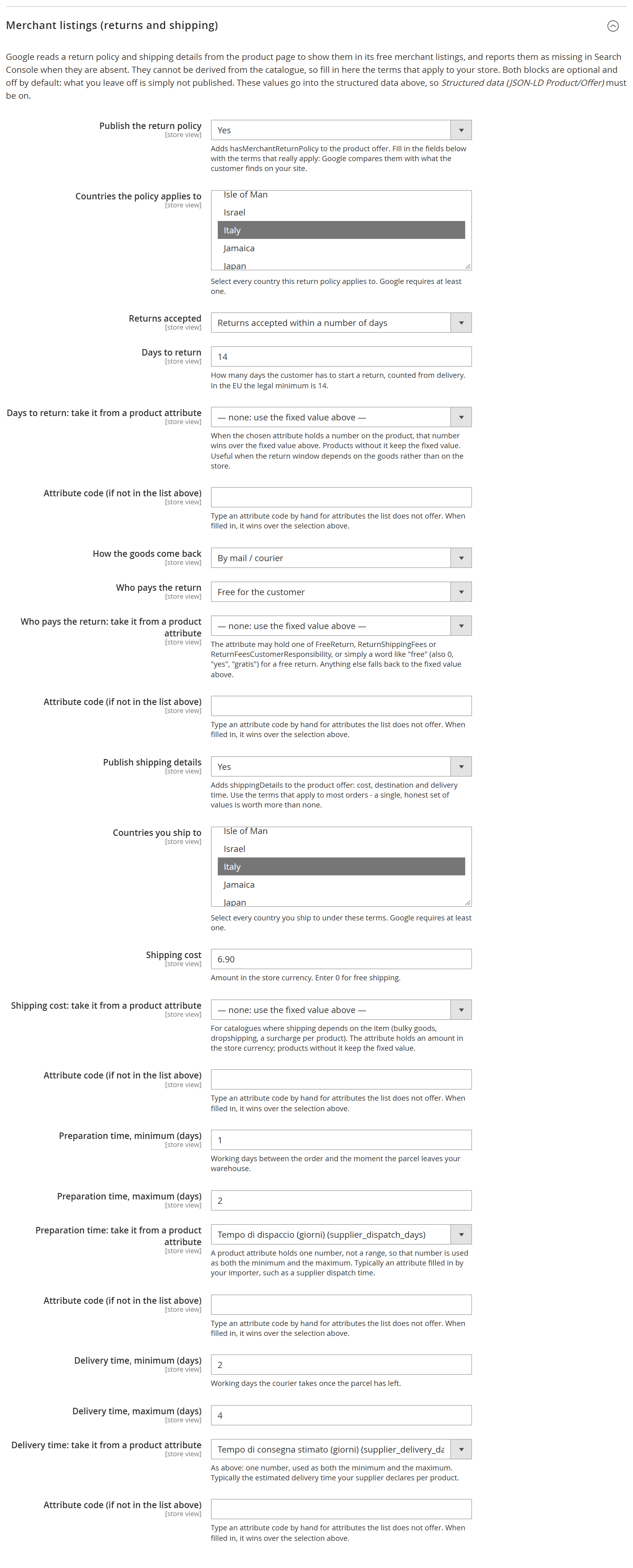
Google lee de la ficha de producto las condiciones de devolución y de envío para mostrarlas en sus fichas de comerciante gratuitas, y Search Console las señala como ausentes cuando no están. No pueden deducirse del catálogo — son condiciones comerciales — así que se declaran en la configuración, en Merchant listings (returns and shipping). Ambos bloques están desactivados por defecto y requieren los datos estructurados del producto activos.
- Condiciones de devolución →
hasMerchantReturnPolicy: países (elegidos de la lista de Magento), plazo de devolución, días, cómo vuelve la mercancía, quién paga y el coste cuando lo hay. - Condiciones de envío →
shippingDetails: países a los que envías, coste (0para envío gratuito), tiempos de preparación y entrega en días laborables.
Dos reglas son deliberadas. Un bloque con los campos obligatorios incompletos se descarta entero en lugar de publicarse a medias: Google compara lo que declaras con lo que el cliente encuentra en tu sitio, así que una declaración equivocada vale menos que una ausente. Y con "devoluciones no aceptadas" no se publica ni el método ni quién paga: no hay devolución que describir.
La oferta lleva además validFrom, la fecha desde la que vale el precio publicado: el inicio del precio especial cuando lo hay, si no la fecha de creación del producto. Esa no necesita configuración.
Casi nunca estas condiciones son iguales para todo el catálogo: los tiempos de preparación y entrega cambian entre almacén propio y dropshipping, el envío depende del volumen, el plazo de devolución de lo que se vende. Y el número suele existir ya en el producto, en un atributo que rellena tu importador o tu equipo. Por eso cada uno de esos campos puede apuntar a un atributo del producto — la lista incluye los personalizados — con una casilla para escribir un código que la lista no ofrece. Donde el producto tiene un valor gana él; donde no, se mantiene el valor fijo; y un valor que no es un número recae en el fijo en lugar de publicar un disparate.
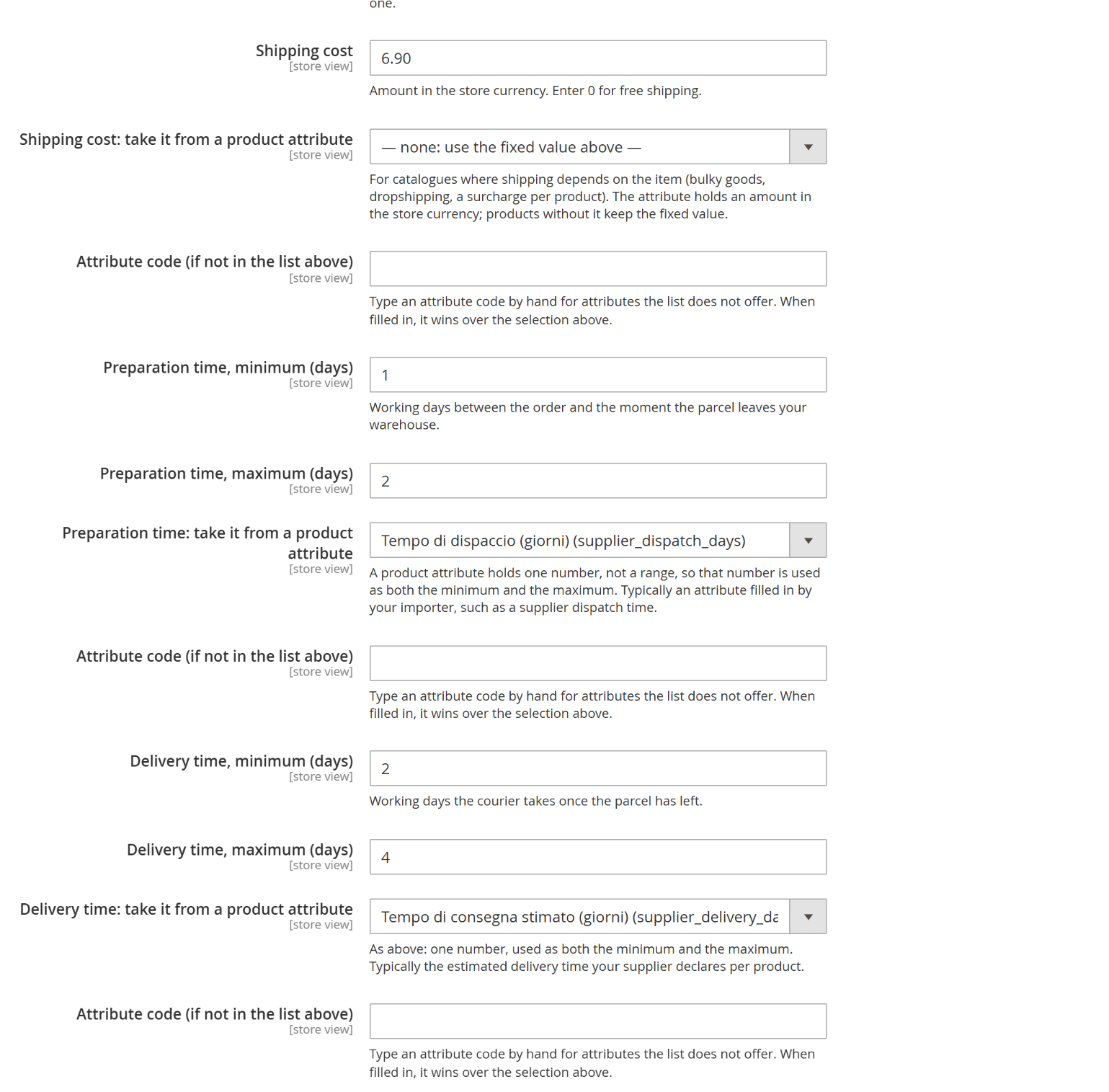
Cada número puede venir de un atributo del producto, elegido de la lista del catálogo: aquí los tiempos de preparación y entrega salen de los atributos que rellena un importador.
Línea de comandos (CLI)
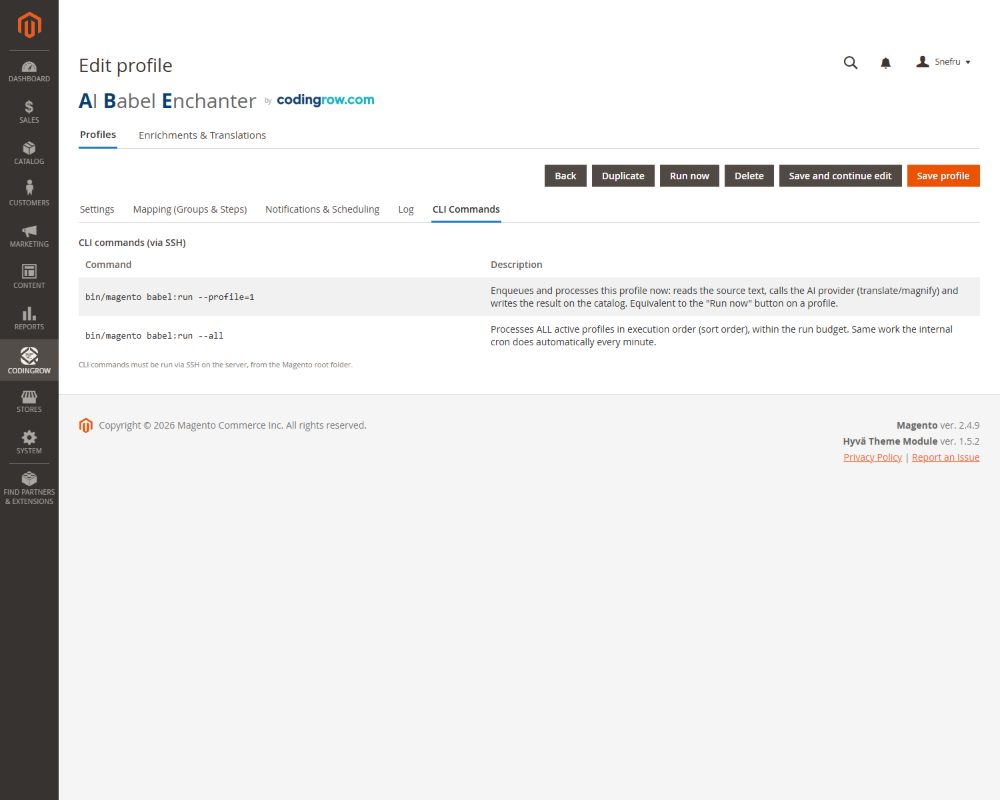
Todo se puede pilotar desde la CLI para la programación y las ejecuciones grandes.
| Comando | Qué hace |
|---|---|
bin/magento babel:run | Ejecuta un perfil (pipeline mejorar/traducir) sobre sus productos de destino — la forma estándar de lanzar una pasada sobre todo el catálogo. |
bin/magento babel:rollback | Revierte el contenido generado al texto original, con alcance por perfil, producto o toda la ejecución. |
bin/magento babel:queue | Inspecciona y controla la cola de procesamiento: estado, pausa, reanudación. |