 AI catalog content · Magento 2
AI Babel Enchanter
AI rewrites your product texts into rich, persuasive copy and translates them into any language, for every store view. It automatically builds cross-sell and related products, choosing only real SKUs from your catalog — no hallucinations. It handles SEO for you: url_key with 301 redirects, JSON-LD and hreflang. Works with Hyva and Luma. Risk-free: preview before you spend, undo anytime.
Try it on your catalog, not on ours
Install the module without buying anything and enrich ten real products from your own store. It is not a demo on made-up data: those ten pages stay, and they are yours.
Create an account and try itYou register with just your email, copy the repository credentials from your account and install with Composer. At the tenth product the module stops and says so: the queue stays as it is, so with a license it resumes from there without redoing anything.
See it running on a live store
Explore the admin, run a dry-run preview and see AI-generated cross-sell on our public demo — no install required.
Open the live demoInstant delivery: license key and download link by email right after checkout.
One license activates one production domain. Your first domain change is included and immediate from your account, handy when you move from staging to production.
Includes 12 months of updates and priority support. The releases published within that year stay yours forever; to install later ones you renew support at −35%.
Try it on 10 of your own products before paying — instead of a refund.
AI Compare — pick the best model on evidence
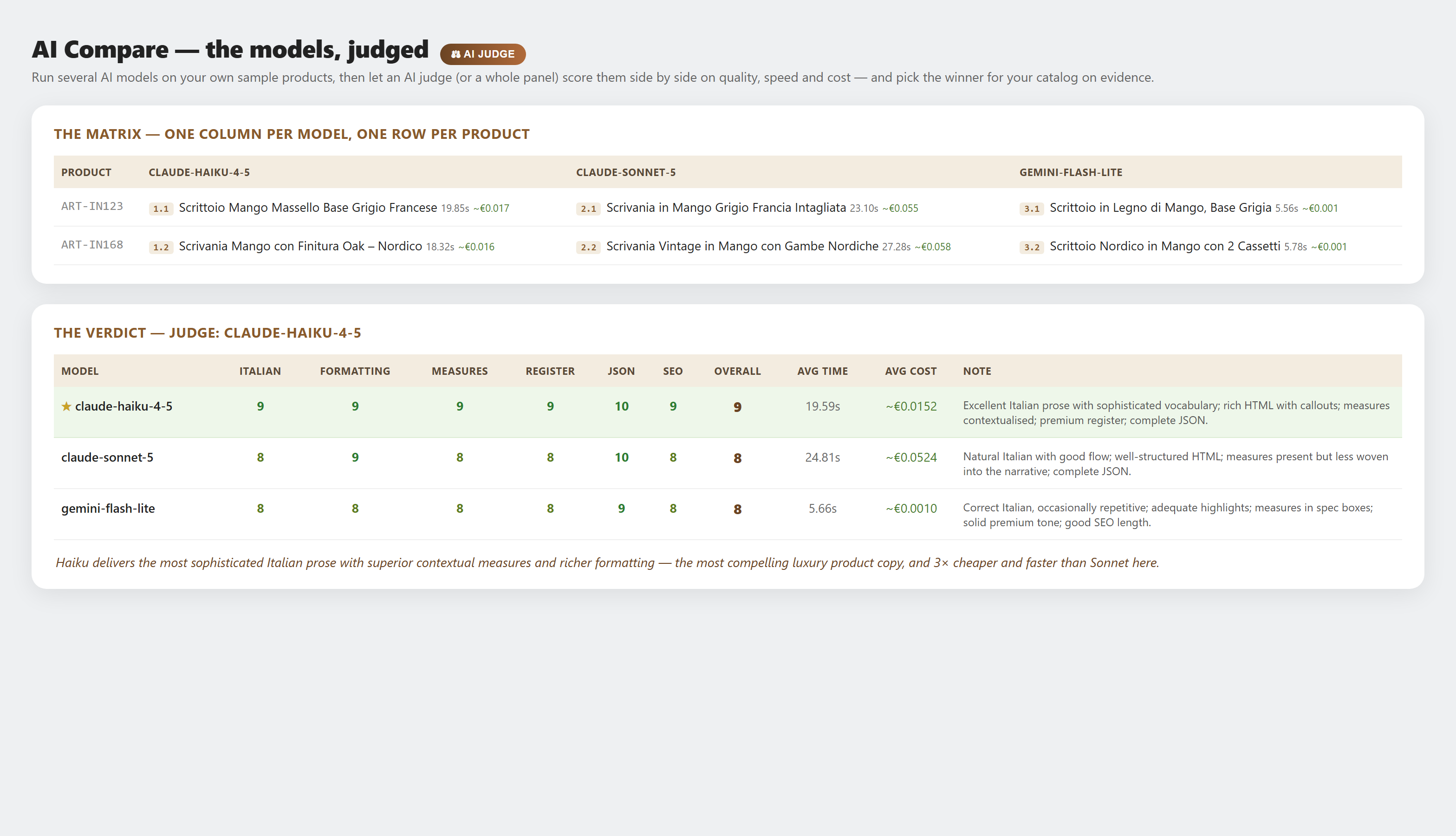
Don't guess which AI to trust with your catalog. AI Compare runs several models on your own sample products — a dry-run, nothing is written — lays the results in a matrix, and lets an AI judge (or a whole panel) score them side by side on quality, speed and cost, then names a winner.
- Run any of your models on real sample products: one column per model, one row per product, each cell with the generated title, its time and an indicative € cost from the real API token counts.
- An AI judge — your most capable model — scores every output on language quality, formatting, contextualized measures, premium register, JSON validity and SEO, with average time and cost per model.
- “All models judge”: every model returns its own verdict, so you see each one's taste — and its bias — at a glance before you commit.
- Live before/after preview, a Stop button, and the last comparison saved on the profile: reopen the tab and it's all there — no re-run, no extra cost.
The AI cross-sell & related-products generator for Magento 2
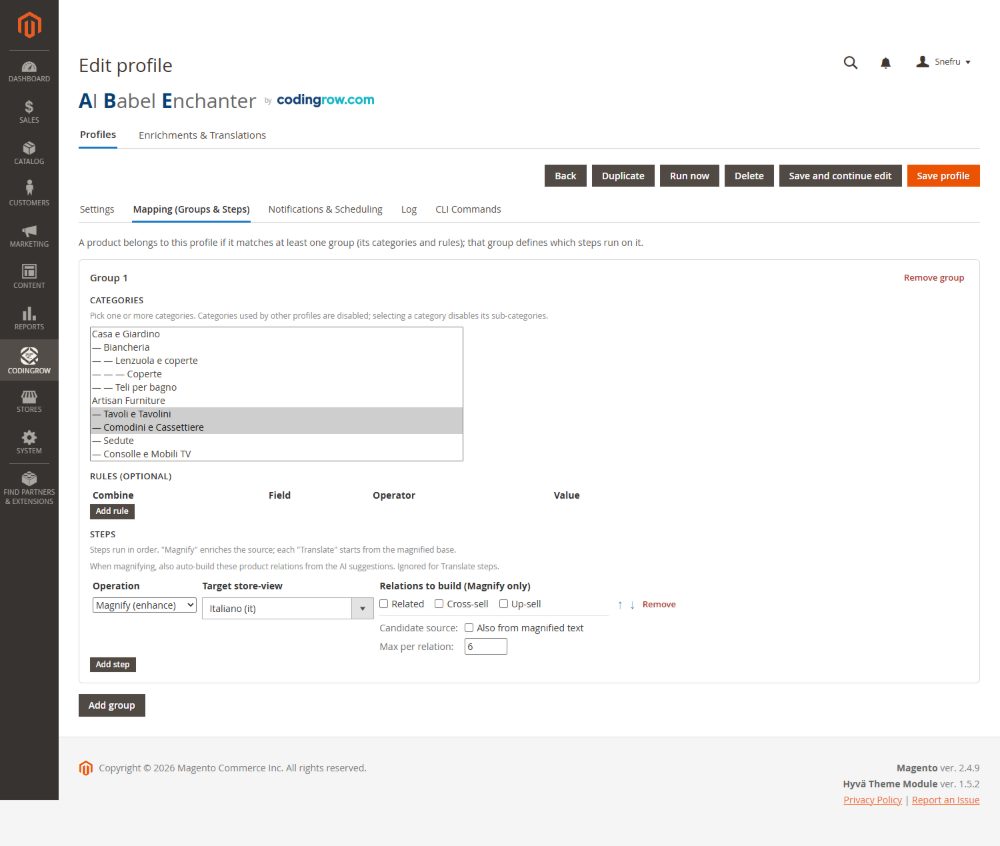
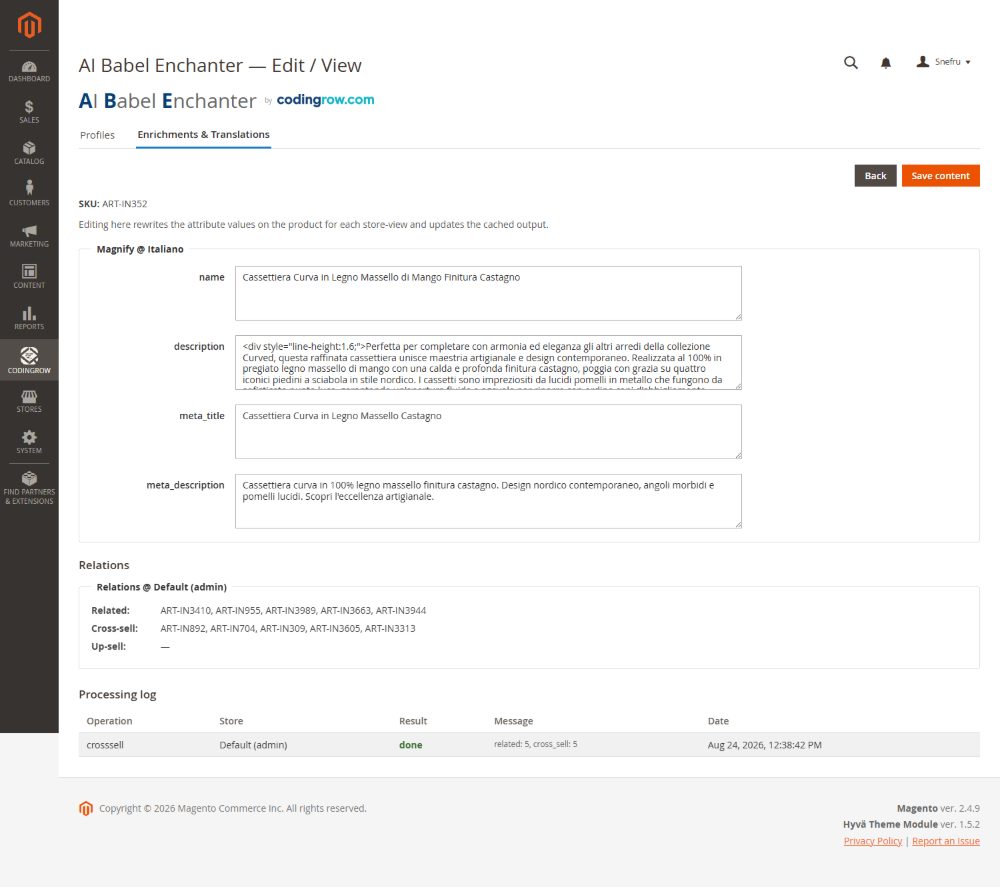
AI Babel Enchanter fills Magento's native related, cross-sell and up-sell fields automatically — choosing only real products that already exist in your catalog. It looks inside the product's own categories and sibling categories, and optionally at complementary items mentioned in the improved text. Three independent toggles, zero hallucinations.
- Populates native Magento related, cross-sell and up-sell fields — no custom tables, no theme changes.
- Picks only real, in-catalog SKUs from the product's categories and sibling categories.
- Optionally links complementary items the AI mentions in the improved description.
- Three independent toggles — enable related, cross-sell and up-sell separately per profile.
From thin supplier text to rich, on-brand copy — in every language
Most catalogs ship with dry, one-line supplier text. AI Babel Enchanter rewrites each product into rich, persuasive, on-brand copy — then translates it into the language of every store view.
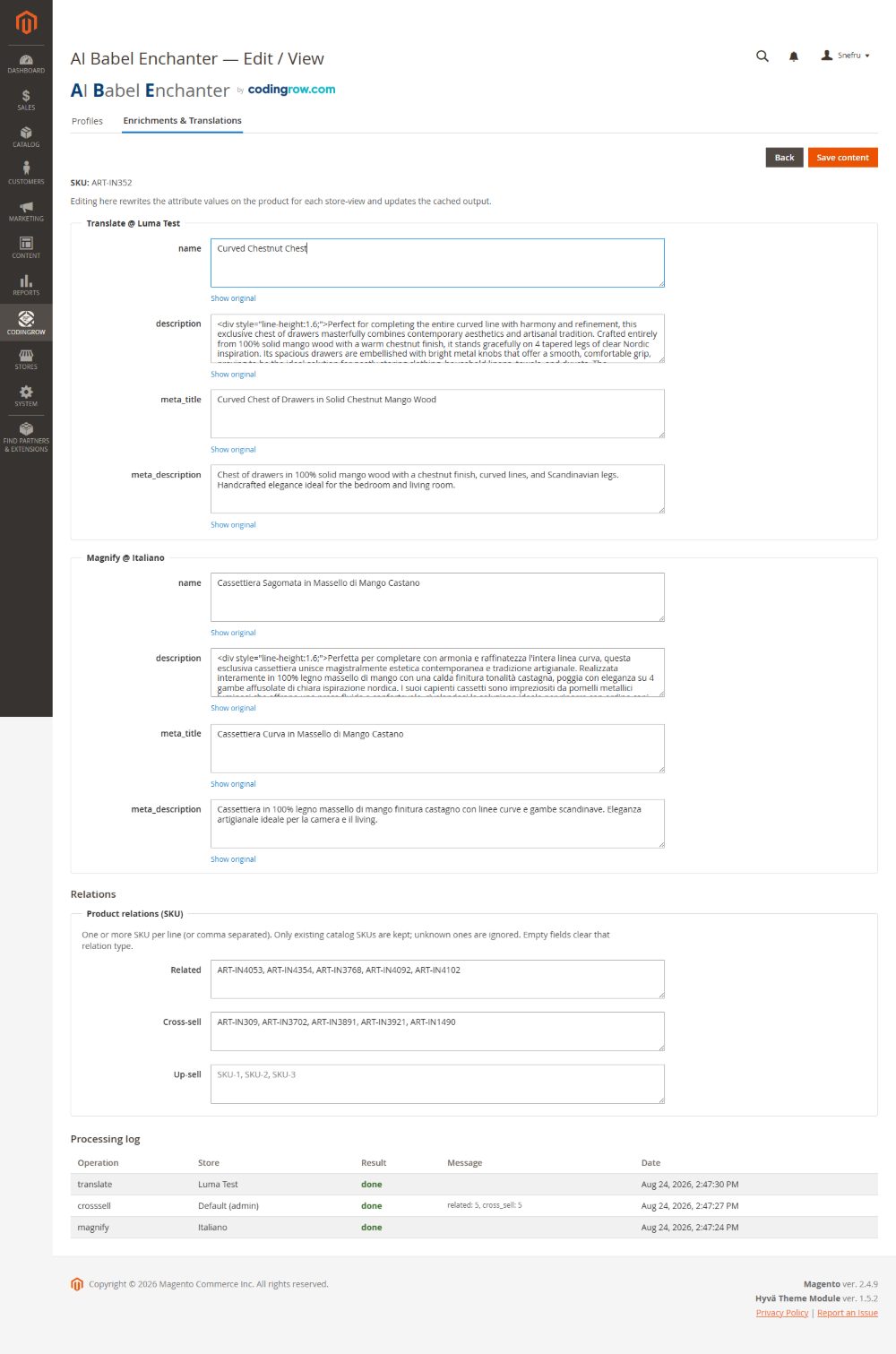
Curved Chestnut Chest — Solid mango wood, hand-painted, 1 drawer.
A statement piece that turns a hallway into a welcome. The Curved Chestnut Chest is carved from solid mango wood, its front hand-painted with warm chestnut tones that age beautifully. A single deep drawer glides smoothly, keeping keys, gloves and everyday clutter out of sight while its sculpted silhouette does the talking.
After — translated (Italian store view)
Un pezzo d'arredo che trasforma un corridoio in un benvenuto. La Cassettiera Curva in Castagno è intagliata in legno massello di mango, con il fronte dipinto a mano in calde tonalità di castagno che invecchiano splendidamente. L'unico ampio cassetto scorre morbido e tiene chiavi, guanti e piccoli oggetti fuori dalla vista, mentre la sua silhouette scolpita parla da sola.
One profile, many steps
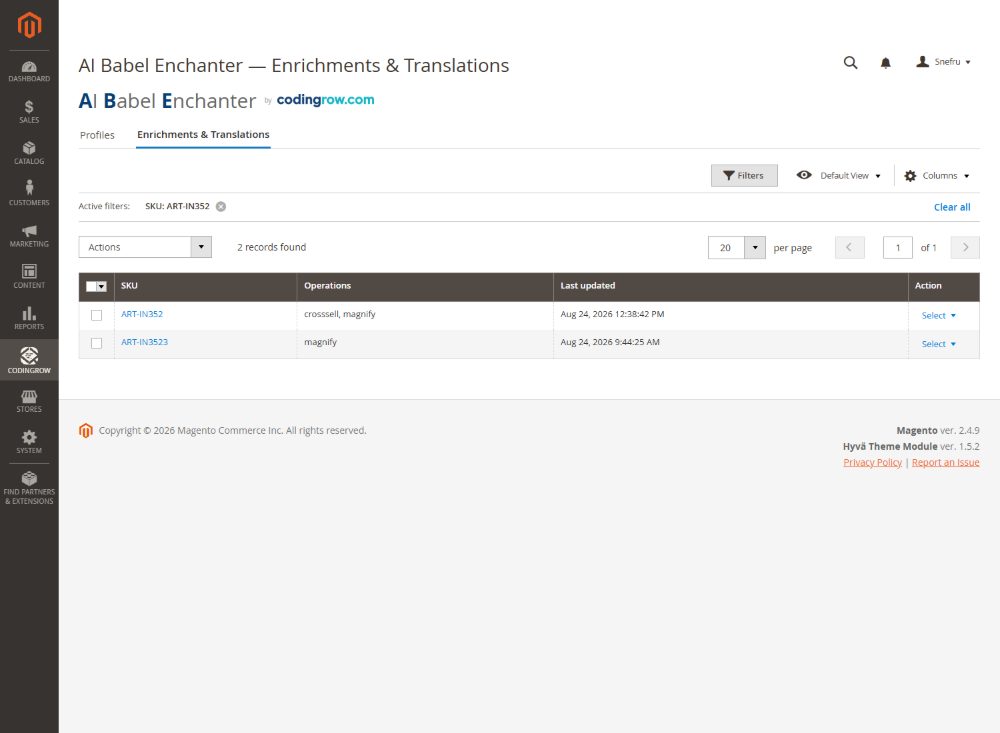
Each profile chains several steps in sequence. The text is improved once, then translated into the languages of your stores — efficient and consistent, because every language starts from the same polished source.
Improve in the source language
The AI rewrites the product into rich copy in your base language — for example, improve the description in Italian.
Translate to your next store view
The improved text is translated into the target locale — for example, translate to English — matching the right store view.
Repeat for every language
Add as many translation steps as you have stores — translate to French, German, Spanish and more — all from the same improved source.
Tell the AI who your shop is
Create one profile per supplier or catalog segment, then give it a persona prompt — a short brief that tells the AI your tone of voice and expertise. The same catalog can sound completely different depending on the profile you apply.
Pick exactly which items get processed
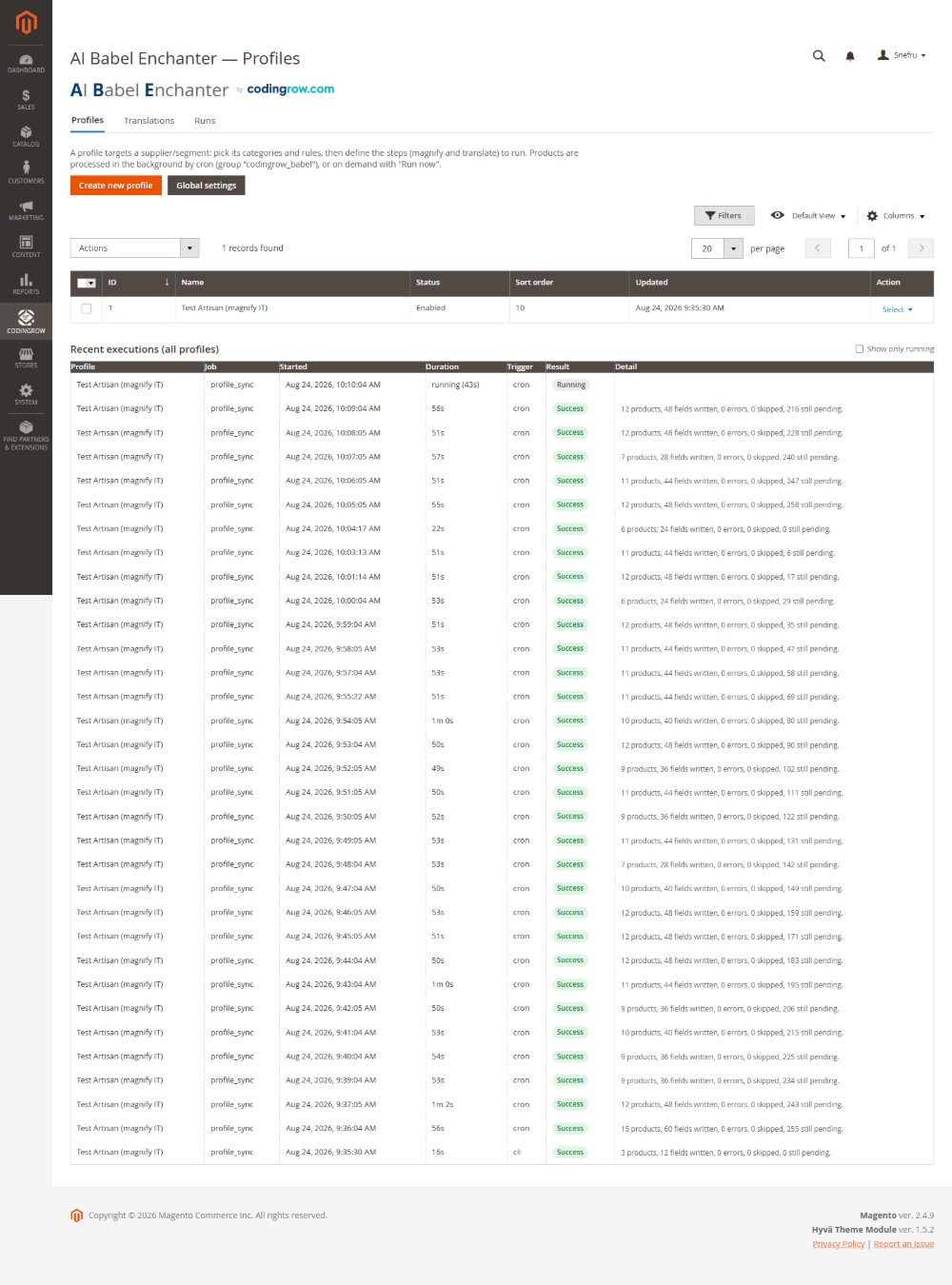
A profile does not have to take the whole catalogue. Choose the categories, decide whether a category brings its branch with it, and add the rules you want: process a hundred items or just one, and always know which.
- Categories: the profile works on what is in them. A category used by another profile stays that profile’s, so two profiles never write over each other.
- Also take the sub-categories: pick the parent category and the whole branch comes in, without selecting each child by hand. Switched on per profile, when you need it.
- Rules on name, SKU, brand or description (contains, equals, starts, ends), combined with AND/OR: this is how you go from a category down to a single item.
- Variants: variants of a configurable stay out, because they have no page of their own and nobody ever reads that text. If you sell them as separate articles, untick it.
Narrowing is not just tidiness: it is how you try a new prompt on a handful of items before letting it loose on the catalogue, and how you avoid paying for text on products you do not care about.
The measurements that live inside names, finally in a field
On a great many catalogues the measurements are in no attribute at all: they sit inside the product name. Wallpaper Roll 10 m, Extension Lead 5 m. A person reads that fine; the shop does not. While Babel works on a product, it writes that product’s measurable facts into a field — which you read and correct.
- One key: value per line, in an ordinary text box: three lines to fix take three seconds, with no syntax to respect.
- The catalogue also says how each thing is sold, and together with it how much one piece covers: they are a pair, and one half is worth nothing — how it is sold, without how much it covers, does not say how many pieces someone needs. Width 180 cm on a roll of wallpaper and on a sofa is the same number with opposite meanings, and only the pair tells them apart. Not there? No arithmetic is done at all, which is the safe side.
- A line ending in (dedotto) was deduced by the AI, not read from the product: it helps the assistant understand and search, but no quantity is ever worked out from it. To confirm a value you just delete that word.
- It rewrites nothing. It is a separate, small call: descriptions already written stay identical and are not regenerated. An unchanged product is not even asked about a second time.
- For items already processed there is a button of its own: it writes the characteristics without redoing the texts, which would otherwise mean paying for a whole product page again to get three lines of measurements.
Two things said plainly, because a buyer who knows what they bought does not open a ticket: the value is deduced by an AI and sits in your catalogue so that you can check it, not because it is guaranteed; and whatever is merely supposed sits below the line, declared as such. Installation advice, waste allowances and overlaps never go in there: they belong in a manual, and a wrong installation figure becomes a wrong order with your shop’s name on it.
Every product type needs a different text
A configurable product is not a single item, a grouped product is not a parcel, and a digital product is not shipped. Babel works out the type on its own and changes what the text says — and above all what it must not say.
- Configurable — the text describes the range, not one variant. The choice axis and its options are picked up automatically from the product: there is no list to fill in by hand. Prices never go into the text, because prices change.
- Bundle — the text explains how it is put together: the option titles, which ones are required, and the items that can be chosen in each.
- Grouped — the text says the items are bought together and what each one in the list is for.
- Virtual — shipping, delivery, packaging and weight are off limits. Without that rule the model writes «fast shipping» even for an extended warranty: that is a false promise, not a stylistic slip.
- Downloadable — digital delivery: how many files, whether there is a sample, and how to download it. Shipping is off limits here too.
How to set it. It is switched on per step, in the profile's Mapping tab: Product structure context. It is off by default because it changes what the AI receives, and therefore makes that profile's pages regenerate — switch it on when you are ready for a fresh run, not halfway through one.
What about the variants? Next to it sits Skip variants, on by default: the children of a configurable product have no page a customer can open, so writing one is work paid for and thrown away. In a catalogue built on variants they are most of the queue — in a real shop, 97 products out of 135. Switch it off if you sell your variants as standalone items.
Living alongside Product Page Pro & SEO
The two modules are independent and can sit on the same store: neither disables the other, and neither names the other in its own code. There is one point where they overlap, though, and it is better decided by you than left to chance.
- Only one of the two should publish the structured data. Both can emit the Product block for Google: leave both on and the same page carries two blocks, with Google choosing which one to read. The good practice is to keep one on and switch the other off.
- Where to switch it off. In Babel: Stores › Configuration › Codingrow › AI Babel Enchanter › SEO Rendering › Structured data (JSON-LD Product/Offer). In Product Page Pro & SEO: General › Enable SEO structured data on product. Flush the cache after the change.
- Everything else coexists untouched. The two-column gallery, the sticky buy-box and the repeated image strip stay with Product Page Pro; the texts, translations, relations and internal links stay with Babel. Switching off one module's structured data leaves all of its other features alone.
Preview without risk
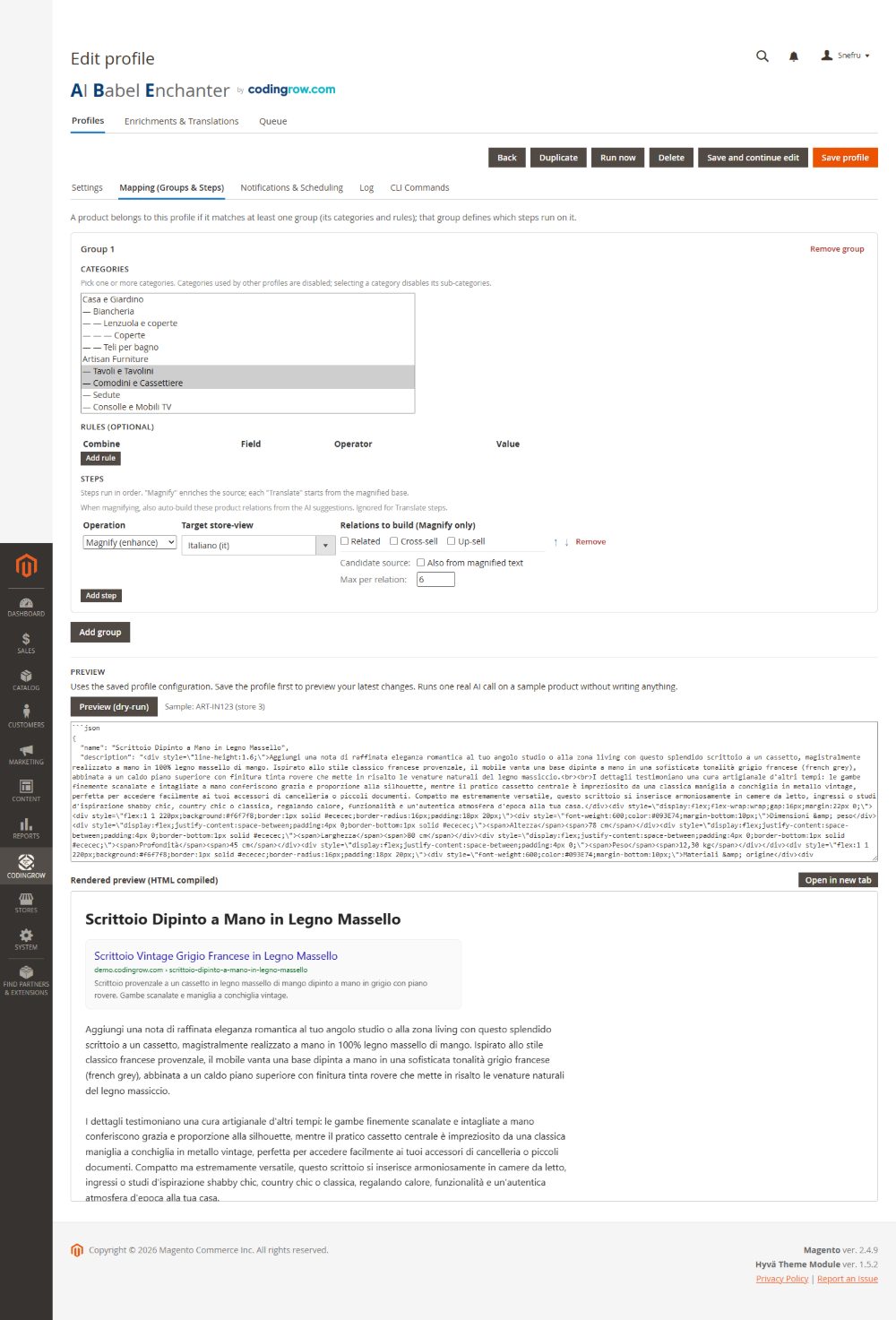
Try any prompt on a sample product without writing a single change. You see the raw AI response and a rendered preview of exactly how it will look on the storefront — including the Google snippet.
- Dry-run on a sample product — nothing is saved to the catalog.
- See the raw AI output before it touches any field.
- Rendered preview shows how the copy will appear on the storefront.
- Google snippet preview for title and meta description.
Undo anything
Every write is reversible. AI Babel Enchanter takes a snapshot before it changes a product, so you can roll back to the original state at any time — texts, url_key and 301 redirects, and product relations included.
- A snapshot is saved before every write — automatically.
- Restore original texts, url_key and 301 redirects, and relations in one click.
- Roll back a single product, a batch, or a whole run.
- Available from the admin or the command line.
See it running on a live store
Explore the admin, run a dry-run preview and see AI-generated cross-sell on our public demo — no install required.
Open the live demoSEO built in
Good copy is only half the job. AI Babel Enchanter keeps your catalog technically sound for search engines as it rewrites and translates.
- Automatic url_key generation with 301 redirects — no broken links.
- Structured data (JSON-LD) for products.
- Open Graph tags for clean social sharing.
- hreflang across store views for correct language targeting.
- Meta title and description kept within recommended lengths.
- Anti-duplicate toggle to avoid repeating content across products.
- AI title regeneration: rewrite the product title from its description — set it per profile, or change only the titles at minimal cost.
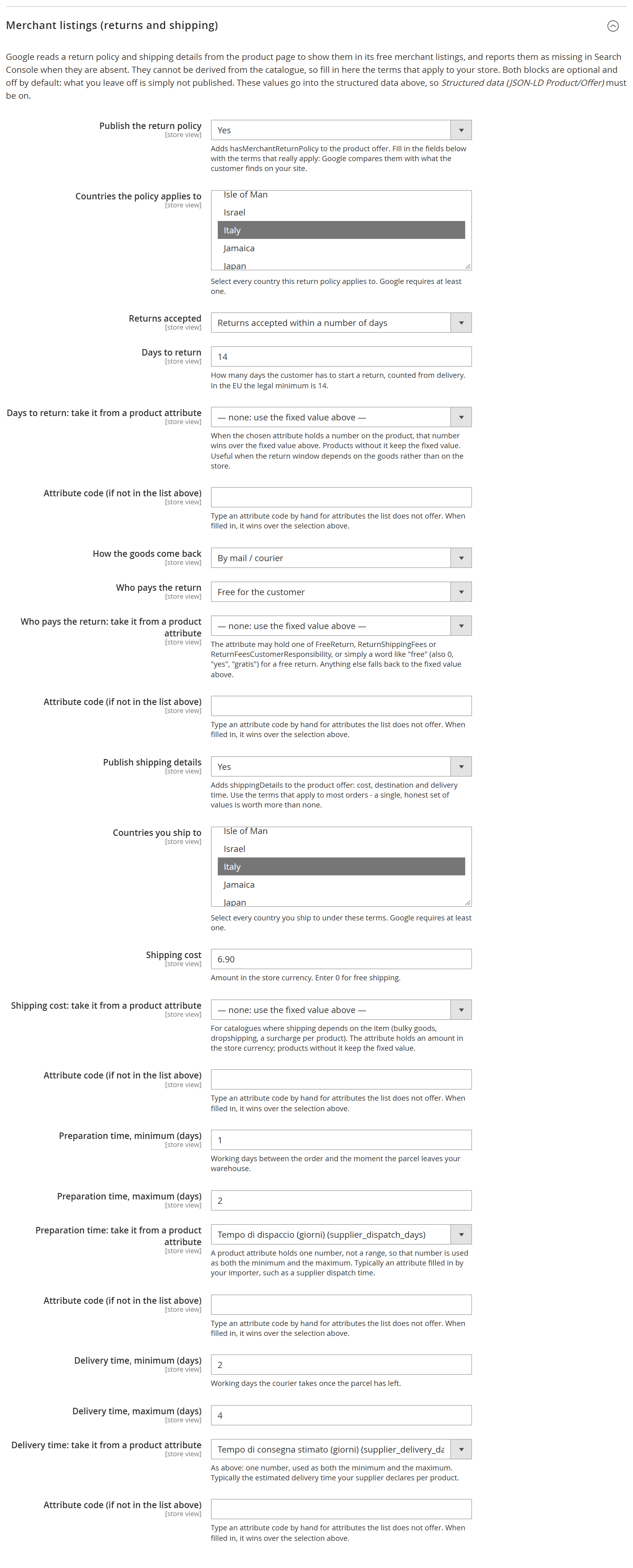
Return policy and shipping details for Google
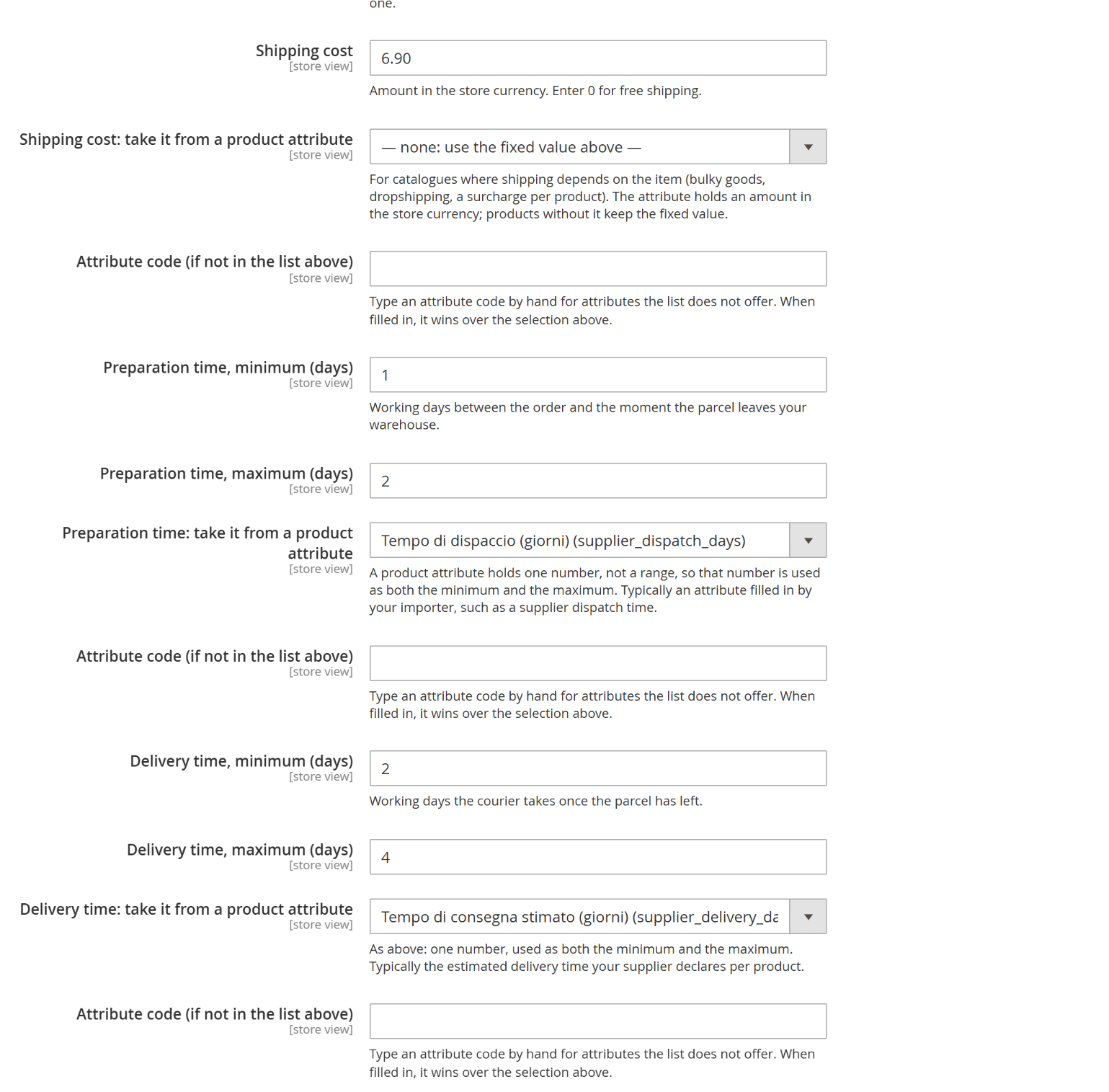
Along with the texts, the module publishes the product structured data — and Google reads a return policy and shipping details from it to show them in its free merchant listings, reporting them as missing when they are not there. They cannot be derived from the catalogue, so you declare them once: countries, return window and days, how the goods come back, who pays, shipping cost and preparation and delivery times.
Both blocks are off by default, and a block whose required fields are incomplete is left out entirely rather than published half-true: Google compares what you declare with what the customer finds on your site, so a wrong declaration is worth less than a missing one. The date the price is valid from is filled in automatically, with nothing to configure.
These terms are rarely the same for the whole catalogue: preparation and delivery times differ between your own warehouse and dropshipping, shipping depends on how bulky the item is, the return window on what is being sold. And the figure usually already exists on the product, in an attribute your importer or your team fills in. So each of those fields can be pointed at a product attribute — the list includes your custom ones — with a box to type a code the list does not offer. Where the product carries a value it wins; where it does not, the fixed value stands; and a value that is not a number falls back to the fixed one instead of publishing nonsense.
Never stuck on credits
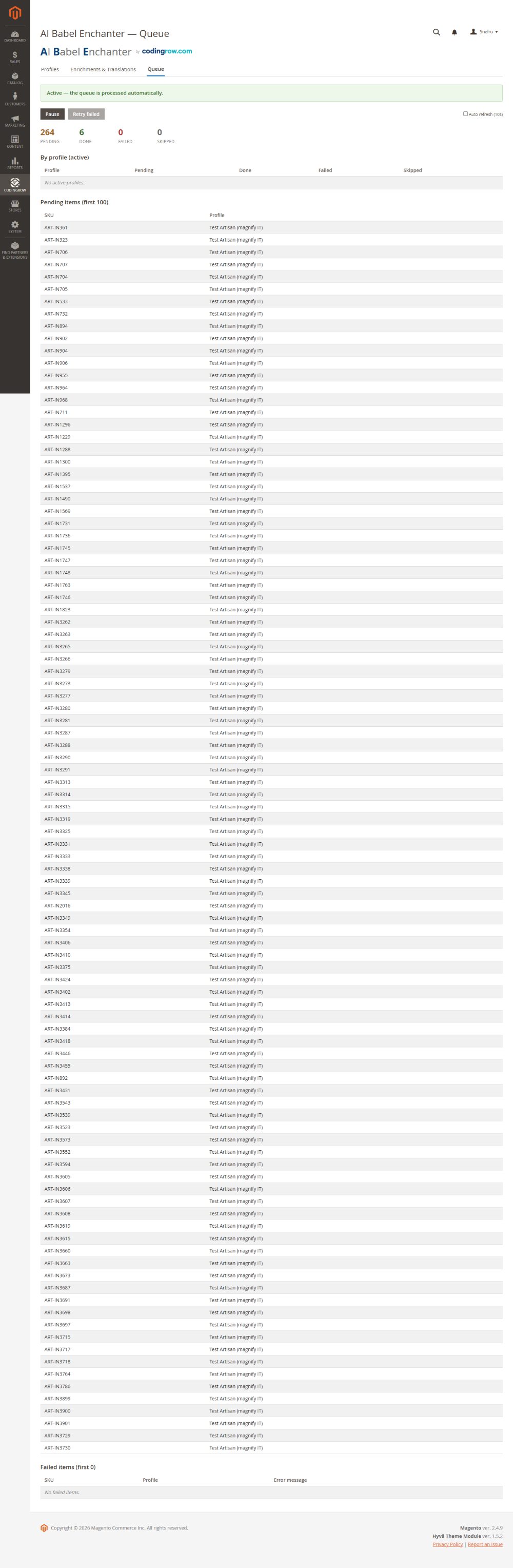
If your AI provider runs out of credit, AI Babel Enchanter does not waste attempts or lose your queue. It pauses cleanly, emails you, and resumes on its own or with a single Resume click.
- Credit circuit-breaker: stops retrying the moment credits run out.
- Email alert so you know exactly why it paused.
- Resumes automatically, or on demand with Resume — no work is lost.
- A dedicated Queue page shows every job, its status and history.
Multi-provider, your choice
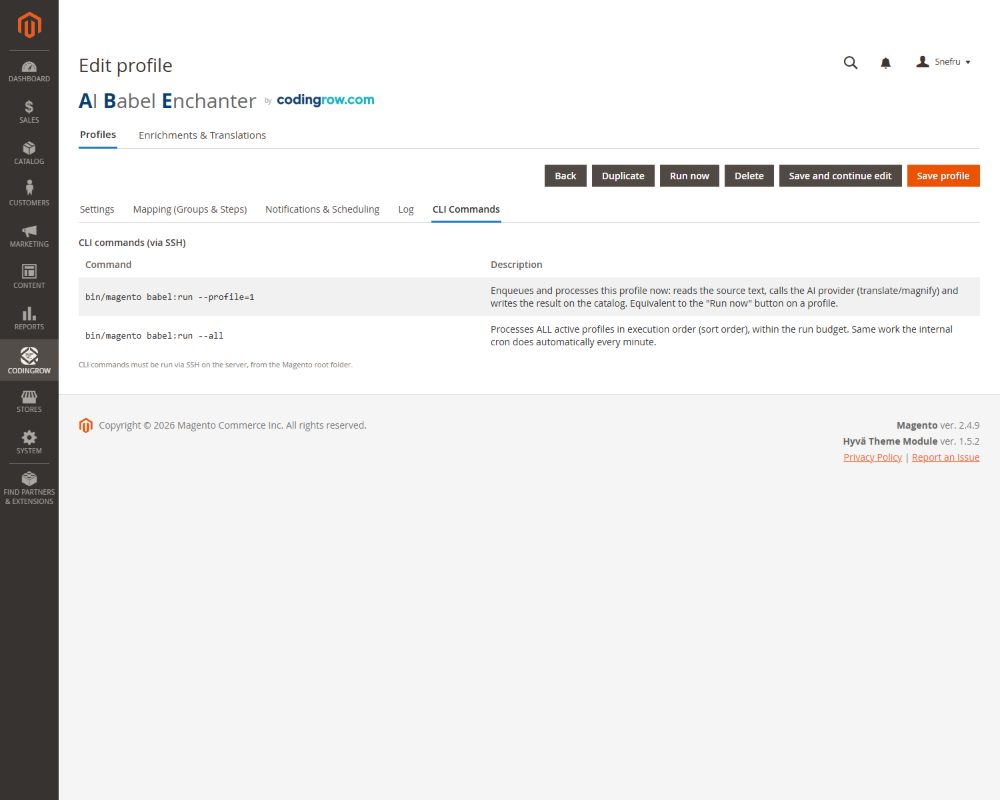
Bring your own AI provider for writing, and choose how you translate. Pick the model that fits your budget and quality — and switch anytime.
- Anthropic (Claude) for content generation.
- OpenAI for content generation.
- Google Gemini for content generation.
- OpenRouter to reach many models through one key.
- DeepL or an LLM for translation.
Requirements
Magento 2.4.x (Open Source or Adobe Commerce), PHP 8.1 or newer, and an API key from at least one supported AI provider. Works with Hyva and Luma themes. Composer install, no core changes.
Documentation
Full setup and usage docs cover installation, profiles and persona prompts, the improve/translate pipeline, cross-sell generation, dry-run preview, rollback, the Queue, provider setup and the cost calculator.
The trial is the guarantee, not a refund
This module is not refundable, and the reason is simple: what it produces stays yours. The texts written on your pages are not uninstalled with the module — they stay there, on your catalog, afterwards. So the guarantee is not a refund after buying: it is ten real products from your own store, enriched before you pay a cent. Try it on your catalog, look at the result on your own pages, and decide afterwards. At checkout we ask you to confirm that you did.
Changelog
Every release is listed here so you always know what changed.
- The Queue page refreshes on its own with a visible countdown: you always know when it moves.
- Only the numbers that change are updated: you keep your place on the page and nothing flickers.
- The Final field tick also works on an item never processed: a text is safe before the first run.
- One command sets the same tick on a list of items, instead of one by one from the grid.
- The catalogue also says how each thing is sold: by piece, by metre, by square metre, by pack.
- Inferred values are marked line by line: to confirm one, delete that word.
- On an item with variants, the parent carries what holds for all and each variant what sets it apart.
- Babel notes the objective characteristics of each item in a field you can read and correct.
- A line separates what the product states from what is inferred; to confirm a value, move it above.
- On by default, switched off with a single toggle.
- For items already processed, a button notes them without redoing the descriptions.
- Save and continue editing holds the profile still: it does no work until you are done.
- Save profile starts it again; left half-done, it resumes on its own after a couple of hours.
- You can see it is held: a notice at the top, a label in the grid with a link to release it.
- The Run now button works all the same.
- New Include subcategories checkbox: a parent category brings its whole branch along.
- On profiles you already have it stays unticked: nothing changes until you tick it.
- The preview runs on an item the profile would really work on, and says when the rules catch nothing.
- Minor fixes.
- If the AI does not answer, the work pauses and resumes on its own instead of burning through the queue.
- Products stay waiting, and the queue reaches the end by itself.
- "Failed" means one thing again: something is wrong with that product.
- On saving a profile, items a filter had excluded come back into the queue on their own.
- A message tells you how many.
- Changing the instructions does not requeue them: rewriting texts stays your choice.
- Deleting a profile now takes its queue away too.
- A product with a range declares its price range to Google, not the lowest price passed off as the only one.
- Only variants that can really be bought count.
- The links the module writes into descriptions are now visible, with the last word left to your theme.
- The variants of a configurable no longer enter the queue: they have no page of their own.
- The AI knows how the item is built: what the customer picks, what it is made of, what it holds.
- For a virtual or downloadable product it stops promising deliveries.
- Related, cross-sell and up-sell step outside the neighbouring categories and fish in the whole catalogue.
- Each candidate brings its own category: two items with similar names are no longer swapped.
- The same product can no longer appear in two lists on the same page.
- The AI names only accessories your shop really sells, and turns them into links.
- It never writes an address: it picks a catalogue entry, so no broken links.
- A term with no reliable match simply stays text.
- Try it on your own catalogue: the module works on up to ten of your products, and those pages stay.
- At ten it stops and says so; the queue is not lost and picks up where it was.
- The preview, AI Compare and the structured-data publishing stay free as well.
- Returns and shipping can come from a product attribute, not just from a fixed value.
- Return days, who pays, shipping cost, handling and delivery each point to their own attribute.
- Where the product has a value it wins, elsewhere the fixed one stays.
- New group to declare return and shipping terms for Google's merchant listings.
- Countries, return window, how goods come back, who pays, costs and times.
- Off by default; an incomplete block is dropped whole rather than published half-done.
- New Final checkbox on every field: the AI never touches it again, and if the text vanishes the module puts it back.
- Correcting a text from the grid ticks the box by itself.
- The module checks on its own whether the texts it wrote are still on the products, and restores the missing ones.
- New Apply to already processed button on the profile page.
- Minor fixes.
- Fuller structured data: stars from reviews, brand, price validity, EAN code.
- Up to five images, and the navigation trail on themes that do not publish it already.
- A step that comes back empty marks the product partial, with the reason, and you can rerun just that step.
- New command to reapply corrected instructions to products already processed.
- A switch per step and a tick per credential keep expensive models out of the stand-ins.
- Categories are set per group: a single profile can cover several sections.
- The single provider becomes a set of AIs with automatic takeover.
- Model and instructions are chosen per single step.
- New AI Compare bench: several models on your sample products, judged side by side.
- A length cap per AI, the real error shown in the queue, and a live preview.
- Titles without duplicates: no two products ever share a title, and the formula varies.
- Queue throughput controls: how many products per batch and how much time to give them.
- New option to rewrite the title from the description, with a free instructions field.
- Title-only mode leaves the description untouched: fit for huge catalogues, at minimal cost.
- The new title updates the page address, leaving a redirect from the old one.
- First public version: processing profiles that improve and translate per store view.
- Related, cross-sell and up-sell picked among items that really exist.
- Dry-run preview, full rollback, and a queue that stops when the credit runs out.
- Structured data and alternate languages declared to Google.