Installation
Voraussetzungen
Magento 2.4.x (Open Source oder Adobe Commerce), PHP 8.1–8.5. Funktioniert mit jeder von Magento unterstützten Suchmaschine (OpenSearch, Elasticsearch oder MySQL). Kompatibel mit Hyvä- und Luma-Themes. Erfordert das kostenlose codingrow/module-core. Kein KI-Anbieter oder API-Schlüssel nötig — das Modul ist reine Katalogsuche.
Einrichtung
Über Composer installieren, das Modul aktivieren und das Standard-Upgrade/Compile ausführen:
composer require codingrow/module-live-search-autocomplete
bin/magento module:enable Codingrow_LiveSearchAutocomplete
bin/magento setup:upgrade && bin/magento setup:di:compile
bin/magento cache:flush
Gehen Sie dann zu Stores → Konfiguration → Codingrow → Live Search & Autocomplete, fügen Sie Ihren Lizenzschlüssel ein, setzen Sie Aktivieren = Ja und leeren Sie den Cache.
Konfiguration
Alle Optionen befinden sich unter Stores → Konfiguration → Codingrow → Live Search & Autocomplete.
| Einstellung | Was sie bewirkt | Standard |
|---|---|---|
| Lizenzschlüssel | Der für diese Domain ausgestellte Lizenzschlüssel. Akzeptiert einen Einzelmodul-Schlüssel oder einen Codingrow-Abonnementschlüssel. Die Autovervollständigung wird ohne gültige Lizenz nicht gerendert. | — |
| Aktivieren | Schaltet die Storefront-Autovervollständigung ein oder aus. | Nein |
| Mindestzeichenzahl | Wie viele Zeichen der Kunde tippen muss, bevor Vorschläge starten. | 2 |
| Max. angezeigte Produkte | Maximale Anzahl von Produkten im Dropdown. | 6 |
| Produktbild anzeigen | Zeigt das Produkt-Vorschaubild neben jedem Vorschlag. | Ja |
| Preis anzeigen | Zeigt den Preis (und etwaigen Rabatt) für jeden Vorschlag. | Ja |
| Nur lagernde Produkte | Blendet nicht vorrätige Produkte aus den Vorschlägen aus. | Nein |
| AI Personal Shopper-Synonyme verwenden | Ist das AI Personal Shopper-Modul installiert, werden auch dessen selbstlernende Synonyme verwendet. | Ja |
| Akzentfarbe | Farbe für Preise und den Link „alle Ergebnisse anzeigen“. | #2563eb |
Deinstallation
Setzen Sie Aktivieren = Nein, um es auszuschalten, ohne etwas zu entfernen, oder entfernen Sie das Modul vollständig:
bin/magento module:disable Codingrow_LiveSearchAutocomplete
composer remove codingrow/module-live-search-autocomplete
bin/magento setup:upgrade && bin/magento cache:flush
Suche & Synonyme
So funktioniert es
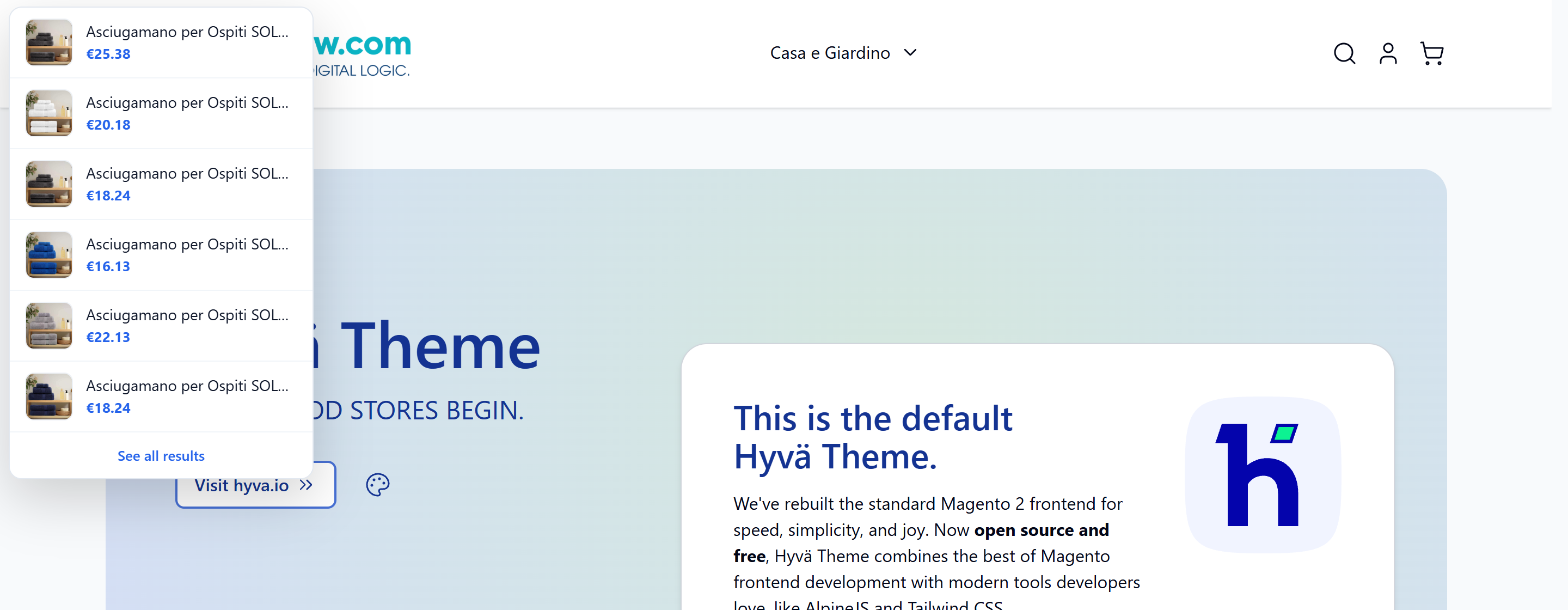
Ein kleines, theme-unabhängiges Skript bindet sich an Ihr bestehendes Sucheingabefeld (es erkennt Hyvä- und Luma-Suchleisten automatisch). Während der Kunde tippt, entprellt es die Eingabe und fragt das Modul nach passenden Produkten, dann rendert es ein Dropdown mit Vorschaubild, Name, Preis und etwaigem Rabatt für jedes Ergebnis, plus einen Link „alle Ergebnisse anzeigen“ zur vollständigen Suchseite. Jedes Ergebnis verlinkt direkt zur Produktseite. Die Ergebnisse berücksichtigen Produktsichtbarkeit, Lagerbestand und Store-Scope.
Performance
Vorschläge werden aus der eigenen indexierten Suchmaschine von Magento abgerufen — derselben Engine, die die Ergebnisseite antreibt (OpenSearch, Elasticsearch oder MySQL) — über die native Anfrage quick_search_container. Da die Zuordnung vom Index und nicht durch Scannen der Datenbank erfolgt, bleibt die Antwortzeit niedrig und wächst nicht mit der Kataloggröße. In einem Live-Shop mit 67.000 Produkten kommen die Vorschläge in etwa einer Sekunde zurück und bleiben konstant, während der Katalog wächst.
Erweiterte Feldsuche
Ob die Autovervollständigung nur den Namen/die SKU oder auch die Beschreibung und andere Felder durchsucht, wird von Magento selbst gesteuert, pro Attribut — nicht durch einen Modulschalter. Unter Stores → Attribute → Produkt hat jedes Attribut ein Kennzeichen „In Suche verwenden“ und ein Suchgewicht. Standardmäßig sind name, sku, description und short_description durchsuchbar, sodass die Autovervollständigung sie bereits durchsucht. Um ein Feld ein- oder auszuschließen oder ihm mehr Gewicht zu geben, ändern Sie die Sucheinstellungen dieses Attributs und reindexieren Sie — die Autovervollständigung folgt derselben Konfiguration wie die Ergebnisseite und bleibt unabhängig von der Kataloggröße schnell.
Native Search Synonyms
Das Modul nutzt immer die nativen Search Synonyms von Magento. Fügen Sie sie im Standard-Admin unter Marketing → SEO & Search → Search Synonyms hinzu oder bearbeiten Sie sie; die Autovervollständigung übernimmt sie sofort. Wenn eine Suchanfrage nichts zurückgibt, erweitert das Modul sie mit den passenden Synonymen und versucht es erneut.
AI Personal Shopper-Synonyme
Ist auch das Modul Codingrow AI Personal Shopper installiert (optional, weiche Abhängigkeit), greift die Autovervollständigung zusätzlich auf dessen selbstlernendes Synonymregister zu — die regionalen, Dialekt- und falsch geschriebenen Begriffe, die der Assistent aus echten Gesprächen gelernt hat. Dadurch treffen selbst „falsche“ Suchen die richtigen Produkte. Schalten Sie es mit AI Personal Shopper-Synonyme verwenden = Ja ein. Ohne dieses Modul funktioniert die Autovervollständigung perfekt allein mit den nativen Synonymen.
Verwendung
Wie es erscheint
Das Dropdown wird unter Ihrer bestehenden Suchleiste eingefügt und so gestaltet, dass es Ihrem Theme nicht in die Quere kommt. Jede Zeile zeigt das Produkt-Vorschaubild (falls aktiviert), den Namen und den Preis mit etwaigem Rabatt; die Akzentfarbe (Preise und der Link „alle Ergebnisse anzeigen“) ist konfigurierbar. Tastaturnavigation (Pfeiltasten und Enter) und mobiles Layout werden automatisch gehandhabt.
Fixierte Suchleiste
Verwandeln Sie die Shop-Suche in eine kompakte, dauerhaft sichtbare Kopfzeile: Sobald der Kunde nach unten scrollt, heftet sich eine schmale Leiste an den oberen Rand mit dem Shop-Logo, dem Menu, den Konto- und Warenkorb-Links und — vor allem — dem Suchfeld mit derselben Live-Autovervollstandigung. Die Suche bleibt auf jeder Seite in Sichtweite, so wie es grosse Marktplatze machen. Theme-unabhangig: funktioniert mit Hyva und Luma und nutzt die native Suchaktion wieder, sodass Absenden und Autovervollstandigung sich genau wie die normale Suche verhalten.
Auf dem Desktop ist die Leiste eine einzige Zeile. Auf dem Mobilgerat uberschreitet sie nie zwei Zeilen — Hamburger-Menu, Logo, Konto und Warenkorb in der ersten Zeile, das Suchfeld in der zweiten — so passt sie auf kleine Bildschirme, ohne Inhalt nach unten zu drangen. Sie erscheint, sobald der Kunde einen konfigurierbaren Scroll-Schwellenwert uberschreitet, und verbirgt sich oben wieder.
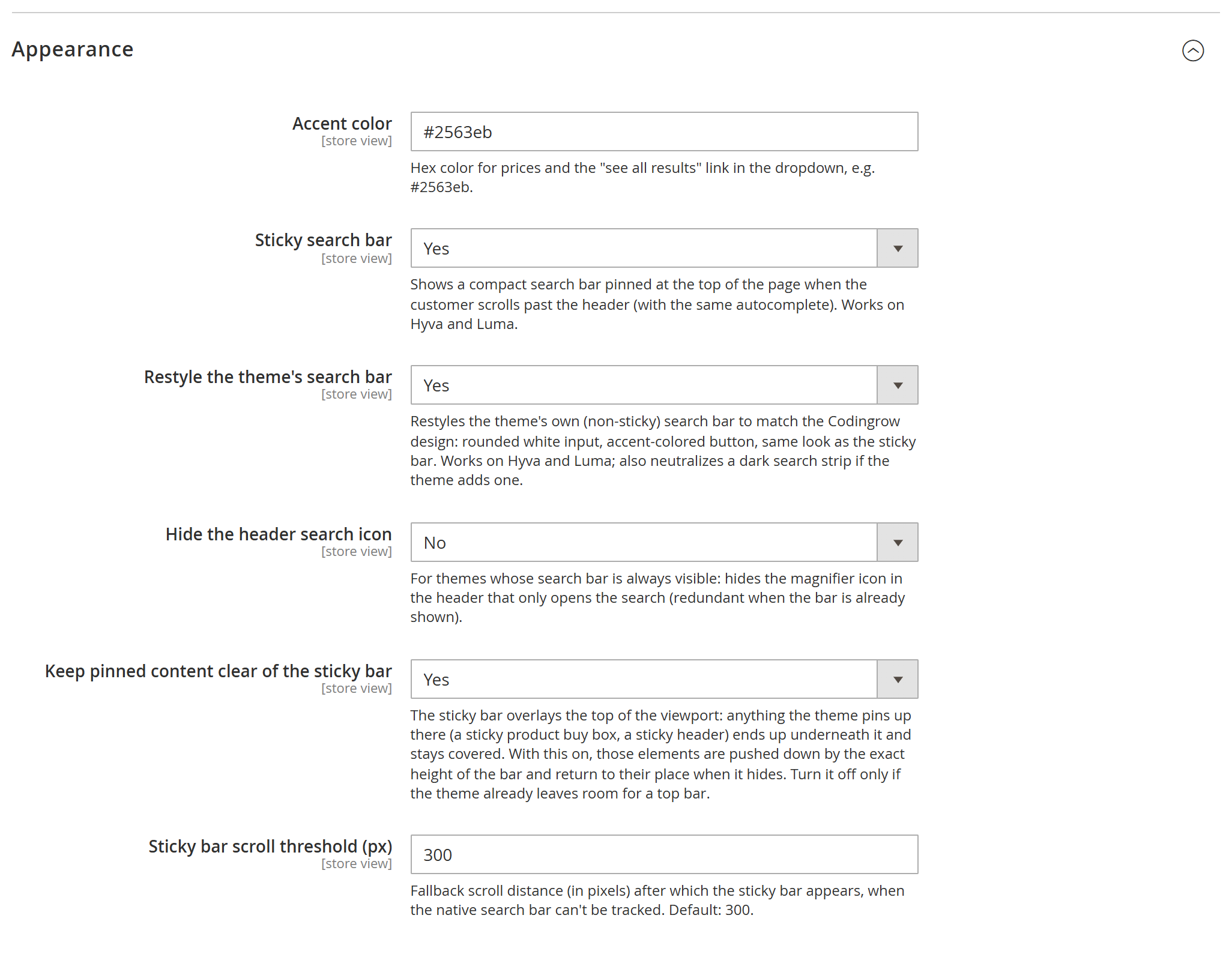
Aktivieren Sie sie unter Stores → Configuration → Codingrow → Live Search & Autocomplete → Appearance mit Sticky search bar = Yes (mit optionalem Scroll-Schwellenwert in Pixeln). Die Leiste bietet ausserdem einen Platz fur die KI-Suchschaltflache des Moduls AI Personal Shopper, sofern installiert.


Die Sticky-Leiste und was sie nicht verdecken darf
Mit aktiver Sticky-Suchleiste erscheint oben am Bildschirm eine kompakte Leiste, sobald der Kunde über die Schwelle hinaus scrollt. Da sie fixiert ist, verdeckt sie, was darunter liegt — auf der Produktseite meist den Produkttitel, die erste Zeile der Kaufbox, die das Theme im Blick behält. Und er bliebe die ganze Seite über verdeckt, nicht nur im Vorbeiscrollen.
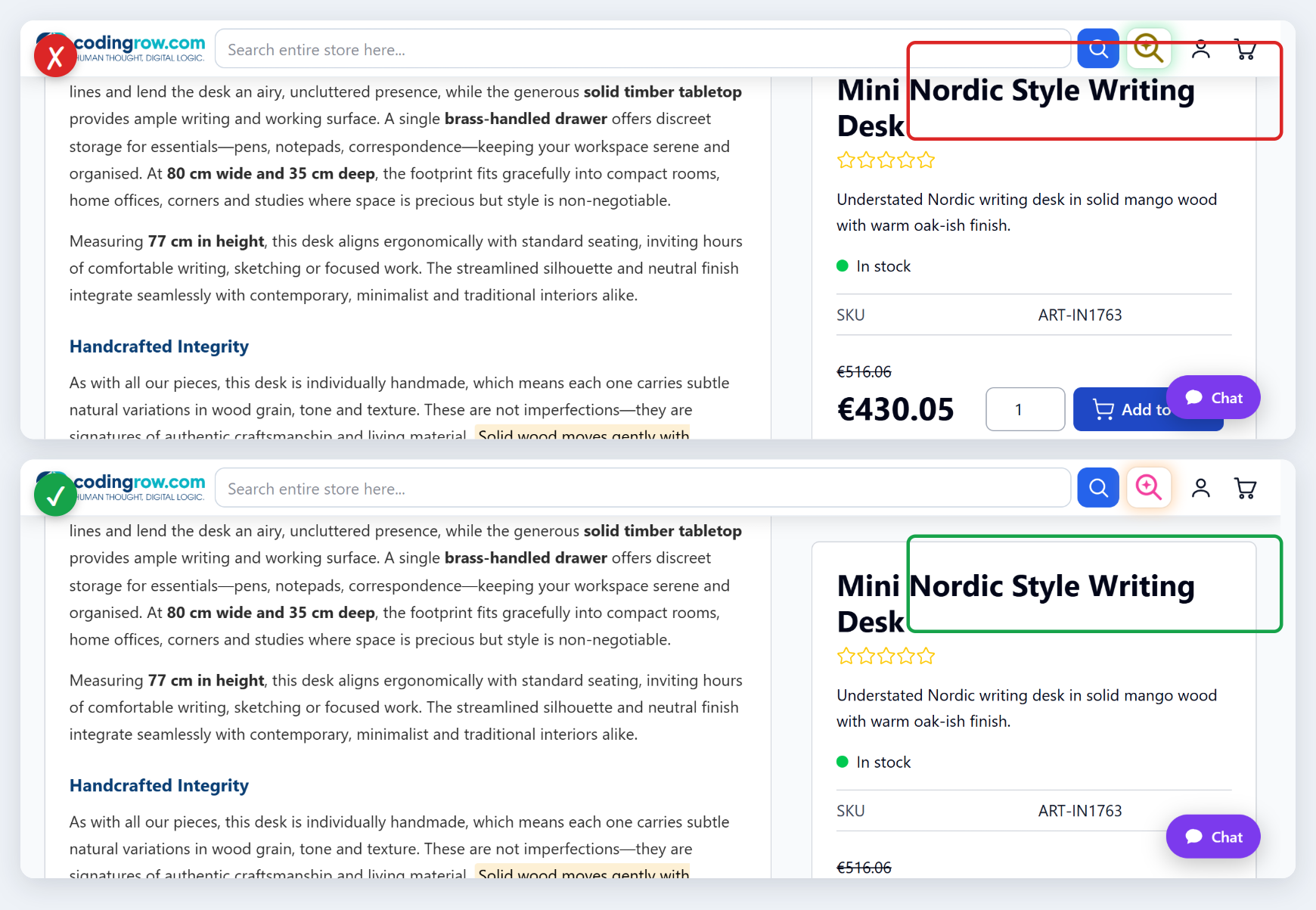
Keep pinned content clear of the sticky bar (standardmäßig aktiv) löst das: Die Leiste veröffentlicht ihre gemessene Höhe als CSS-Eigenschaft --crls-sticky-h am <html>-Element — 0px, solange sie verborgen ist — und alles oben Verankerte rückt genau um diesen Betrag nach unten und kehrt zurück, sobald die Leiste verschwindet. Auch Ankerlinks landen darunter. Die Höhe wird gemessen, nie fest codiert: rund 57px auf dem Desktop, rund 107px unter 768px, wo das Suchfeld in eine eigene Zeile umbricht.
Elemente, die in einem wirklich scrollenden Container angeheftet sind, bleiben unberührt: Sie sind an diesen Container gebunden, nicht an den Viewport. Auch Ihre eigenen Templates können dieselbe Eigenschaft lesen: top: calc(1.5rem + var(--crls-sticky-h, 0px)), dessen Fallback den ursprünglichen Abstand behält, wo das Modul nicht installiert ist.
Lizenz
Das Modul verwendet eine Lizenz pro Domain (einen Einzelmodul-Schlüssel oder einen Codingrow-Abonnementschlüssel, der jedes Codingrow-Modul freischaltet). Der Schlüssel wird lokal überprüft: die Storefront wird nie verlangsamt und Ihre Daten werden nie offengelegt. Die Autovervollständigung wird ohne gültige Lizenz nicht gerendert. Ihre Lizenz umfasst die aktuelle Version plus 1 Jahr Updates und Support; die abgedeckten Versionen können Sie für immer weiter nutzen und den Support (−35%) verlängern, um auf neuere Versionen zu aktualisieren.
Fehlerbehebung
| Symptom | Was zu prüfen ist |
|---|---|
| Die Autovervollständigung erscheint nicht | Stellen Sie sicher, dass Aktivieren = Ja ist, der Lizenzschlüssel gültig ist und Sie mindestens die Mindestzeichenzahl getippt haben. Dann bin/magento cache:flush. |
| Ein vorhandenes Produkt wird nicht gefunden | Reindexieren Sie den Katalog-Suchindex (bin/magento indexer:reindex catalogsearch_fulltext) und prüfen Sie, ob das Produkt in der Suche sichtbar und auf Lager ist (falls „Nur lagernde Produkte“ aktiviert ist). |
| Teilweise oder falsch geschriebene Wörter finden wenig | Fügen Sie native Search Synonyms hinzu oder installieren Sie AI Personal Shopper für automatisch gelernte Synonyme. |
| Nach einem Update hat sich nichts geändert | Führen Sie setup:upgrade, setup:di:compile und cache:flush nach jedem composer update aus. |