 Magento 2 · Search
Live Search & Autocomplete
The moment a customer starts typing in your Magento search bar, a dropdown shows the matching products — image, name, price and discount — one click from the product page. It is the instant, Google-style search Magento Open Source does not give you out of the box.
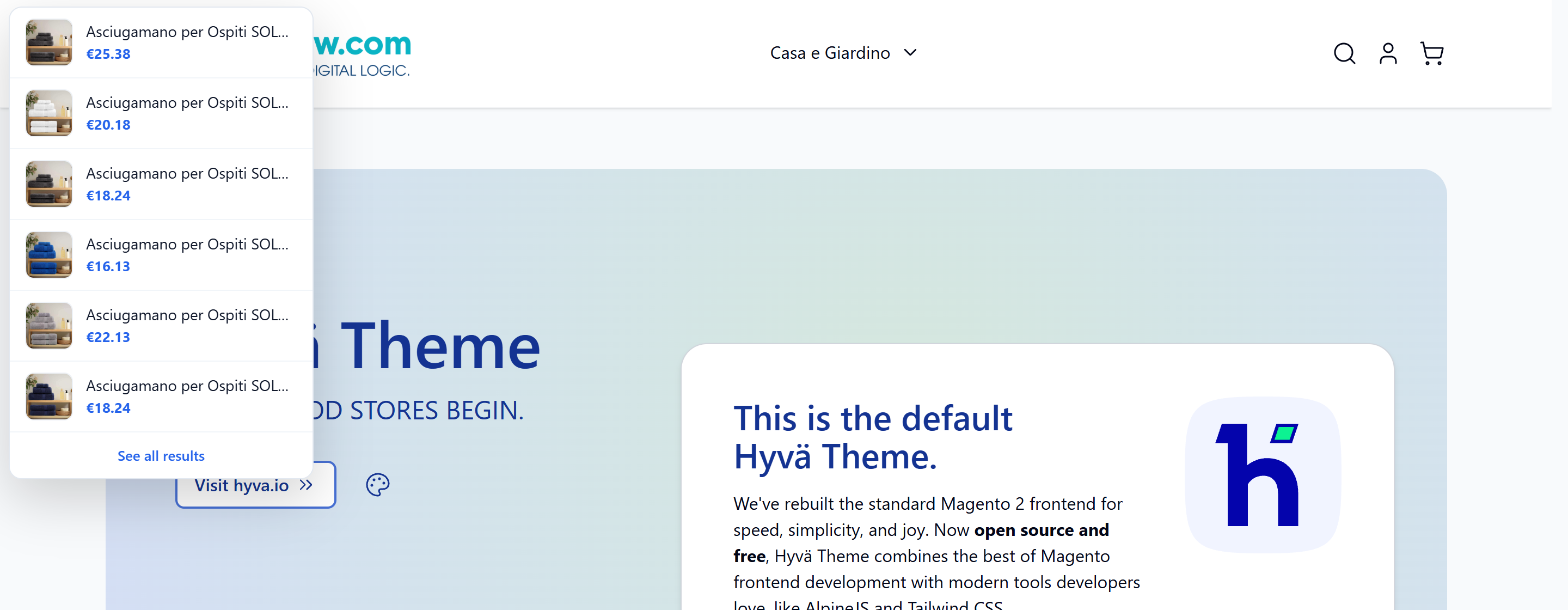
Try it live
Type a few letters in the search bar of our demo store and watch the product suggestions appear in real time.
Open the live demoInstant delivery: your license key is emailed the moment the payment is confirmed.
Optional installation service available at checkout — we set it up for you.
What it fixes
Magento's native search bar does not suggest products in real time — and a customer who can't find a product doesn't buy it.
Native autocomplete only suggests past search terms
With Elasticsearch or OpenSearch, Magento Open Source's native autocomplete only proposes terms that were already searched before (from the search_query table) — never live products from your catalog. Type a product that nobody searched yet and you get nothing. This is a structural limit of Open Source, not a misconfiguration: it behaves the same on Luma and Hyvä. This module adds the real, product-based autocomplete that is missing.
A shopper who doesn't find, leaves
Search users are your highest-intent visitors — they already know what they want. Every extra click or empty result is a chance to lose the sale to a competitor. Showing the right products instantly, with a picture and a price, turns that intent into a click straight to the product page.
How it works
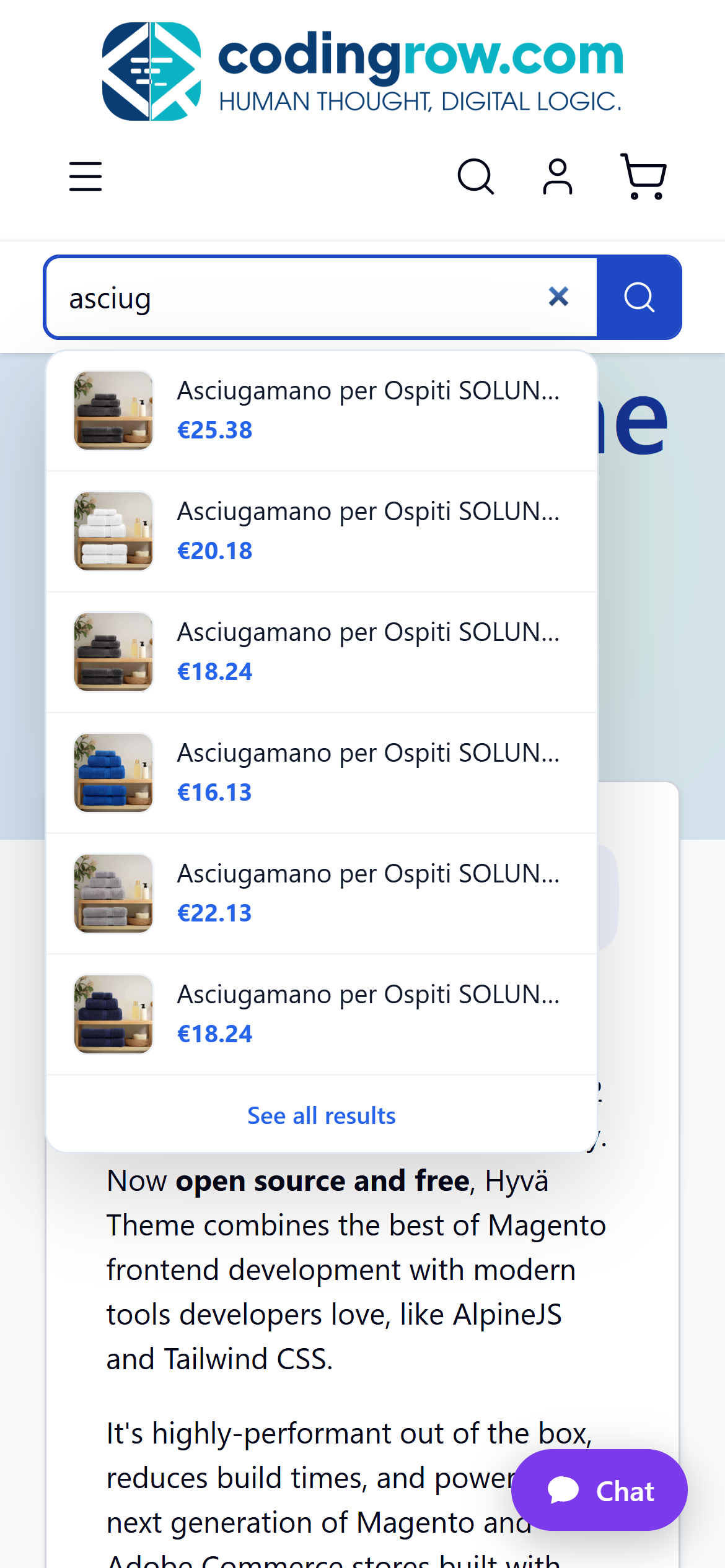
A lightweight, theme-agnostic script attaches to your existing search bar (Hyvä or Luma) and, as the customer types, calls the module and renders a clean dropdown of matching products — thumbnail, name, price and any discount — plus a "see all results" link. Works on desktop and mobile.
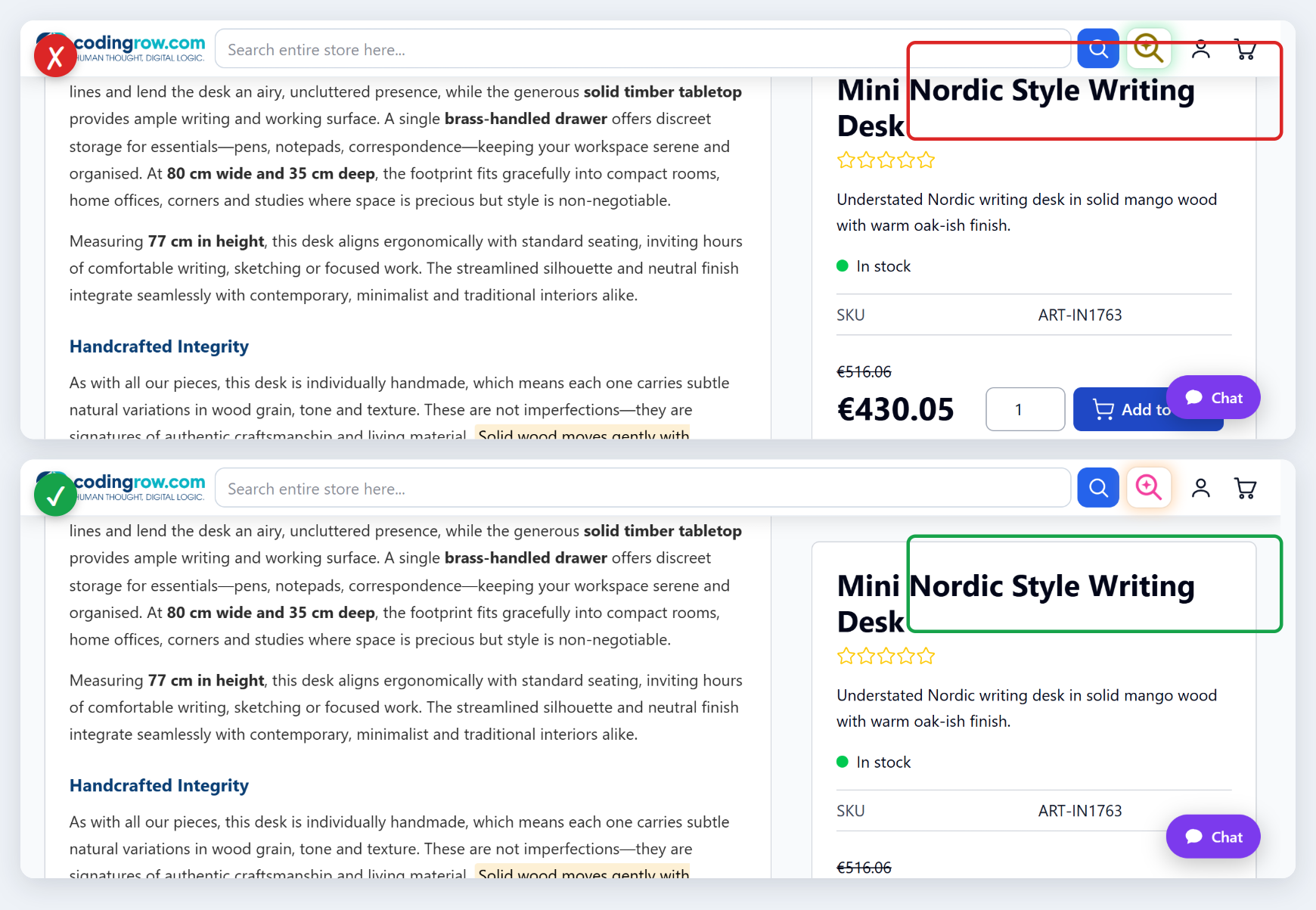
The sticky bar stays out of the way
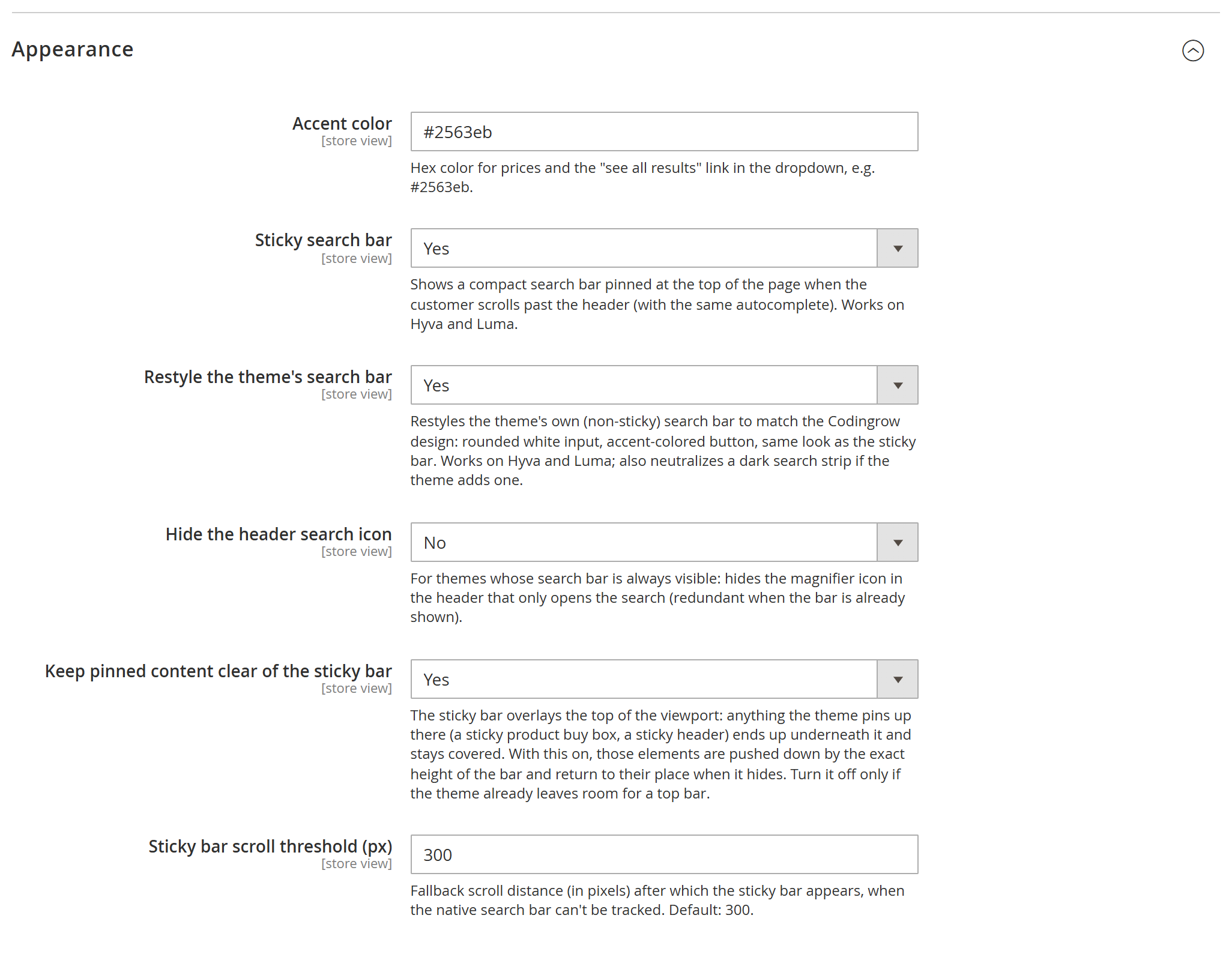
A bar pinned to the top of the screen covers whatever is beneath it — and on a product page that is usually the product title, the first line of a buy box the theme keeps in view. It would stay covered for the whole page, not just in passing. With Keep pinned content clear of the sticky bar, on by default, anything anchored at the top moves down by exactly the height of the bar and returns to its place when the bar hides. Anchor links land below it too. The height is measured, not guessed: it follows the bar when it wraps onto two lines on a phone.
What it does
- Real-time product suggestions as the customer types.
- Thumbnail, name, price and discount for each suggestion.
- Each result links straight to the product page.
- "See all results" link to the full search page.
- Theme-agnostic: works on Hyvä and Luma.
- Respects visibility, stock and store scope.
- Configurable minimum characters and number of results.
- Self-hosted, no SaaS, no recurring cost, no external data sharing.
Fast on large catalogs
The suggestions come from Magento's own indexed search engine — the very same engine behind the results page — not from a slow database scan. That is what keeps it fast even on very large catalogs.
- Uses the indexed engine (OpenSearch / Elasticsearch, or MySQL).
- Response time does not grow with catalog size.
- Partial matches, like the results page (type "tow" → towels).
- Honours your search-weights and searchable-attributes settings.
Synonyms: find the right product even for the "wrong" word
Customers don't always type the exact catalog wording. The module expands the query with synonyms so those searches still match.
- Always uses Magento's native Search Synonyms.
- Add or edit synonyms from the standard Magento admin (Marketing → Search Synonyms).
- Optional: if the Codingrow AI Personal Shopper module is installed, it also taps its self-learning synonyms registry.
- With that registry, misspelled, regional or dialect words still match the right products.
Simple to configure
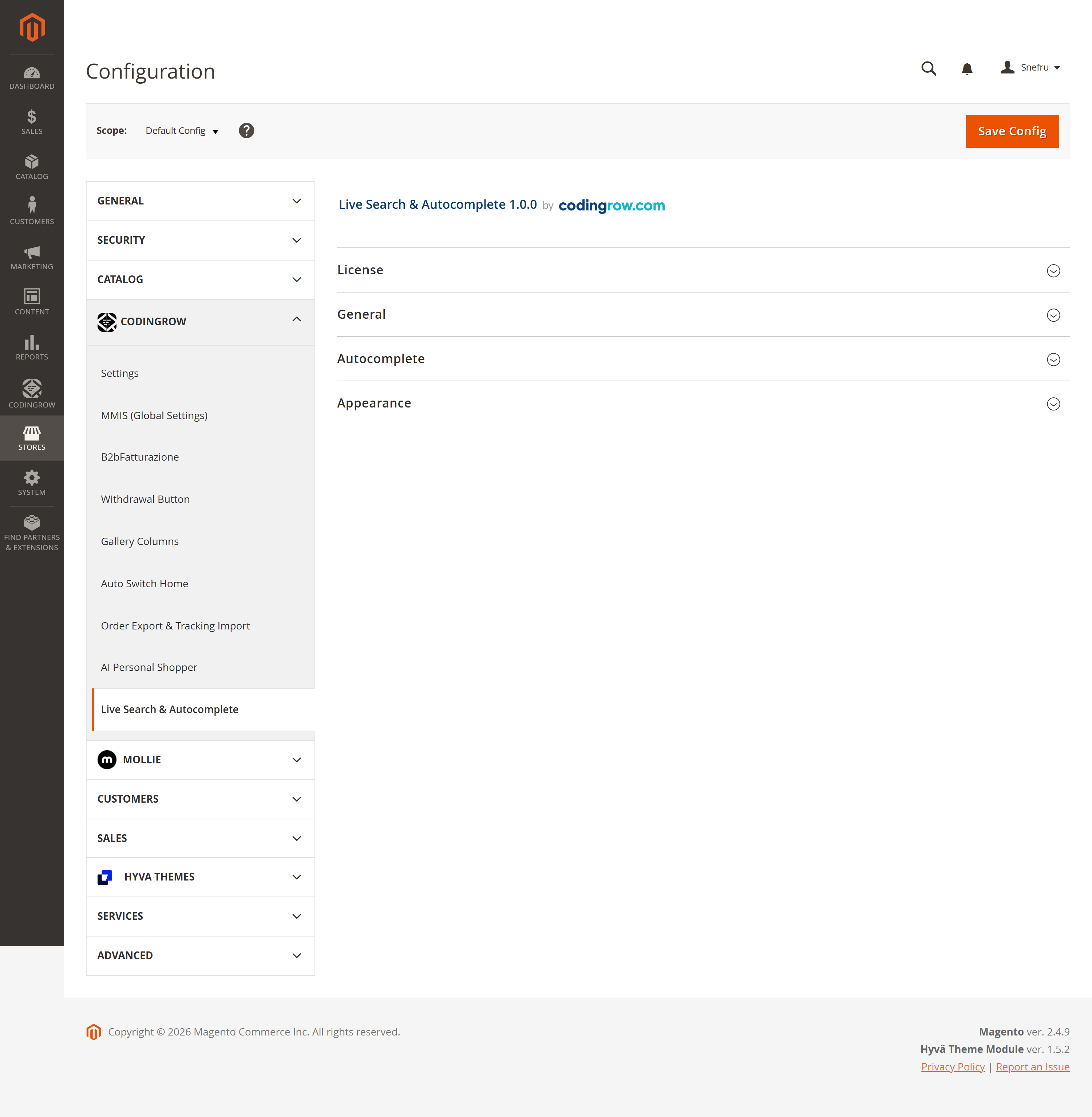
Everything lives under Stores → Configuration → Codingrow → Live Search & Autocomplete. Paste your license key, turn it on, and tune a few options.
- Enable / disable the storefront autocomplete.
- Minimum characters before it starts (default 2).
- Maximum number of products shown (default 6).
- Show product image / show price / only in-stock products.
- Use AI Personal Shopper synonyms when available.
- Accent color for prices and the "see all results" link.
Licensing & privacy
A per-domain license, validated locally and safely — nothing about your catalog or customers leaves your server.
- Per-domain license (single-module key or Codingrow subscription key).
- Verified locally: no store data ever leaves, and the check never slows the storefront.
- Search runs entirely on your server — no catalog or customer data sent to any third party.
- 1 year of updates & support included; the covered versions stay yours forever.
Admin in 7 languages
The admin configuration and the storefront labels ship translated in seven languages:
The storefront picks the store's language automatically; the small UI labels ("see all results", "no products found") follow the store view.
Requirements
Magento 2.4.x (Open Source or Adobe Commerce), PHP 8.1–8.5, any search engine Magento supports (OpenSearch, Elasticsearch or MySQL). Compatible with Hyvä and Luma themes. Requires the free codingrow/module-core. No AI provider or API key needed — it is pure catalog search.
Documentation
Full setup and admin reference — installation, configuration options, native and AI Personal Shopper synonyms, extended-field search via native searchable attributes, and troubleshooting.
Money-back guarantee
Not satisfied within 30 days of purchase? Request a refund yourself from your account area (codingrow.com/login), no questions asked. The refund is processed instantly, automatically, and the license is deactivated upon confirmation.
Changelog
A short history of recent releases.
The sticky bar no longer covers what the shop pins at the top of the page. The bar is fixed across the top of the screen: whatever the theme (or another module) pins up there — typically the product title, the first element of the buy box — ended up underneath it and stayed covered for the whole page. Those elements now move down by exactly the height of the bar and return to their place when it hides; anchor links (#reviews and the like) land below the bar instead of behind it. New option in Appearance, "Keep pinned content clear of the sticky bar", on by default: turn it off only if the theme already leaves room for a top bar. No effect when the sticky bar is off.
Search bar rendering fixes on the Luma theme: the restyled bar and the sticky bar now look identical (rounded input, accent button, white magnifier icon, centered and clearly visible) on desktop and mobile. Fixed the missing icon on Luma's submit button, the squashed and non-rounded sticky bar, and a thin line under the buttons on narrow viewports. No configuration change.
Two new Appearance options to align the theme's search bar with the Codingrow design: Restyle the theme's search bar redraws the native bar (rounded white input, accent-colored button, matching the sticky bar) and neutralizes any dark background the theme places around the search; Hide the header search icon hides the header magnifier that only opens the search. Both cross-theme (Hyva and Luma), off by default.
New Sticky search bar option (Appearance): as the customer scrolls, a compact header bar appears at the top with logo, search (same autocomplete), account and cart taken from the theme - theme-agnostic (Hyva and Luma), hiding when back at the top. It also exposes a slot for the AI button of the AI Personal Shopper module (if installed).
Faster, more scalable search on large catalogs, with the same partial matching and the same searchable-attribute weights as the results page. No configuration changes.
First release: real-time product autocomplete for the Magento 2 search bar, Hyvä and Luma, native Search Synonyms plus optional AI Personal Shopper synonyms, and display/appearance options.