Installazione
Requisiti
Magento 2.4.x — testato su 2.4.9, compatibile con le versioni precedenti 2.4.*. PHP 8.1–8.5. Compatibile sia con il tema Luma di default che con il tema Hyvä (il widget della chat viene renderizzato in uno Shadow DOM isolato, quindi appare identico su entrambi, senza modifiche al tema). Dipende dal modulo gratuito codingrow/module-core, installato automaticamente. Richiede una chiave API di almeno un provider AI (OpenAI, Anthropic, Google o OpenRouter) — fatturata a te direttamente dal provider.
Passaggi di installazione
- Aggiungi le credenziali che riceverai via email a
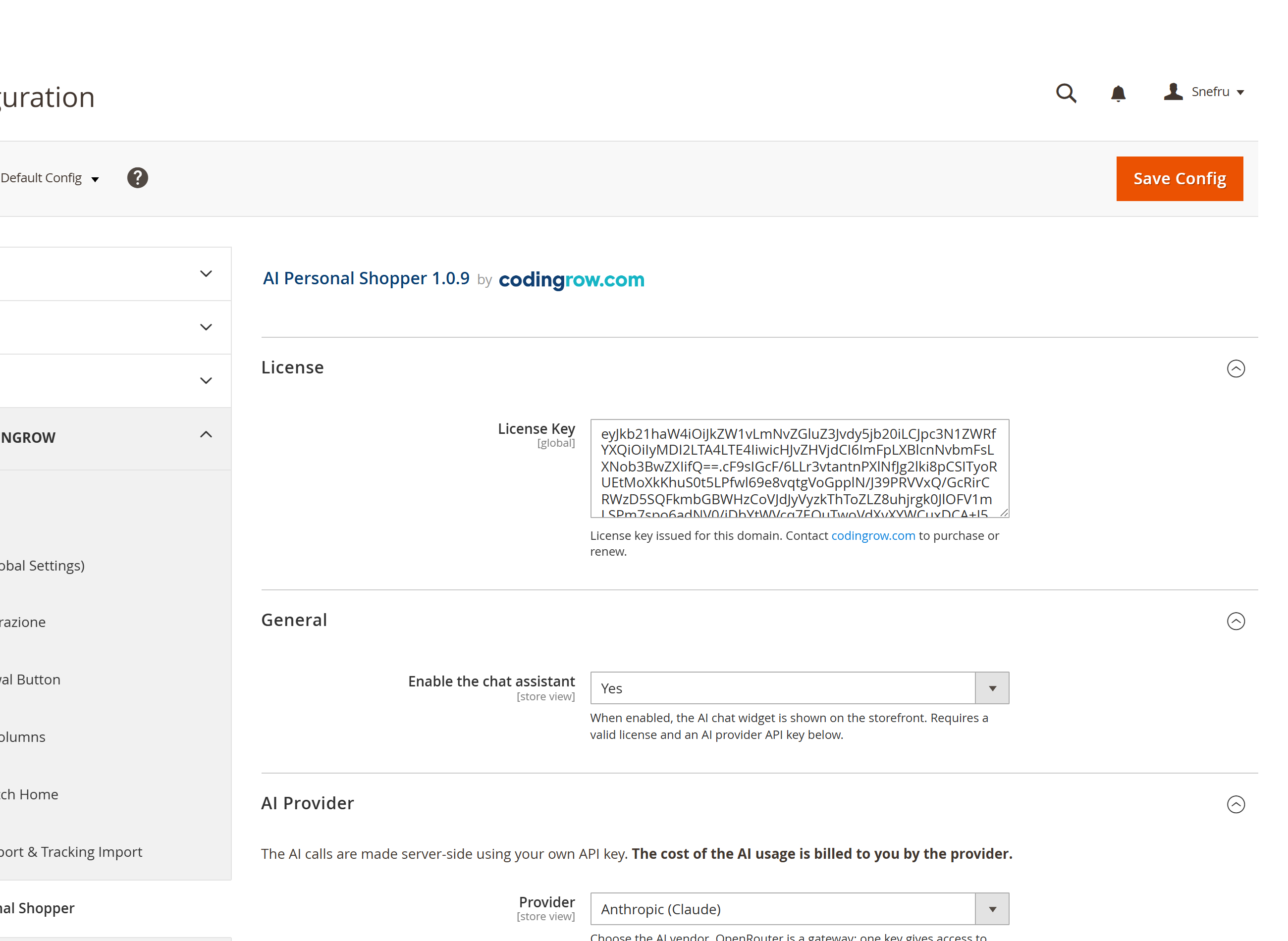
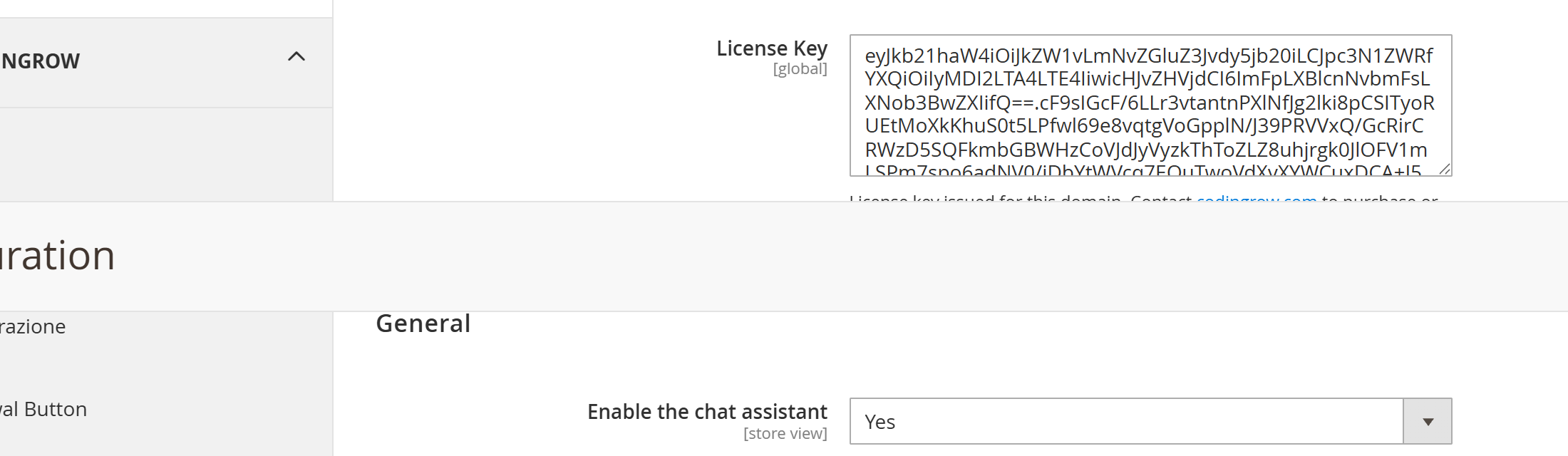
auth.jsonnella root del tuo progetto Magento:{ "http-basic": { "repo.codingrow.com": { "username": "...", "password": "..." } } } composer config repositories.codingrow composer https://repo.codingrow.comcomposer require codingrow/module-ai-personal-shopperbin/magento module:enable Codingrow_AiPersonalShopperbin/magento setup:upgrade && bin/magento setup:di:compile- Incolla la tua chiave di licenza in Admin → Stores → Configuration → Codingrow → AI Personal Shopper → License → License Key, salva, poi
bin/magento cache:flush.
Configurazione
Apri Admin → Stores → Configuration → Codingrow → AI Personal Shopper. Inserisci la License Key, metti Enable su Yes, poi controlla le Capabilities. Provider, modello e chiave API non sono qui: si aggiunge un’AI nella scheda AI Models (Codingrow → AI Personal Shopper → AI Models).
| Impostazione | Cosa fa | Default | Note |
|---|---|---|---|
| License Key | La chiave di licenza rilasciata per questo dominio. | — | Accetta una chiave del singolo modulo o una chiave abbonamento Codingrow. Senza una licenza valida la chat non viene renderizzata. |
| Enable | Attiva il widget della chat sullo storefront. | No | Richiede una licenza valida e almeno una chiave API di un provider AI. |
| AI Models (scheda a parte) | Provider, modello e chiave API usati per la conversazione. | — | Non sono in questa pagina: stanno in Codingrow → AI Personal Shopper → AI Models, l’unico posto da cui la chat li legge. Il gruppo AI Provider che stava qui è stato rimosso nella 2.1.0: i suoi campi non avevano più alcun effetto. |
| Agent limits → Max tool rounds | Quante volte per messaggio l’agente può interrogare catalogo e ordini prima di rispondere. | 4 | Da 1 a 8. Più alto = risposte più accurate ma più lente e costose. |
| Capabilities | Interruttori: ricerca prodotti, stato ordine, promozioni, aggiungi al carrello, input vocale, sinonimi auto-appresi, ticket di assistenza umana. | — | Disattiva qualsiasi funzione non vuoi che l'agente svolga. |
| Human support | Email di assistenza (BCC), tempo di risposta, prefisso ticket, auto-chiusura, notifica alla risoluzione. | 24-48 hours | Usata solo quando la capability Human support tickets è attiva. |
Disinstallazione
Imposta Enable su No e salva per nascondere subito il widget. Per rimuovere completamente il modulo: bin/magento module:disable Codingrow_AiPersonalShopper poi composer remove codingrow/module-ai-personal-shopper.
Configurazione del provider AI
Scegliere un provider
L'assistente funziona con uno qualsiasi dei quattro provider — porti tu la tua chiave API, e l'uso dell'AI ti viene fatturato direttamente dal provider che scegli. OpenAI (ChatGPT/GPT) offre la gamma più ampia; Anthropic (Claude) è adatto a un assistente che deve restare sul pezzo; Google (Gemini) ha prezzi competitivi ed è veloce; OpenRouter ti dà una sola chiave per decine di modelli di più provider, comodo per confrontare costo e qualità.
Ottenere una chiave API OpenAI
- Accedi su platform.openai.com.
- Vai su platform.openai.com/api-keys.
- Clicca su Create new secret key, dalle un nome (es. "AI Personal Shopper") e copiala subito — viene mostrata una sola volta.
- Aggiungila come nuova AI nella scheda AI Models (Codingrow → AI Personal Shopper → AI Models) con Provider impostato su OpenAI, poi usa Load models per scegliere il modello.
Ottenere una chiave API Anthropic
- Accedi su console.anthropic.com.
- Vai su console.anthropic.com/settings/keys.
- Clicca su Create Key, dalle un nome e copia il valore.
- Aggiungila come nuova AI nella scheda AI Models (Codingrow → AI Personal Shopper → AI Models) con Provider impostato su Anthropic, poi usa Load models per scegliere il modello.
Ottenere una chiave API Google
- Accedi su aistudio.google.com con un account Google.
- Vai su aistudio.google.com/app/apikey.
- Clicca su Create API key, scegli o crea un progetto Google Cloud e copia la chiave.
- Aggiungila come nuova AI nella scheda AI Models (Codingrow → AI Personal Shopper → AI Models) con Provider impostato su Google, poi usa Load models per scegliere il modello.
Ottenere una chiave API OpenRouter
- Accedi su openrouter.ai.
- Vai su openrouter.ai/keys.
- Clicca su Create Key, dalle un nome e copia il valore.
- Aggiungila come nuova AI nella scheda AI Models (Codingrow → AI Personal Shopper → AI Models) con Provider impostato su OpenRouter, poi usa Load models per scegliere il modello.
Load models
Una volta inserita la chiave API, clicca su Load models sotto il campo Model: il modulo interroga l'endpoint di elenco modelli del provider con la tua chiave e riempie una tendina con tutti i modelli che la tua chiave può effettivamente usare — scegli dall'elenco invece di digitare un id. Resta disponibile un campo di testo manuale come fallback per un id di modello non ancora in elenco. Un link subito sotto il campo indica sempre la pagina giusta per ottenere la chiave del provider attualmente selezionato.
Calcolatrice della durata del budget
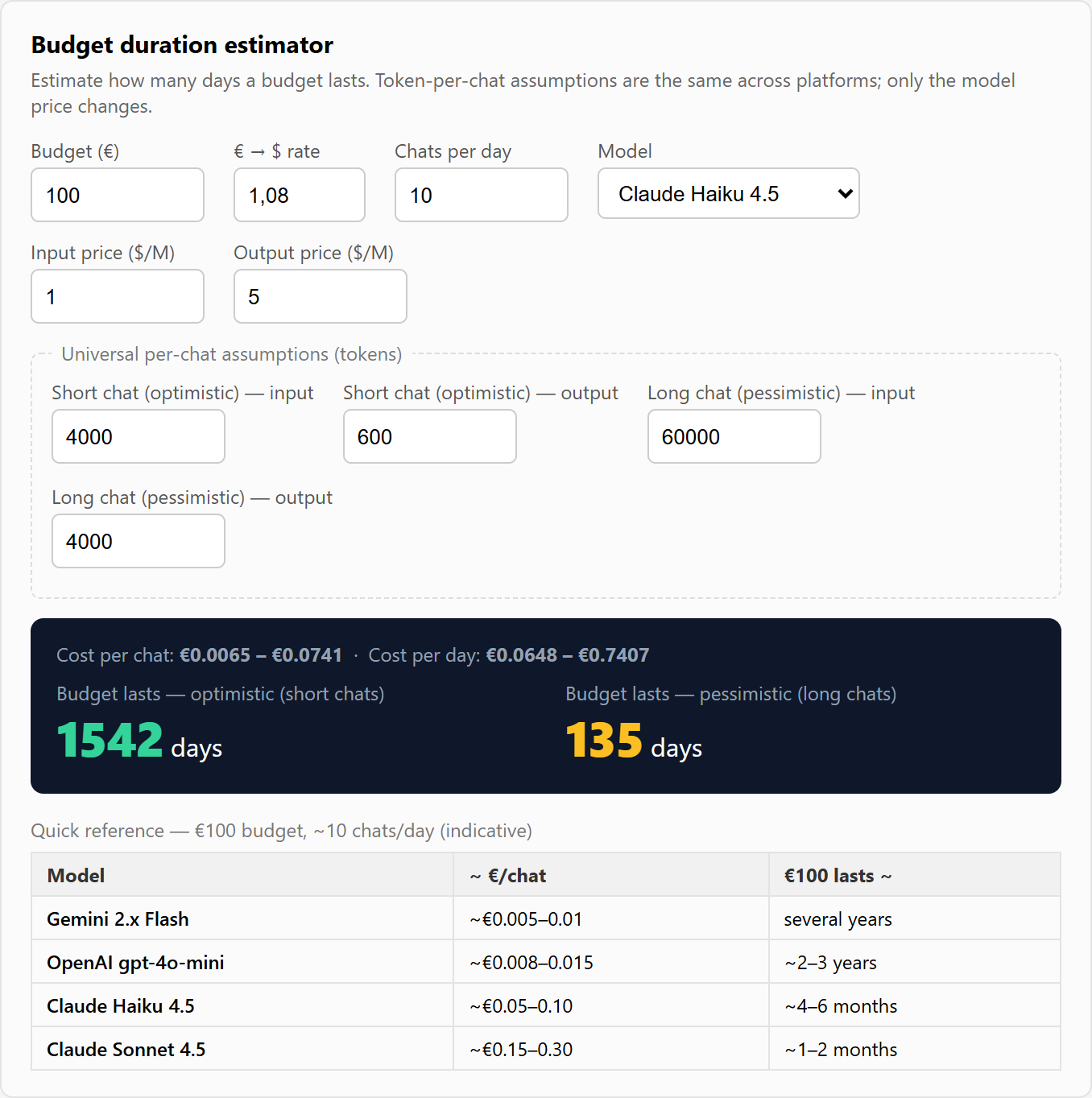
L'uso dell'AI e' fatturato dal provider a token, quindi la domanda naturale e' quanto durera' un certo budget. La schermata di configurazione risponde direttamente: subito sotto le chiavi API c'e' una piccola calcolatrice del budget. Inserisci il budget, il prezzo del modello per milione di token in ingresso/uscita (sono forniti preset per Gemini Flash, OpenAI gpt-4o-mini, Claude Haiku 4.5 e Claude Sonnet 4.5) e il numero previsto di chat al giorno. Mostra all'istante il costo per chat e quanti giorni dura il budget in uno scenario ottimistico (chat corte) e uno pessimistico (chat lunghe).
Le assunzioni di token per chat sono uguali tra le piattaforme — cambia solo il prezzo del modello — quindi il confronto e' equo. Una tabella di riferimento mostra all'incirca quanto dura un budget di €100 su ciascun modello a circa 10 chat al giorno. E' solo un aiuto alla pianificazione; il costo reale lo fattura sempre il provider.
Qualità e costo. Il modulo fornisce già al modello tutto il necessario per rispondere e assistere — catalogo, ordini, promozioni, categorie, sinonimi e strumenti. La qualità delle risposte dipende poi dal modello scelto: se non ti soddisfano, prova semplicemente un modello o un provider diverso. Il costo dipende direttamente da questa scelta — ma per un assistente di questo tipo non serve un modello costoso, "di ragionamento" o complesso: uno economico e veloce (fascia "flash"/"mini") va benissimo.
Budget duration calculator
Estimate how long an AI budget lasts. Token-per-chat assumptions are the same across platforms; only the model price changes.
| Model | ~ €/chat | €100 lasts ~ |
|---|---|---|
| Gemini 2.x Flash | ~€0.005–0.01 | several years |
| OpenAI gpt-4o-mini | ~€0.008–0.015 | ~2–3 years |
| Claude Haiku 4.5 | ~€0.05–0.10 | ~4–6 months |
| Claude Sonnet 4.5 | ~€0.15–0.30 | ~1–2 months |
Regolazione AI e diagnostica
Ogni AI del pool porta con sé le proprie impostazioni, sulla sua card nella scheda AI Models — più un limite che resta in Configuration:
- Max response tokens (sulla card dell’AI) — limita la lunghezza di ogni risposta; abbassarlo tiene le risposte strette e i costi bassi.
- Temperature (sulla card dell’AI) — da risposte concentrate e prevedibili a formulazioni più varie. Lasciandolo vuoto non viene inviato affatto, che è ciò che le famiglie di modelli più recenti pretendono.
- Max tool rounds (Stores → Configuration → … → Agent limits) — da 1 a 8, quante volte il modello può interrogare i suoi strumenti (ricerca, stato ordine, …) prima di dover rispondere; più alto permette risposte più approfondite a più passi, più basso è più rapido ed economico.
- Recent AI calls (diagnostica) (scheda AI Models) — le ultime 10 chiamate al modello con esito, errore, messaggio e risposta: quando una risposta non arriva si vede il perché a colpo d’occhio. Con il failover attivo nomina l’AI che ha davvero risposto, non la primaria.
Nota importante: la qualità, la coerenza e la proattività delle risposte dipendono soprattutto dal modello AI scelto, non solo dal modulo. Un modello economico e veloce (tipo "flash"/"mini"/Haiku) costa poco ma è meno bravo a curare l'ordine delle schede, a restringere le opzioni verso poche e a proporre abbinamenti/cross-sell; un modello più capace (es. Claude Sonnet, classe GPT-4) segue queste logiche in modo molto più affidabile. Se le risposte non ti soddisfano, la prima cosa da provare è passare a un modello superiore — il costo cambia di conseguenza, usa la calcolatrice qui sopra.
Guida utente
Capabilities
Ogni capability è un interruttore indipendente sotto Capabilities. Disattivarne una toglie subito quella funzione all'agente — nulla viene mai dedotto o inferito oltre a ciò che è attivo:
- Ricerca prodotti — ricerca in linguaggio naturale sul catalogo live, restituita come card prodotto (o card categoria quando la richiesta è troppo vaga per un singolo prodotto).
- Stato ordine — recupera lo stato reale dell'ordine per i clienti loggati, o per gli ospiti che confermano numero ordine + email.
- Promozioni — l'agente conosce gli sconti attivi e può segnalarli o filtrare in base ad essi.
- Lettura contenuti categoria — permette all'agente di leggere la descrizione PageBuilder della categoria (
get_category_info), così guide all'acquisto, tabelle taglie e testi editoriali che hai già scritto sulle pagine categoria alimentano la risposta invece di essere ignorati. - Aggiungi al carrello — permette al cliente di aggiungere un prodotto direttamente da una card, con un selettore di quantità, senza uscire dalla chat.
- Input vocale — i clienti possono dettare la richiesta invece di digitarla (microfono Web Speech).
- Sinonimi auto-appresi — registra la corrispondenza tra una parola di ricerca fallita e il termine di catalogo che poi ha trovato riscontro.
- Ticket di assistenza umana — permette all'agente di aprire un ticket e passare la mano a una persona quando una richiesta ha davvero bisogno di un umano; disattivandola, l'agente non proporrà mai di aprire un ticket.
- Suggerimenti cross-sell in chiusura — quando il cliente sta concludendo, l'agente può aggiungere uno o due prodotti complementari come suggerimento finale prima di salutare. Disattivato di default; attivalo solo se vuoi quella spinta in chiusura.
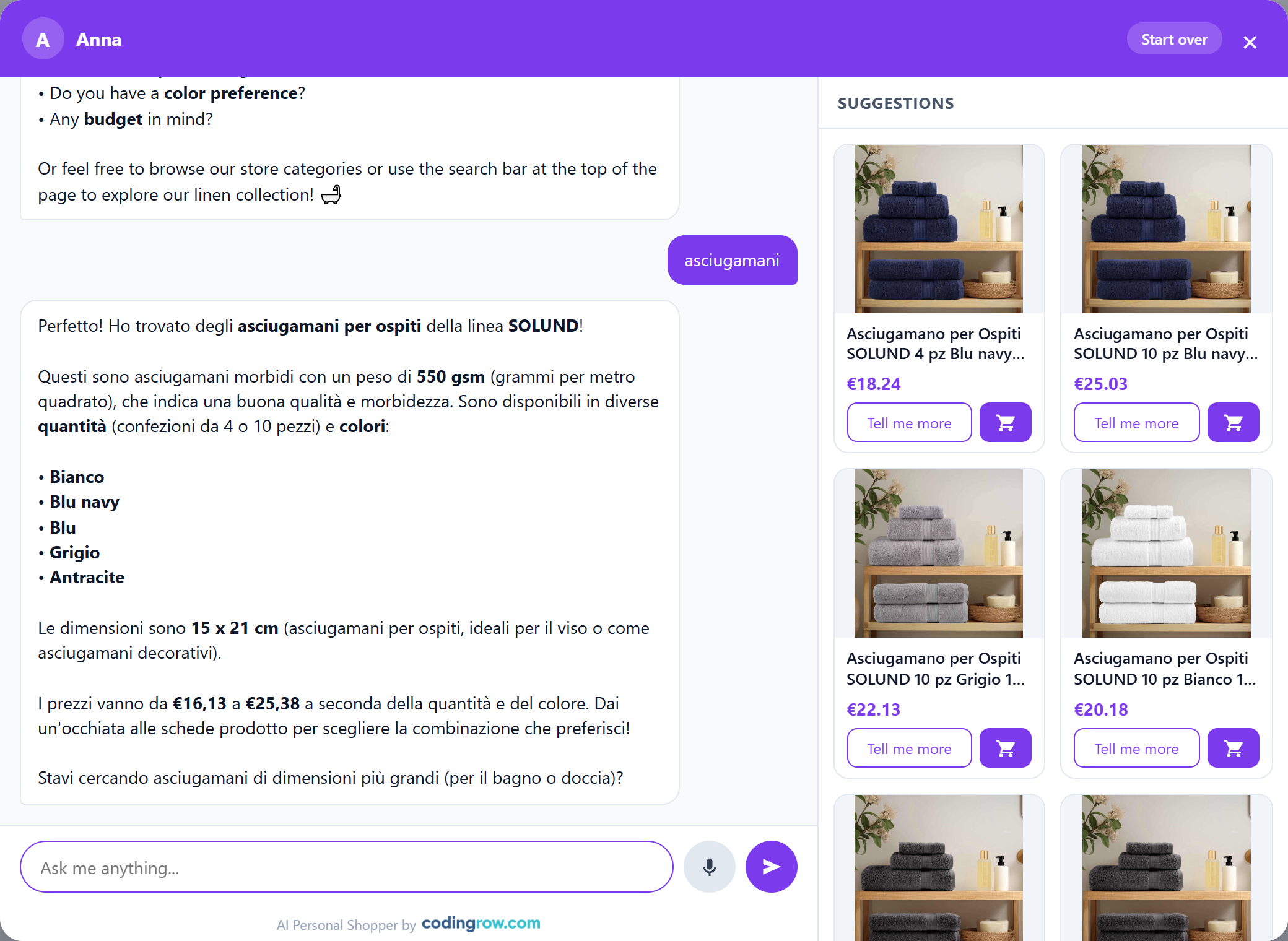
L'esperienza prodotto
Tutto ciò che il cliente vede in chat — quali prodotti, in quale ordine e come cambiano le card man mano che la conversazione procede — è guidato dall'assistente, non da un elenco di risultati fisso.
- Card curate e live — l'assistente cerca in modo ampio, poi sceglie quali prodotti mostrare e in quale ordine, spingendo verso 2–3 opzioni forti invece di scaricare un muro di risultati. Le card si aggiornano in tempo reale a ogni turno: man mano che il cliente restringe ("quello in mango", "qualcosa di più economico"), la griglia viene ricostruita di conseguenza.
- Card categoria — quando una richiesta è troppo vaga per un singolo prodotto ("un regalo per casa, non so cosa"), l'assistente propone categorie da esplorare invece di un vicolo cieco.
- Risposte rapide — bottoni-opzione cliccabili sotto un messaggio, così il cliente può proseguire con un tocco invece di scrivere.
- Aggiungi al carrello — un selettore di quantità sulla card conferma prima di aggiungere. Dalla 2.2.0 anche i prodotti con taglie, colori o più articoli si comprano dentro la chat: l’assistente chiede una scelta per volta e nel carrello finisce la variante giusta. La scheda prodotto viene offerta soltanto per le opzioni che la chat non può gestire, come un’incisione o un file da caricare.
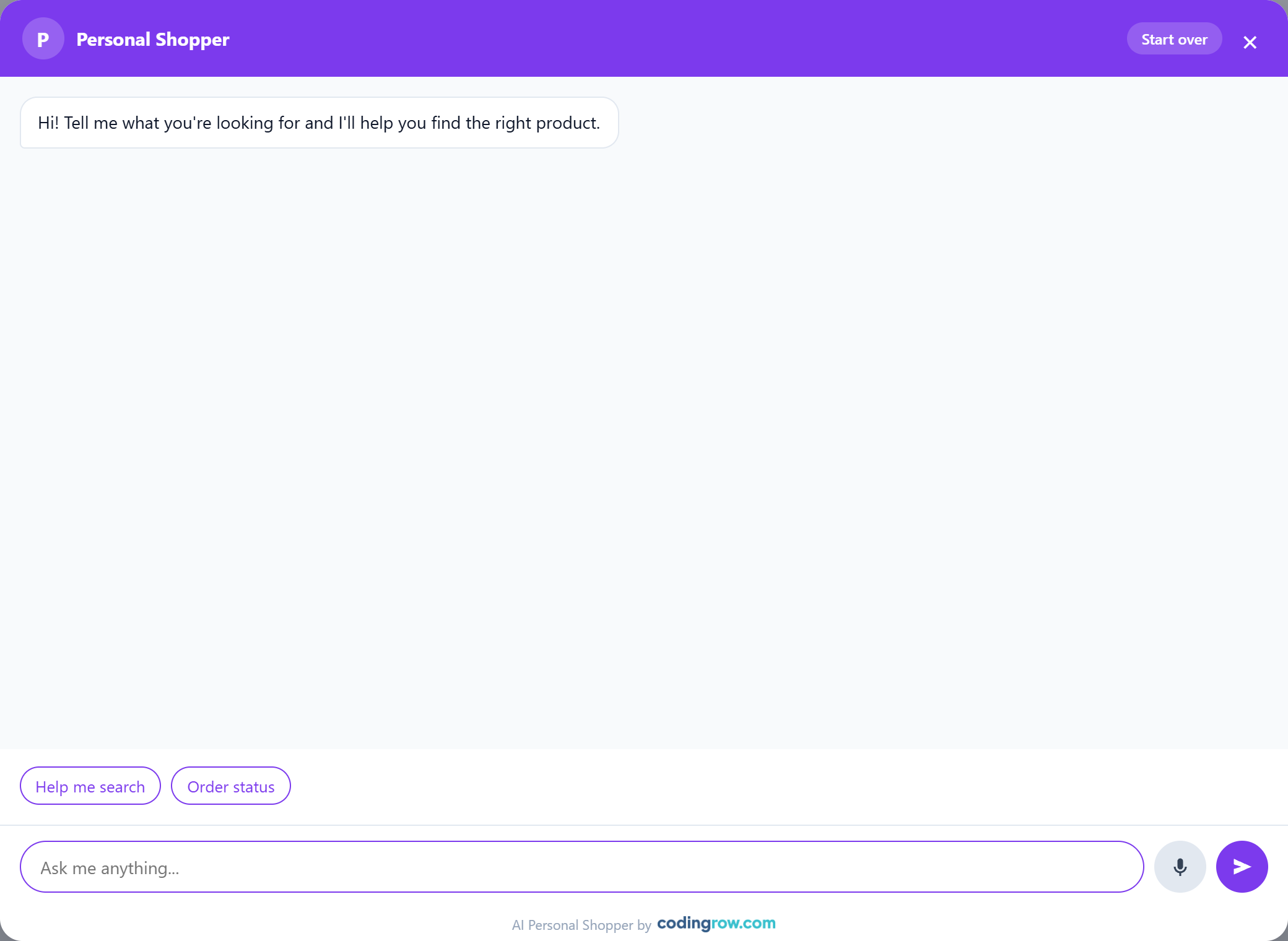
- Card ricche — le card prodotto mostrano nome, immagine, prezzo ed eventuale sconto, più un "Tell me more"; le card ordine mostrano il tracking (corriere + numero) quando disponibile.
- Persistenza — la conversazione sopravvive al refresh della pagina per 7 giorni, e un bottone Start over la azzera per ricominciare da capo.
Taglie, colori e kit
Dalla 2.2.0 il carrello della chat non accetta più soltanto i prodotti semplici. Quando il prodotto ha delle scelte da fare, l’assistente le propone una per volta dentro la conversazione, e il prodotto va nel carrello con la variante giusta.
- Configurabili — prima la taglia, poi il colore, poi la quantità, nell’ordine in cui hai configurato gli attributi in Magento. Le combinazioni che non esistono non vengono nemmeno proposte.
- Raggruppati (kit) — tutti gli articoli in un colpo solo, ciascuno con la sua quantità; quelli lasciati a zero non finiscono nel carrello.
- Bundle (set componibili) — una scelta per ogni opzione, accessori facoltativi compresi.
Le scelte si disegnano come le hai configurate in Magento: i colori con il loro codice esadecimale vero, le taglie con il valore grande e leggibile, gli elenchi lunghi a discesa. La quantità compare sull’ultima scheda del percorso. Su desktop tutto avviene nel pannello laterale, su telefono dentro la chat. Sulle schede di bundle e raggruppati il prezzo è l’intervallo vero, non 0,00 €.
Le opzioni esaurite restano visibili, in grigio. È il comportamento predefinito: nascondere una taglia finita fa credere al cliente che quella misura non la fai. L’interruttore è in Stores → Configuration → Codingrow → AI Personal Shopper → Catalog Search → Show unavailable choices, greyed out; le opzioni ancora ordinabili non vengono mai spente. Da non confondere con Only in-stock products, che decide se il prodotto viene proposto del tutto.
Se un prodotto ha opzioni personalizzate che la chat non può gestire (un’incisione da scrivere, un file da caricare), l’assistente lo dice e offre il collegamento alla scheda, invece di aprire una pagina senza spiegazioni.
Sessioni e contesto pagina
L'assistente tiene traccia di con chi sta parlando e dove, così la conversazione risulta continua e resta sul prodotto giusto.
- Rito d'ingresso — invece di una risposta preconfezionata istantanea, il widget mostra un breve Connecting…, poi un operatore con un nome "entra in chat" dopo 10–20s e chiede il nome del cliente. Il timing e la digitazione sono simulati, e la velocità è configurabile.
- Sessioni — se il cliente torna dopo oltre ~5 minuti parte una nuova sessione senza richiedere di nuovo il nome, segnalata da una linea separatrice in chat; entro pochi minuti prosegue semplicemente.
- Contesto della pagina prodotto — quando la chat è aperta da una scheda prodotto, una domanda implicita ("me ne parli?", "di che materiale è fatto?") si risolve su quel prodotto, collegato nativamente via URL/url_key e robusto ai redirect.
- Consapevolezza del carrello — tramite
get_cartl'assistente può tenere conto di cosa c'è già nel carrello come segnale di interesse — per proporre abbinamenti ed evitare di riproporre ciò che c'è già — senza commentarlo. - Cross-sell in chiusura — quando la capability è attiva e il cliente ha concluso, aggiunge in coda uno o due prodotti complementari come suggerimento finale, poi saluta.
Assistente proattivo
Dalla 2.2.0 l’assistente può prendere l’iniziativa. Si configura in Stores → Configuration → Codingrow → AI Personal Shopper → Proactive assistant ed è tutto spento all’inizio: un commesso che parla per primo può vendere di più o infastidire, e come parli ai tuoi clienti lo sai solo tu. In nessun caso la finestra della chat si apre da sola: l’assistente accende il pallino sul bottone e aspetta.
- Suggest pairings after an add to cart — Never (predefinito), only the first time in a visit oppure every time. Quando il cliente mette qualcosa nel carrello girando per il negozio, l’assistente prepara un paio di abbinamenti. Ogni volta è una chiamata AI, fatturata dal tuo provider. Non c’è alcun tempo di attesa: parte subito e compare quando il modello risponde.
- Offer help after (seconds on the page) — 0 = mai (predefinito). Se il cliente sta su una pagina da quel tempo senza aver mai aperto la chat, gli si offre una mano. Non costa nulla: la frase la scrive il widget. Mai sul carrello e sul checkout.
- What it says — il testo dell’invito. Vuoto = frase predefinita, tradotta in tutte le lingue del modulo.
Funziona sia su Hyvà sia su Luma: il widget ascolta gli eventi che il tema emette già quando il carrello cambia, quindi anche un’aggiunta in AJAX senza ricaricamento di pagina viene rilevata.
Le conversazioni nate così partono senza il rito del nome, quindi in Conversations arrivano senza nome: si riconoscono dalla colonna Origin (Customer, Assistant — after an add to cart, Assistant — offered help). Se il cliente risponde e dice come si chiama, il nome viene registrato come in una chat qualunque.
Branding e colori
Imposta un Assistant name (mostrato come nome dell'operatore, es. "Anna") e, opzionalmente, un Brand logo (altezza fissa così non si deforma mai) o un Brand text con il nome della tua azienda — mostrati in alto a sinistra nell'header della chat. Il nome dell'operatore resta visibile come sottoriga con un pallino di presenza attivo sotto il brand, anche quando è impostato un logo. Accent color controlla il bottone di apertura e gli accenti nella chat; Header/theme color (opzionale) colora la barra dell'header e le bolle dei messaggi del cliente — lascialo vuoto per riusare l'accent color.
Bottone di ricerca AI
Quando la barra di ricerca fissa del modulo Live Search e' attiva, l'AI Personal Shopper puo' aggiungere un secondo bottone lente AI proprio accanto al campo di ricerca. Cliccandolo si apre la chat dell'assistente; e se il cliente ha gia' scritto qualcosa nel campo di ricerca, quel testo viene inviato direttamente come primo messaggio — cosi' una ricerca che restituisce troppi (o zero) risultati diventa una conversazione guidata con un tocco.
Si attiva in Stores → Configuration → Codingrow → AI Personal Shopper → Assistant & Branding con AI button in the search bar = Yes. E' un'integrazione morbida: se Live Search non e' installato o la sua barra fissa e' disattivata, il bottone semplicemente non compare — nessuna dipendenza obbligatoria.

Sinonimi auto-appresi
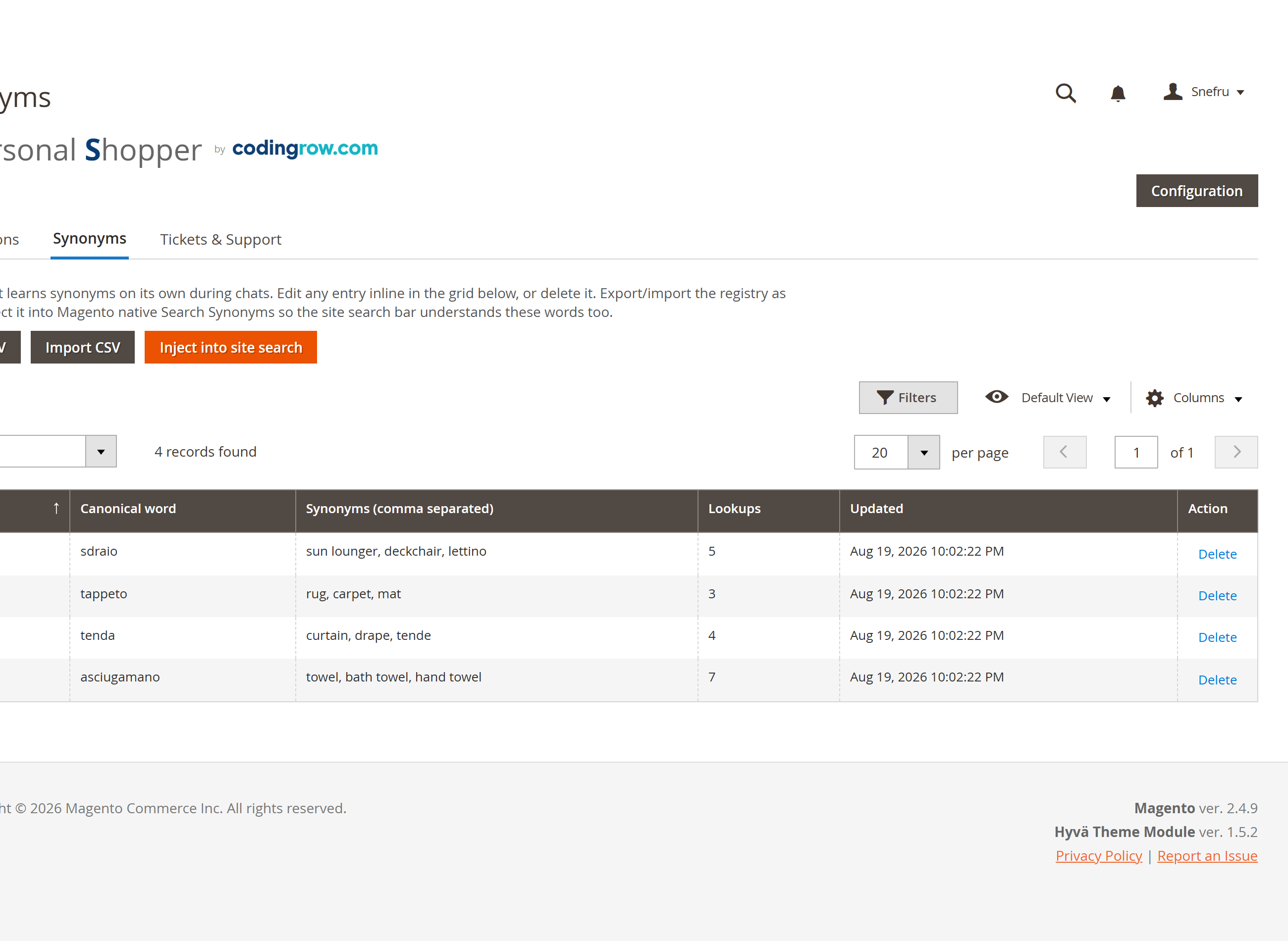
Quando è attiva (Capabilities → Self-learning synonyms), l'agente registra una corrispondenza ogni volta che la parola di ricerca di un cliente non trova corrispondenza diretta nel catalogo ma un tentativo successivo sì — nomi regionali, dialetto, errori di battitura, sinonimi. Rivedi e modifica il registro in Codingrow → AI Personal Shopper → Synonyms: una tabella paginata e modificabile inline. Usa Export CSV / Import CSV per farne un backup, modificarlo in blocco o spostarlo tra ambienti. Il bottone Inject into site search riversa l'intero registro nei Search Synonyms nativi di Magento, così ne beneficia anche la barra di ricerca del sito — non solo la chat. L'agente legge anche i tuoi Search Synonyms nativi curati a mano, così i due sistemi si rafforzano a vicenda.
Esempio: un cliente cerca "felpa" e l'agente non trova nulla direttamente, ma un tentativo successivo con "sweatshirt" trova corrispondenza — la coppia viene registrata automaticamente, così la prossima ricerca "felpa" si risolve subito, e puoi inserirla nella ricerca nativa con un clic.
Ticket di assistenza umana
Quando è attiva (Capabilities → Human support tickets), l'agente propone di aprire un ticket se un cliente ha bisogno di un umano e non viene risolto dalla sola conversazione. Chiede l'email (obbligatoria) e, se utile, il numero d'ordine e un contatto telefono/WhatsApp, poi assegna un numero di ticket — con il Ticket number prefix (default AIPS-) davanti, es. AIPS-000042 — e invia via email la trascrizione completa al cliente, in copia nascosta all'indirizzo impostato in Human support → Support email (BCC) (se lasciato vuoto, l'email va solo al cliente). Il testo del tempo di risposta mostrato al cliente proviene da Human support → Response time.
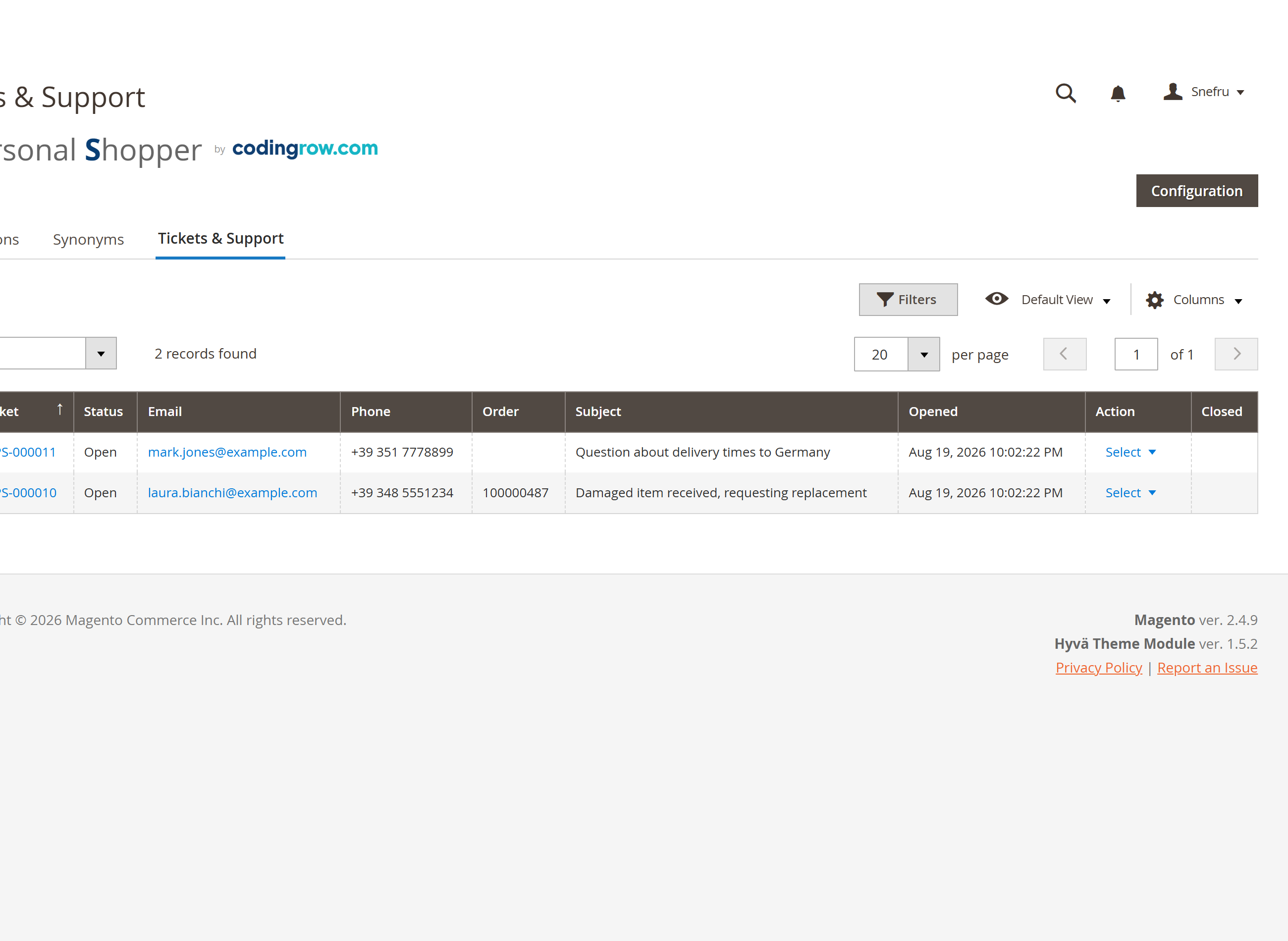
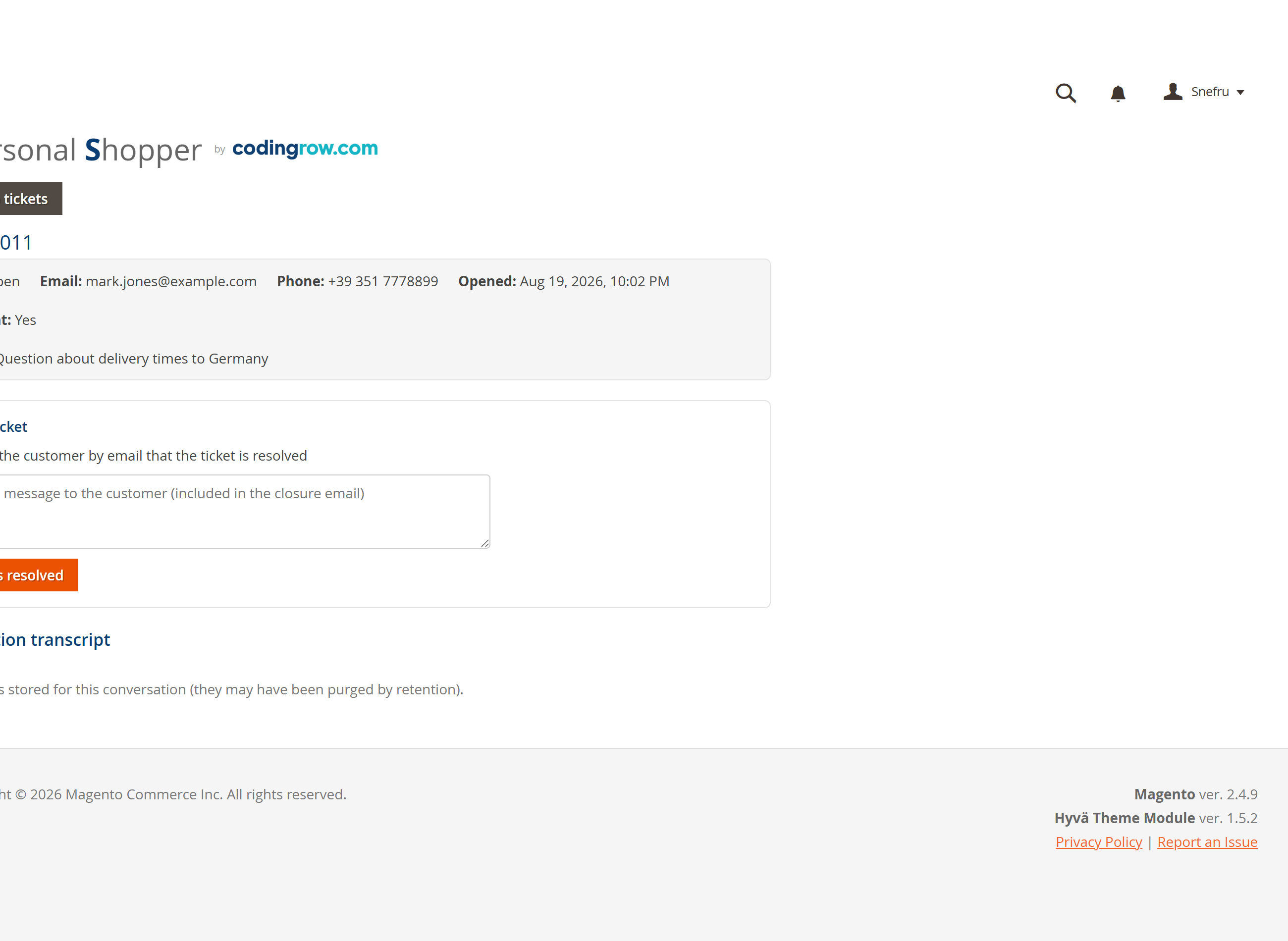
I ticket compaiono nella tab Tickets & Support: una griglia con View che apre i dati di contatto e la trascrizione completa, e una colonna Closed by che registra chi ha chiuso ciascuno — admin, cron o customer. L'azione Resolve chiude il ticket e può forzare per quel ticket un'eccezione alla notifica di chiusura, inviando al cliente un messaggio personalizzato. Un task giornaliero auto-chiude ogni ticket rimasto aperto oltre Auto-close open tickets after (days) (registrato come closed_by = cron). Anche il cliente può chiudere o annullare il proprio ticket dalla chat, ma solo dopo una verifica di proprietà — numero di ticket ed email devono combaciare entrambi. L'agente classifica inoltre come Bug report le conversazioni che segnalano un problema del sito, così i problemi arrivano al tuo team senza bisogno di un ticket di assistenza.
Esempio: un cliente scrive "Devo parlare con qualcuno per il mio ordine". L'agente chiede l'email (e, se utile, il numero d'ordine e un contatto telefono/WhatsApp), assegna un numero di ticket come AIPS-000042 e invia via email la trascrizione completa al cliente, in copia nascosta al tuo indirizzo di assistenza. Il tuo team lo risolve dalla tab Tickets & Support — notificando facoltativamente al cliente un messaggio personalizzato — oppure si auto-chiude (closed_by = cron) dopo essere rimasto inattivo per il numero di giorni configurato.
| Impostazione | Cosa fa | Default |
|---|---|---|
| Support email (BCC) | Indirizzo che riceve una copia nascosta di ogni email di trascrizione ticket. | — (solo cliente se vuoto) |
| Response time | Testo mostrato al cliente quando si apre un ticket. | 24-48 hours |
| Ticket number prefix | Prefisso usato nell'assegnare i numeri di ticket. | AIPS- |
| Auto-close open tickets after (days) | I ticket senza attività vengono chiusi automaticamente da un task giornaliero (registrato come closed_by = cron). | — |
| Notify on close | Chi viene notificato quando un ticket si chiude; l'azione Resolve può forzare un'eccezione per singolo ticket e inviare al cliente un messaggio personalizzato. | Admin |
| Closed by | Colonna della griglia che registra chi ha chiuso ogni ticket: admin, cron o customer. | — |
Sicurezza e anti-abuso
Poiché ogni risposta AI costa una chiamata API reale, il widget è protetto da una difesa a strati che blocca probe, scanner, tentativi di injection e prompt-injection e messaggi senza valore prima che raggiungano il modello — a costo zero.
- Tetti per IP — un limite di raffica di 15 richieste / 60s, 300 richieste al giorno, al massimo 30 nuove chat al giorno e 60 turni per conversazione.
- Circuit breaker globale — un tetto complessivo di circa 5.000 chiamate AI al giorno protegge il budget da un attacco distribuito.
- Token "prova-del-rito" — il widget dimostra di essere passato dal vero rito d'ingresso; il toggle Require widget token (Security & anti-abuse) lo impone e rifiuta le chiamate contraffatte all'endpoint.
- Log completo — ogni evento bloccato è registrato con IP, user-agent e motivo, così l'abuso resta visibile.
- Watchdog del provider — se il provider AI comincia a fallire (crediti finiti, chiave errata), un watchdog ti avvisa via email così un'interruzione silenziosa non passa inosservata.
Leggere le conversazioni
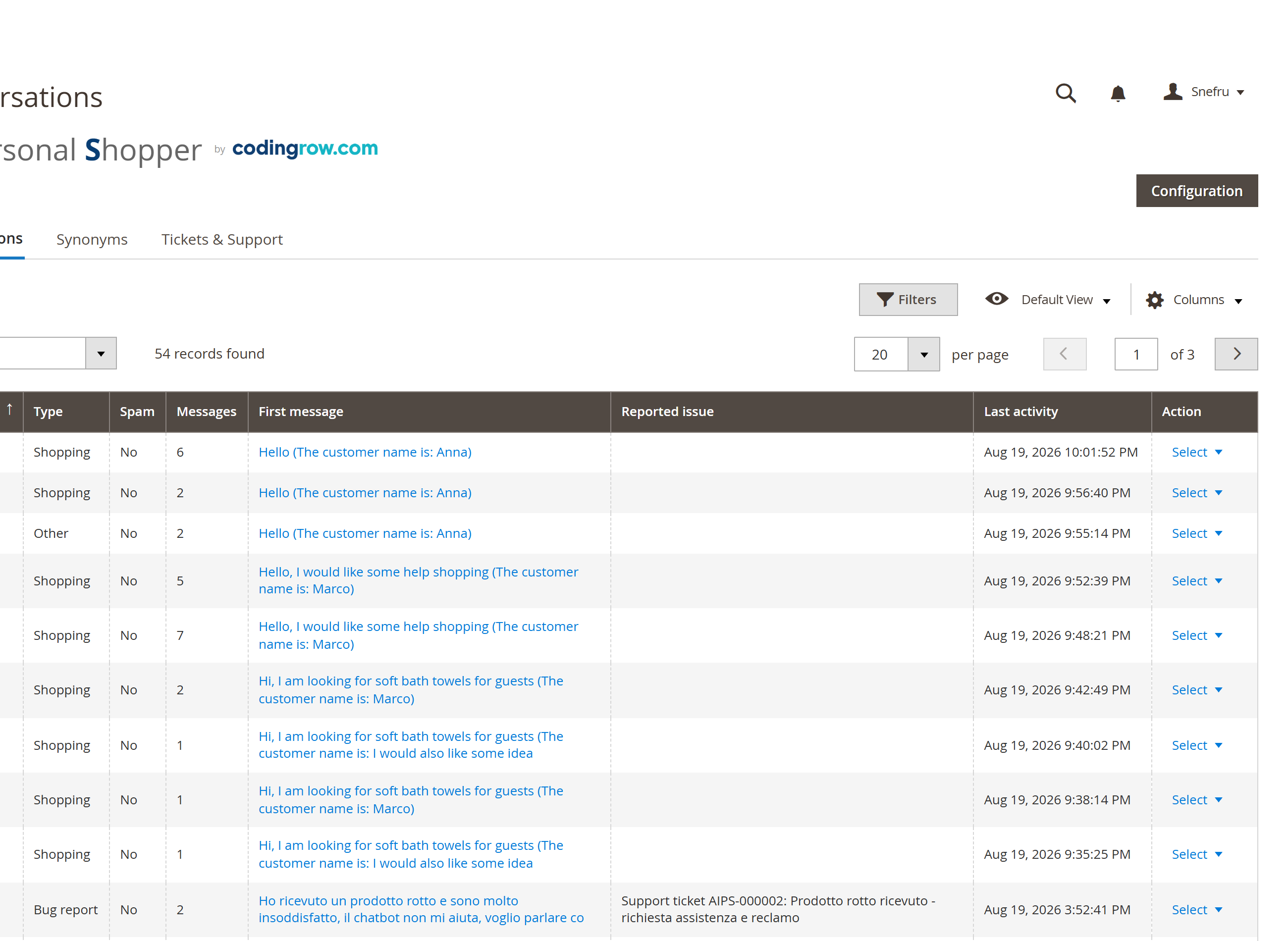
Codingrow → AI Personal Shopper → Conversations elenca ogni conversazione, classificata automaticamente come Shopping, Support, Bug report, Possible spam o Other, paginata e filtrabile per tipo. L'azione View apre l'intero thread — ogni messaggio del cliente e dell'assistente, comprese le card prodotto proposte a ogni turno — in sola lettura. Le conversazioni possono essere eliminate singolarmente o in blocco; le conversazioni più vecchie oltre la conservazione configurata vengono eliminate da un task giornaliero (le segnalazioni di bug sono escluse dalla pulizia automatica).
Esempio: una conversazione in cui il cliente descrive un errore in checkout viene classificata automaticamente come Bug report, così il tuo team la vede in console senza che nessuno debba mandare un'email.
Licenza
La licenza è rilasciata per un dominio e può essere una chiave del singolo modulo (AI Personal Shopper) o una chiave abbonamento Codingrow (tutti i moduli). Senza una licenza valida il widget della chat non viene renderizzato. La licenza copre la versione attuale più 1 anno di update e supporto; puoi continuare a usare per sempre le versioni coperte e rinnovare il supporto (−35%) per aggiornare a versioni successive.