Shoppers rarely type the exact words in your product titles — they search for "sneakers" when your catalog says "trainers", or "laptop bag" when you sell "notebook case". Setting up Magento 2 search synonyms natively closes this gap and turns near-misses into conversions without touching a single line of code.
- Configure synonym groups natively from the Magento admin
- Understand scope (website vs store view) so synonyms apply where needed
- Test synonym behavior safely before it affects live search
- Bulk-manage large synonym lists with CSV import/export
Step 1: Locate the Search Synonyms grid
This grid lists every synonym group already configured, along with the scope each one applies to.
Expect an empty form with a Synonyms text field, a Website dropdown and a Store View dropdown.
Step 2: Create your first synonym group
In the Synonyms field, enter comma-separated terms that should be treated as equivalent.
- Every word in the list is treated as interchangeable during search.
- A customer searching "trainers" will now also match products tagged or titled with "sneakers" or "kicks".
Click Save Synonym Group. Expect a success message and the new row appearing in the grid.
Step 3: Reindex and clear cache
Synonyms are picked up by the search index, so Magento needs to rebuild it.
- Run
bin/magento indexer:reindex catalogsearch_fulltextfrom the CLI, or
Also run bin/magento cache:flush to be safe.
Step 4: Test the synonym on the storefront
Open an incognito browser window and search for one of the synonym terms.
- Search for "trainers" and confirm products tagged "sneakers" appear in the results.
- Search for the original term ("sneakers") too, to make sure nothing was broken.
Expect both terms to return the same (or overlapping) result set.
Step 5: Handle multi-store and multi-language scope
If you run separate store views per language, synonyms often need to be language-specific.
- Create one synonym group per store view for non-English terms, e.g.
zapatillas, tenison the Spanish store view. - Leave a global group at
All Store Viewsfor universal brand or size synonyms.
This prevents an English synonym from accidentally matching in a French store search.
Step 6: Bulk-manage synonyms with CSV import/export
For stores with dozens of synonym groups, editing one by one in the admin is slow.
Expect the grid to refresh with all new rows after a successful import.
Step 7: Monitor real search terms to find missing synonyms
Synonyms are only useful if they match what customers actually type.
Expect a report of every phrase searched, including ones with zero results — a goldmine for spotting missing synonym opportunities.
- Sort by
Number of Resultsascending to find queries that returned nothing. - Add these as new synonym groups pointing to existing product terminology.
Checklist
- ☐ Synonym groups created for the most common alternate product terms
- ☐ Correct website/store view scope assigned to each group
- ☐
catalogsearch_fulltextindexer reindexed after every change - ☐ Storefront search tested with both original and synonym terms
- ☐ CSV export kept as a backup before bulk imports
- ☐ Search Terms report reviewed regularly for new synonym candidates
Common mistakes
Problem: Synonyms saved but storefront search still shows zero results for the alternate term.
Fix: Reindex catalogsearch_fulltext and flush cache — synonym changes don't apply live without it.
Problem: A synonym works on one store view but not another.
Fix: Check the Store View scope on the synonym group; it may be restricted to a single view instead of All Store Views.
Problem: Too many unrelated words grouped together cause irrelevant results.
Fix: Split large synonym groups into smaller, topic-specific ones so matching stays precise.
Problem: Synonyms conflict with product attribute values (e.g. a color synonym matching the wrong variant).
Fix: Review synonym groups against your attribute set and remove overly broad terms.
FAQ
Do Magento 2 search synonyms work with Elasticsearch and OpenSearch?
Yes. Native synonym groups are respected by both the legacy MySQL search and Elasticsearch/OpenSearch engines, as long as the catalogsearch_fulltext index is rebuilt after changes.
Can synonyms replace the need for good product titles and attributes?
No. Synonyms help match search queries to existing catalog data, but they don't fix poorly structured titles or missing attribute values — those should still be optimized separately.
How many synonym groups can I add before performance is affected?
Magento doesn't impose a hard limit, but very large synonym dictionaries can slow down indexing. Keep groups focused and review them periodically to prune unused entries.
Do synonyms affect autocomplete suggestions?
Synonyms primarily influence full search result matching. Autocomplete behavior depends on separate search configuration and may not always reflect synonym groups identically.
A faster alternative
Manually building and maintaining synonym groups works, but it's reactive — you only discover gaps after checking the Search Terms report. An AI-driven layer can shortcut this by understanding intent directly, even before a synonym exists.
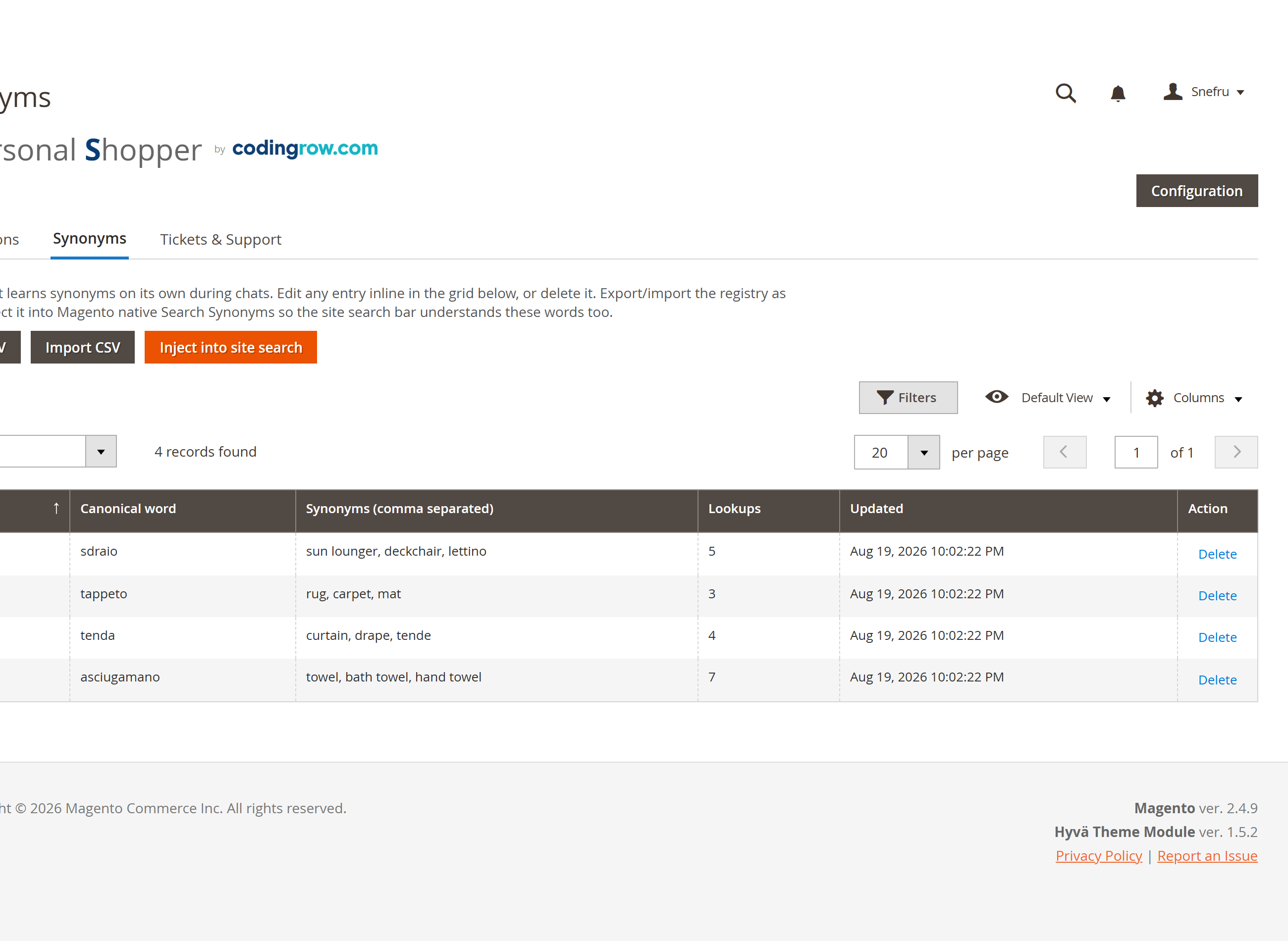
The AI Personal Shopper includes its own synonyms registry with CSV export/import and a one-click "Inject into site search" action, so vocabulary gaps discovered in real conversations can be pushed straight back into native Magento search — closing the loop between what customers actually say and what your catalog returns.