Instalação
Requisitos
Magento 2.4.x — testado na 2.4.9, compatível com versões 2.4.* anteriores. PHP 8.1–8.5. Compatível tanto com o tema Luma predefinido como com o tema Hyvä.
Passos de configuração
- Adicione as credenciais que receberá por email a
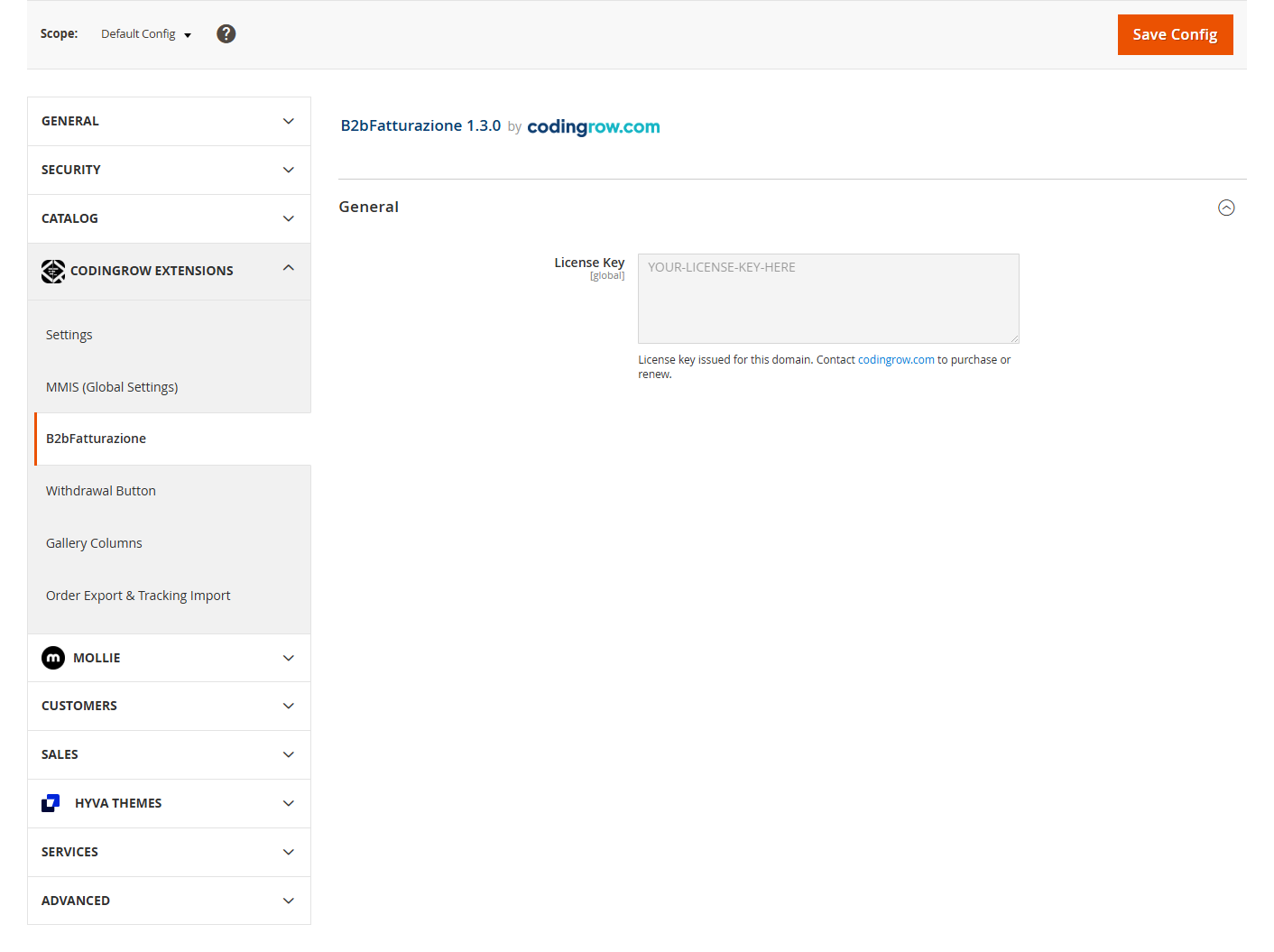
auth.jsonna raiz do seu projeto Magento:{ "http-basic": { "repo.codingrow.com": { "username": "...", "password": "..." } } } composer config repositories.codingrow composer https://repo.codingrow.comcomposer require codingrow/module-b2bfatturazionebin/magento module:enable Codingrow_B2bFatturazionebin/magento setup:upgrade && bin/magento setup:di:compile && bin/magento cache:flush- Cole a sua chave de licença em Admin → Stores → Configuration → Codingrow Extensions → B2bFatturazione → License → License Key, guarde e depois
bin/magento cache:flush. A chave está vinculada ao domínio declarado na compra — em qualquer outro domínio o módulo permanece instalado mas os seus campos ficam desativados. - Se o site estiver em modo
production, volte também a implementar o conteúdo estático:bin/magento setup:static-content:deploy -f.
Desinstalação
composer remove codingrow/module-b2bfatturazione depois
bin/magento setup:upgrade && bin/magento setup:di:compile && bin/magento cache:flush.
Documentação
O que faz
Este é um módulo deliberadamente pequeno e focado: adiciona cinco campos — Tipo de Cliente (empresa/particular), número de IVA, código SDI, PEC (email certificado) e Código Fiscal — ao livro de moradas do cliente e ao checkout (faturação e envio), tanto no tema Luma predefinido como no Hyvä. Não existe qualquer configuração além de instalar o módulo e colar a chave de licença; funciona de imediato após a instalação.
| Campo | Visível quando | Obrigatório quando | Formato / notas |
|---|---|---|---|
| Tipo de cliente | sempre | sempre | Particular / Empresa. Rege tudo o resto. |
| Razão social | Empresa | Empresa | — |
| NIF/IVA | Empresa | Empresa | Máx 15. Duas letras iniciais = estrangeiro → SDI/PEC ocultos. |
| Código SDI | Empresa + IVA italiano + fatura solicitada | SDI ou PEC | Máx 7. |
| PEC | Empresa + IVA italiano + fatura solicitada | SDI ou PEC | E-mail certificado. |
| Fatura solicitada | Particular (caixa) | — | Marcá-la exige o Código Fiscal. |
| Código fiscal | Empresa, ou Particular + fatura solicitada | Particular + fatura solicitada | 16 caracteres (pessoa) ou 11 dígitos (empresa). |
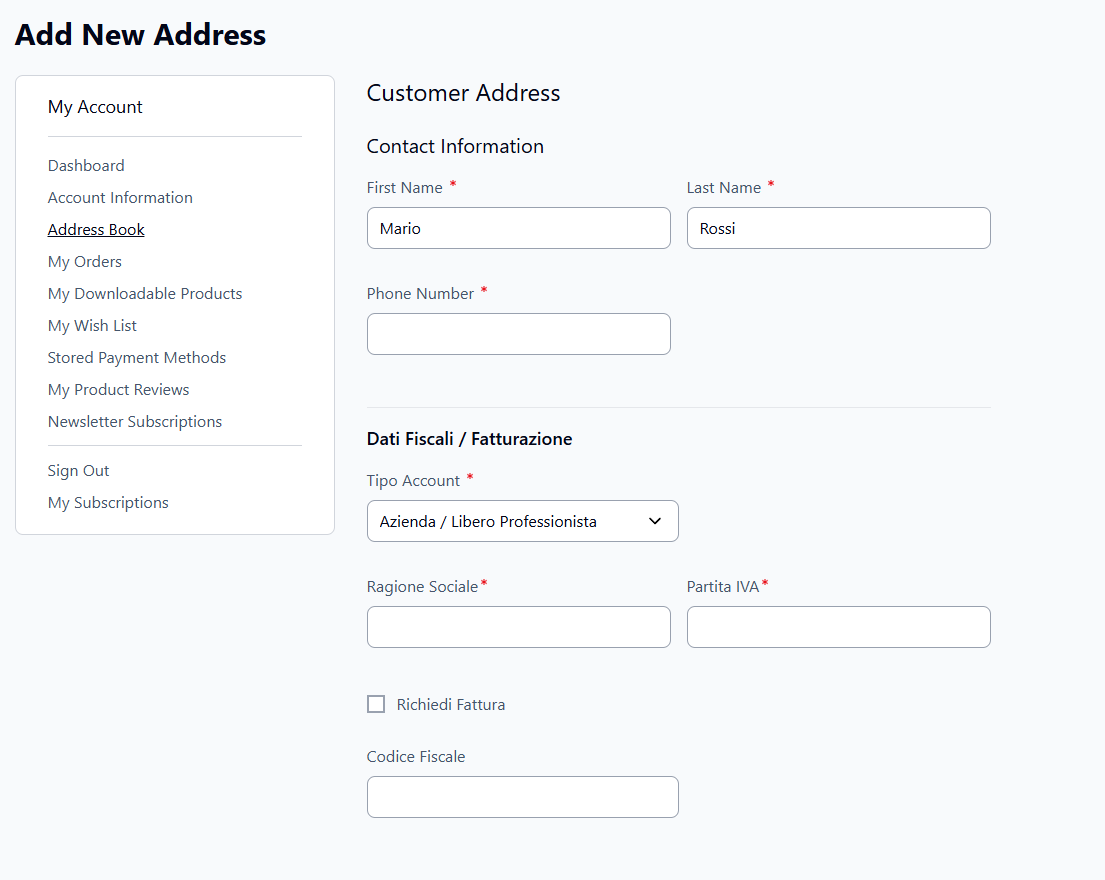
The same fields appear in checkout (billing and shipping) and in the admin customer address book.
Configuração admin
Não há configuração de comportamento — a única definição admin é a chave de licença. Tudo o resto (que campos aparecem, quando são obrigatórios) é automático.
Compatibilidade com GraphQL / headless & React Checkout
Os cinco campos B2B são expostos através dos tipos e mutations GraphQL core do Magento — não uma API personalizada. Se o seu storefront é baseado em GraphQL (React Checkout, ou qualquer outro frontend headless/GraphQL), lê e escreve estes campos exatamente como qualquer outro campo de morada nativo, através das mutations que já está a usar.
Ler os campos
customer_type, sdi, pec, codice_fiscale e
fattura_richiesta são adicionados diretamente aos tipos BillingCartAddress,
ShippingCartAddress e CustomerAddress do Magento:
{
  customerCart {
    billing_address {
      customer_type
      sdi
      pec
      codice_fiscale
      fattura_richiesta
    }
  }
}
{
customer {
addresses {
customer_type
sdi
pec
codice_fiscale
fattura_richiesta
}
}
}Escrever os campos
Os mesmos cinco campos são adicionados ao tipo core CartAddressInput do Magento, pelo que
são passados juntamente com os campos de morada normais nas mutations padrão do carrinho — sem
mutation separada a chamar:
mutation {
  setShippingAddressesOnCart(
    input: {
      cart_id: "abc123"
      shipping_addresses: [
        {
          address: {
            firstname: "Mario"
            lastname: "Rossi"
            street: ["Via Roma 1"]
            city: "Milano"
            postcode: "20100"
            country_code: "IT"
            telephone: "+390000000"
            customer_type: "azienda"
            sdi: "ABC1234"
            pec: "mario.rossi@pec.it"
            codice_fiscale: "RSSMRA80A01F205X"
          }
        }
      ]
    }
  ) {
    cart { id }
  }
}
Notas de implementação
- Tudo isto é feito através dos pontos de extensão oficiais do Magento (plugins
di.xmlsobre interfaces core comoMagento\QuoteGraphQl\Model\Cart\QuoteAddressFactoryeMagento\CustomerGraphQl\Model\Customer\Address\ExtractCustomerAddressData) — sem qualquer patch ou cópia do código do resolver GraphQL core. - A validação do lado do servidor (ex.: "SDI ou PEC é obrigatório para um cliente empresa") funciona da mesma forma independentemente do storefront que chama a mutation — REST, GraphQL, ou o checkout Luma predefinido.
fattura_richiesta(fatura solicitada) aplica-se apenas a clientes particulares — os clientes empresa recebem sempre fatura por lei, pelo que o campo faz sentido especificamente para o caso "particular" ("privato").
Apresentação exata da morada no admin
O resumo da morada de faturação/envio predefinida do cliente em Customers → All Customers → [customer] → Addresses, e no separador Customer View, agora inclui também os campos B2B — não apenas a morada base:
| Antes | Depois |
|---|---|
| Mario Rossi Mario Rossi S.r.l. Via dei Test, 1 Roma, RM, 00100 Itália T: 333 1122334 IVA: 01234567891 |
Mario Rossi Mario Rossi S.r.l. Via dei Test, 1 Roma, RM, 00100 Itália T: 333 1122334 Tipo de Cliente: azienda IVA: 01234567891 SDI: ABCDEFG PEC: mario.rossi@pec.it Código Fiscal: RSSMRA80A01H501V |
React Checkout: pronto a usar, sem desenvolvimento adicional
A Codingrow também mantém codingrow/module-react-checkout, um pequeno pacote complementar que adiciona o formulário de faturação B2B real (tipo de cliente, IVA, SDI, PEC, código fiscal) ao React Checkout do Hyvä — a interface sobre os campos GraphQL documentados acima. Instale os dois em conjunto e o formulário de faturação funciona de imediato, sem desenvolvimento personalizado.
str_getcsv() sem escape
provocam ambos erros fatais sob o error handler do Magento em 8.4+, e não apenas avisos, o que
tornaria o React Checkout inutilizável numa stack PHP moderna. Este patch é aplicado automaticamente
como parte da instalação abaixo.Instalar o React Checkout com suporte B2B
- Requeira os dois pacotes:
composer require hyva-themes/magento2-react-checkout codingrow/module-react-checkout - Adicione o patch de compatibilidade PHP 8.4/8.5 ao
composer.jsonna raiz do seu projeto e depois executecomposer update --lockpara que fique registado:
(Requer cweagans/composer-patches; execute primeiro"extra": { "patches": { "hyva-themes/magento2-react-checkout": { "PHP 8.4/8.5 compat": "vendor/codingrow/module-react-checkout/patches/react-checkout-php84-compat.patch" } } }composer require cweagans/composer-patchesse ainda não o tiver.) - Ative os módulos:
bin/magento module:enable Codingrow_ReactCheckout Hyva_ReactCheckout bin/magento setup:upgrade - Ative o React Checkout:
bin/magento config:set hyva_react_checkout/general/enable 1 - Compile a aplicação React:
cd vendor/codingrow/module-react-checkout/reactapp npm install npm run build - Volte a implementar o conteúdo estático — necessário sempre, mesmo fora do modo
production; caso contrário o browser pode continuar a carregar um bundle desatualizado:bin/magento setup:static-content:deploy -f en_US --theme <your-theme> bin/magento cache:flush
Requisitos: Magento 2.4.9, PHP 8.1–8.5 (incluindo 8.4/8.5, através do patch incluído).