Installatie
Vereisten
Magento 2.4.x — getest op 2.4.9, compatibel met eerdere 2.4.*-versies. PHP 8.1–8.5. Compatibel met zowel het standaard Luma-thema als het Hyvä-thema.
Installatiestappen
- Voeg de inloggegevens die je per e-mail ontvangt toe aan
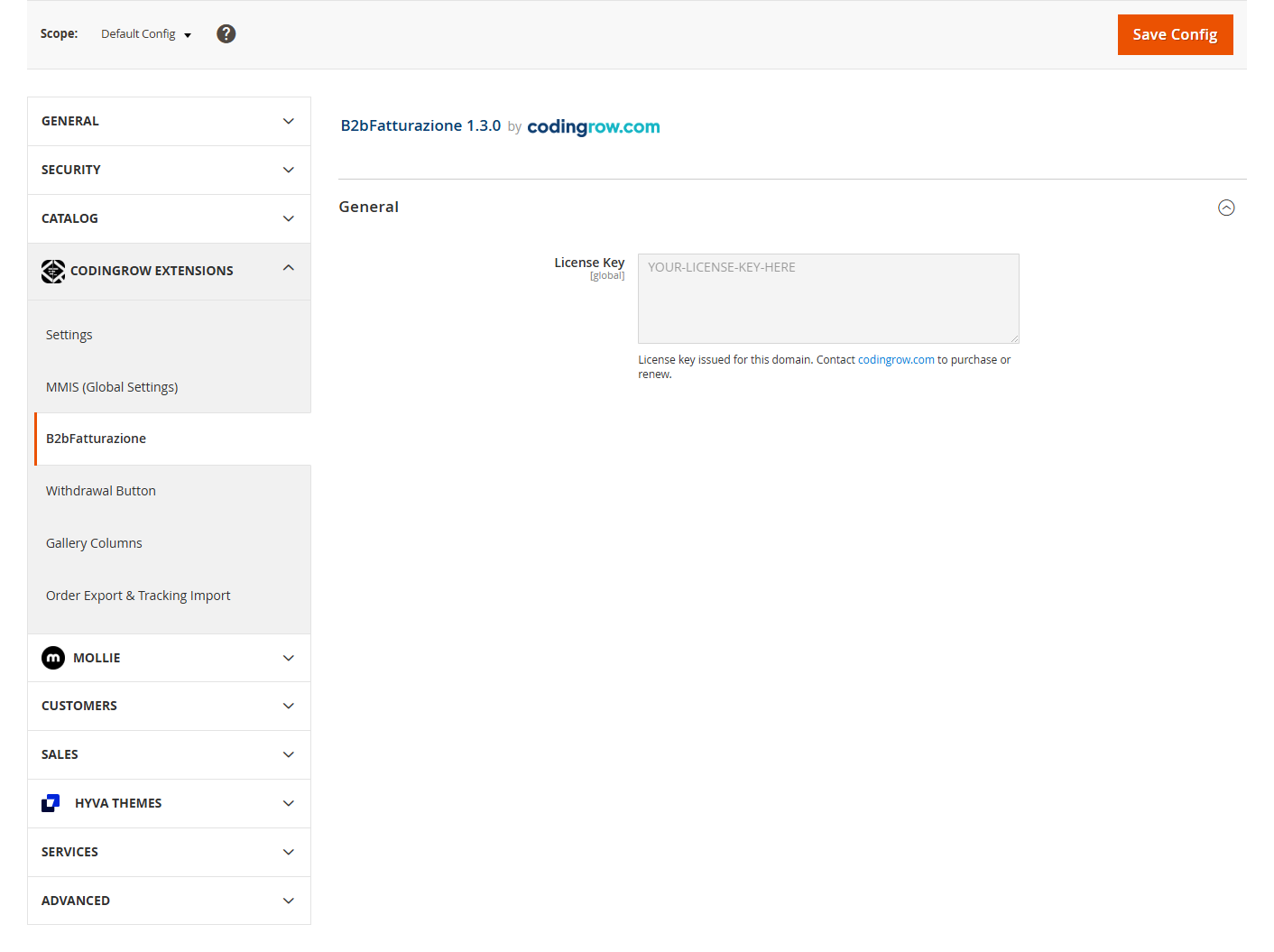
auth.jsonin de root van je Magento-project:{ "http-basic": { "repo.codingrow.com": { "username": "...", "password": "..." } } } composer config repositories.codingrow composer https://repo.codingrow.comcomposer require codingrow/module-b2bfatturazionebin/magento module:enable Codingrow_B2bFatturazionebin/magento setup:upgrade && bin/magento setup:di:compile && bin/magento cache:flush- Plak je licentiesleutel in Admin → Stores → Configuration → Codingrow Extensions → B2bFatturazione → License → License Key, sla op en voer dan
bin/magento cache:flushuit. De sleutel is gebonden aan het domein dat bij aankoop is opgegeven — op elk ander domein blijft de module geïnstalleerd maar blijven de velden uitgeschakeld. - Als de site in
production-modus draait, implementeer dan ook de statische content opnieuw:bin/magento setup:static-content:deploy -f.
Deïnstallatie
composer remove codingrow/module-b2bfatturazione daarna
bin/magento setup:upgrade && bin/magento setup:di:compile && bin/magento cache:flush.
Documentatie
Wat het doet
Dit is een bewust kleine, gerichte module: het voegt vijf velden toe — Klanttype (zakelijk/particulier), btw-nummer, SDI-code, PEC (gecertificeerde e-mail) en fiscaal nummer — aan het adresboek van de klant en aan de checkout (facturering en verzending), zowel in het standaard Luma-thema als in Hyvä. Er is geen configuratie nodig behalve het installeren en invoeren van de licentiesleutel; het werkt meteen na installatie.
| Veld | Zichtbaar wanneer | Verplicht wanneer | Formaat / notities |
|---|---|---|---|
| Klanttype | altijd | altijd | Particulier / Bedrijf. Bepaalt al het andere. |
| Bedrijfsnaam | Bedrijf | Bedrijf | — |
| Btw-nummer | Bedrijf | Bedrijf | Max 15. Twee beginletters = buitenlands → SDI/PEC verborgen. |
| SDI-code | Bedrijf + Italiaanse btw + factuur gevraagd | SDI of PEC | Max 7. |
| PEC | Bedrijf + Italiaanse btw + factuur gevraagd | SDI of PEC | Gecertificeerde e-mail. |
| Factuur gevraagd | Particulier (vinkje) | — | Aanvinken maakt de fiscale code verplicht. |
| Fiscale code | Bedrijf, of Particulier + factuur gevraagd | Particulier + factuur gevraagd | 16 tekens (persoon) of 11 cijfers (bedrijf). |
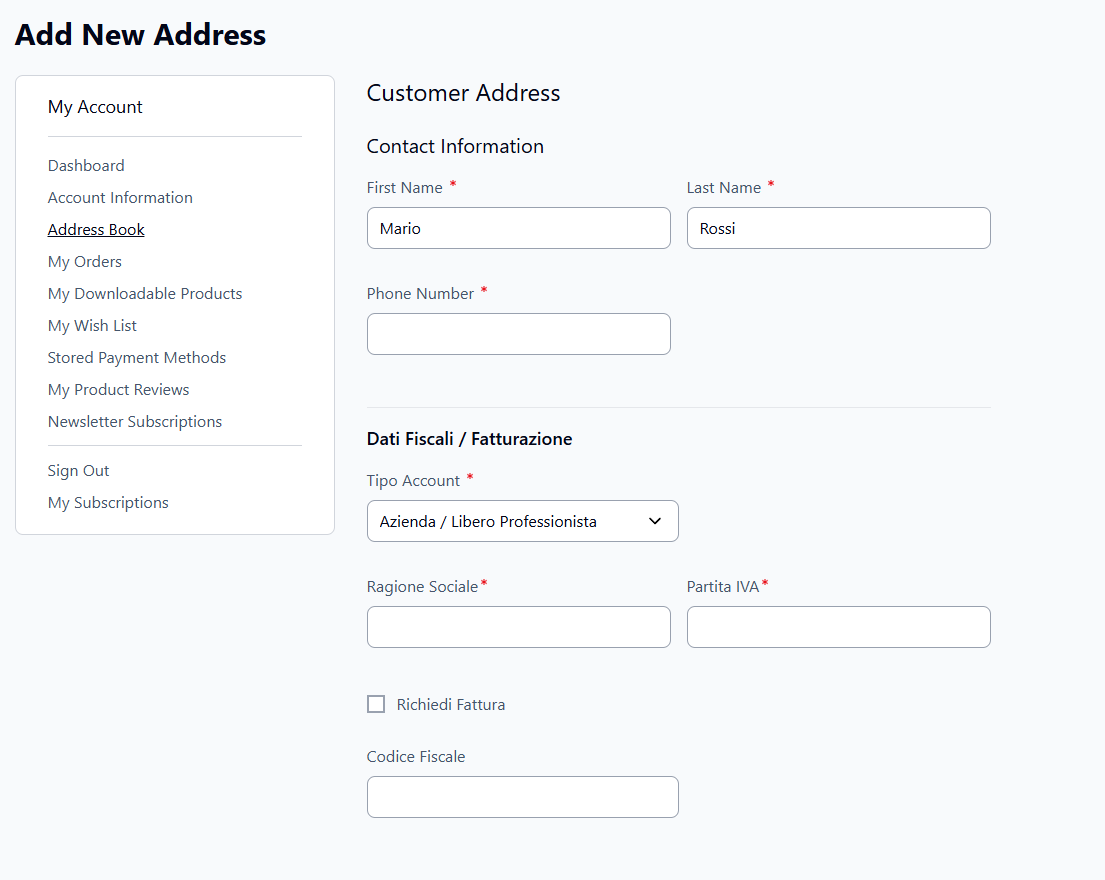
The same fields appear in checkout (billing and shipping) and in the admin customer address book.
Admin-configuratie
Er is geen gedragsconfiguratie — de enige admin-instelling is de licentiesleutel. Al het andere (welke velden verschijnen, wanneer ze verplicht zijn) is automatisch.
GraphQL-/headless- & React Checkout-compatibiliteit
De vijf B2B-velden worden blootgesteld via Magento's eigen core GraphQL-types en mutations — geen aangepaste API. Als je storefront op GraphQL is gebaseerd (React Checkout, of een andere headless/GraphQL-frontend), lees en schrijf je deze velden precies zoals elk ander native adresveld, via de mutations die je al gebruikt.
Velden lezen
customer_type, sdi, pec, codice_fiscale en
fattura_richiesta worden rechtstreeks toegevoegd aan Magento's eigen types BillingCartAddress,
ShippingCartAddress en CustomerAddress:
{
  customerCart {
    billing_address {
      customer_type
      sdi
      pec
      codice_fiscale
      fattura_richiesta
    }
  }
}
{
customer {
addresses {
customer_type
sdi
pec
codice_fiscale
fattura_richiesta
}
}
}Velden schrijven
Dezelfde vijf velden worden toegevoegd aan Magento's eigen core-type CartAddressInput, dus
ze worden meegegeven samen met de normale adresvelden in de standaard cart-mutations — geen aparte
mutation nodig:
mutation {
  setShippingAddressesOnCart(
    input: {
      cart_id: "abc123"
      shipping_addresses: [
        {
          address: {
            firstname: "Mario"
            lastname: "Rossi"
            street: ["Via Roma 1"]
            city: "Milano"
            postcode: "20100"
            country_code: "IT"
            telephone: "+390000000"
            customer_type: "azienda"
            sdi: "ABC1234"
            pec: "mario.rossi@pec.it"
            codice_fiscale: "RSSMRA80A01F205X"
          }
        }
      ]
    }
  ) {
    cart { id }
  }
}
Implementatienotities
- Dit alles gebeurt via de officiële Magento-uitbreidingspunten (
di.xml-plugins op core-interfaces zoalsMagento\QuoteGraphQl\Model\Cart\QuoteAddressFactoryenMagento\CustomerGraphQl\Model\Customer\Address\ExtractCustomerAddressData) — er wordt niets gepatcht of gekopieerd in de core GraphQL-resolvercode. - Serverside validatie (bijv. "SDI of PEC is verplicht voor een zakelijke klant") werkt op dezelfde manier, ongeacht welke storefront de mutation aanroept — REST, GraphQL, of de standaard Luma- checkout.
fattura_richiesta(factuur gevraagd) geldt alleen voor particuliere klanten — zakelijke klanten ontvangen wettelijk altijd een factuur, dus het veld is specifiek zinvol voor het geval "particulier" ("privato").
Nauwkeurige adresweergave in admin
De samenvatting van het standaard facturerings-/verzendadres van de klant in Customers → All Customers → [customer] → Addresses, en op het tabblad Customer View, bevat nu ook de B2B-velden — niet alleen het basisadres:
| Voor | Na |
|---|---|
| Mario Rossi Mario Rossi S.r.l. Via dei Test, 1 Roma, RM, 00100 Italië T: 333 1122334 Btw: 01234567891 |
Mario Rossi Mario Rossi S.r.l. Via dei Test, 1 Roma, RM, 00100 Italië T: 333 1122334 Klanttype: azienda Btw: 01234567891 SDI: ABCDEFG PEC: mario.rossi@pec.it Fiscaal nummer: RSSMRA80A01H501V |
React Checkout: direct te gebruiken, zonder extra ontwikkeling
Codingrow onderhoudt ook codingrow/module-react-checkout, een klein aanvullend pakket dat het daadwerkelijke B2B-factureringsformulier (klanttype, btw-nummer, SDI, PEC, fiscaal nummer) toevoegt aan Hyvä's React Checkout — de UI bovenop de hierboven gedocumenteerde GraphQL-velden. Installeer beide samen en het factureringsformulier werkt direct, zonder maatwerkontwikkeling.
str_getcsv()-aanroep
veroorzaken beide fatale fouten onder Magento's errorhandler op 8.4+, niet alleen waarschuwingen, waardoor
React Checkout anders onbruikbaar zou zijn op een moderne PHP-stack. Deze patch wordt automatisch toegepast
als onderdeel van de installatie hieronder.React Checkout installeren met B2B-ondersteuning
- Vereis beide pakketten:
composer require hyva-themes/magento2-react-checkout codingrow/module-react-checkout - Voeg de PHP 8.4/8.5-compatibiliteitspatch toe aan de
composer.jsonin de root van je project en voer daarnacomposer update --lockuit zodat deze wordt vastgelegd:
(Vereist cweagans/composer-patches; voer eerst"extra": { "patches": { "hyva-themes/magento2-react-checkout": { "PHP 8.4/8.5 compat": "vendor/codingrow/module-react-checkout/patches/react-checkout-php84-compat.patch" } } }composer require cweagans/composer-patchesuit als je dit nog niet hebt.) - Schakel de modules in:
bin/magento module:enable Codingrow_ReactCheckout Hyva_ReactCheckout bin/magento setup:upgrade - Schakel React Checkout in:
bin/magento config:set hyva_react_checkout/general/enable 1 - Bouw de React-app:
cd vendor/codingrow/module-react-checkout/reactapp npm install npm run build - Implementeer de statische content opnieuw — elke keer vereist, ook buiten de
production-modus; anders kan de browser een verouderde bundel blijven laden:bin/magento setup:static-content:deploy -f en_US --theme <your-theme> bin/magento cache:flush
Vereisten: Magento 2.4.9, PHP 8.1–8.5 (inclusief 8.4/8.5, via de meegeleverde patch).