Installation
Requirements
Magento 2.4.x. PHP 8.1–8.5. Works with Hyvä (any child theme) and Luma (the default Magento theme) — the active theme is detected automatically, no configuration needed. On any other theme the module has no effect (safe no-op, same as being disabled).
Setup steps
- Add the credentials you'll receive by email to
auth.jsonin your Magento project root:{ "http-basic": { "repo.codingrow.com": { "username": "...", "password": "..." } } } composer config repositories.codingrow composer https://repo.codingrow.comcomposer require codingrow/module-pppsbin/magento module:enable Codingrow_Pppsbin/magento setup:upgrade && bin/magento setup:di:compile- Paste your license key into Admin → Stores → Configuration → Codingrow Extensions → Product Page Pro & SEO → License → License Key, save, then
bin/magento cache:flush. bin/magento setup:static-content:deploy -f(if running inproductionmode).
No Tailwind build step or theme configuration is required: every layout-critical rule (grid ratios, sticky positioning, breakpoints) ships as plain CSS inlined in the module's own templates, not as Tailwind utility classes.
Configuration
Five independent toggles in Stores → Configuration → Codingrow Extensions → Product Page Pro & SEO → General:
- Enable column gallery on desktop — 2-column image grid instead of one image at a time.
- Enable sticky buy-box on desktop — on Hyvä, both the images and price columns become sticky (the naturally shorter one stays pinned in view while the taller one scrolls past); the description moves under the gallery, and this setting unlocks the two below. On Luma, only the price/buy-box column stays fixed while scrolling.
- Enable repeated image strip below description — requires the sticky buy-box setting above. Shows all product images again in a wrapping row.
- Enable simplified section titles — drops the repeated product name next to titles like "Description" (Hyvä only).
- Enable product SEO structured data — adds a schema.org/Product JSON-LD block (name, image, brand, GTIN, price, availability) for Google rich results, and fills a meta description for products that lack one. Non-visual; Hyvä and Luma, desktop and mobile alike; never overrides an existing meta description.
All five require a valid license; without one, the module behaves as if fully disabled (unmodified theme default layout, no error shown to store visitors).
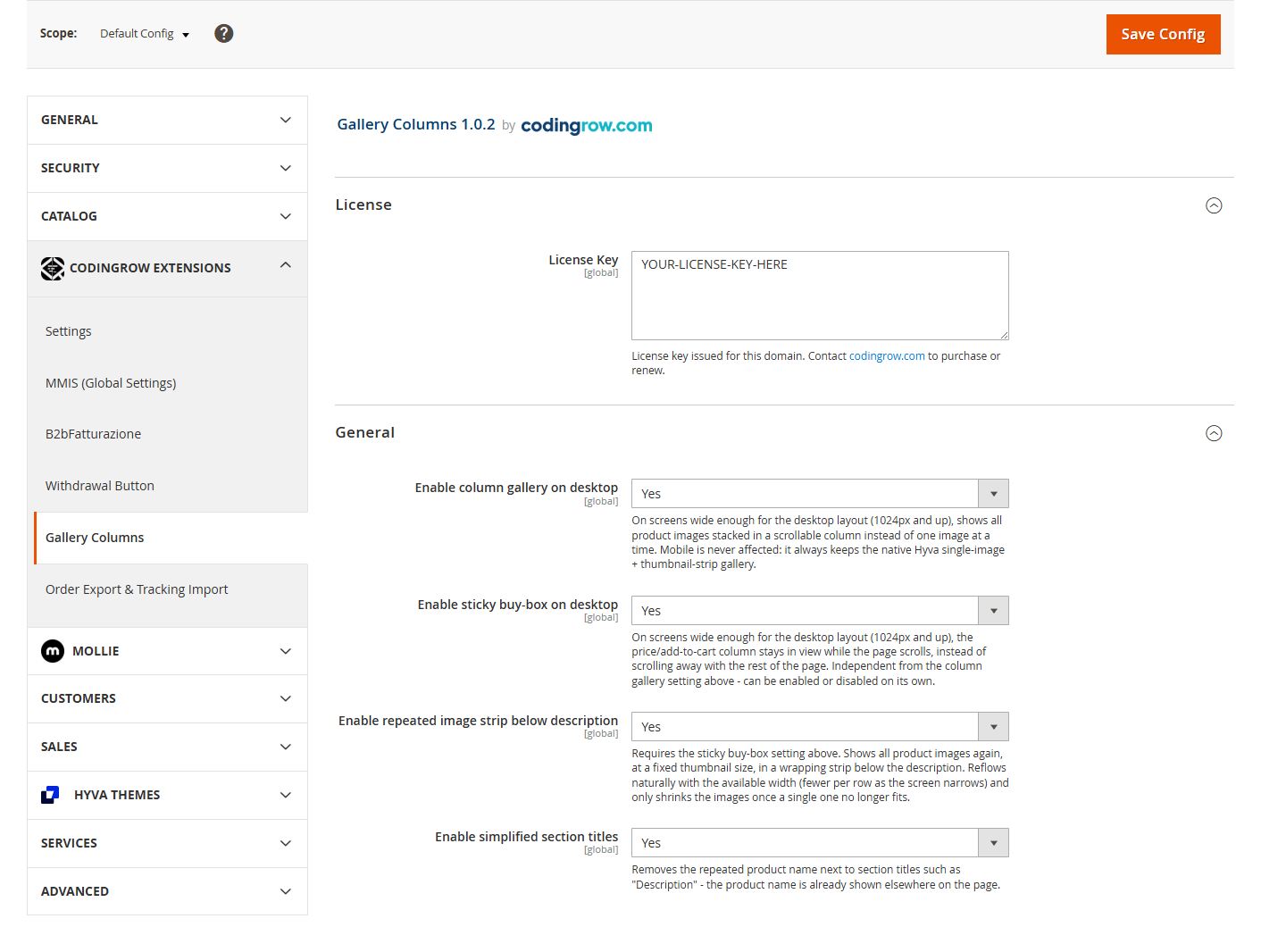
| Option | What it does | Default | Notes |
|---|---|---|---|
| License Key | The license key issued for this domain. | — | Paste it after purchase, then flush the cache. |
| Enable column gallery on desktop | Shows all product images at once in a 2-column grid instead of one at a time. | Yes | Desktop ≥ 1024px only; mobile keeps the native gallery. |
| Enable sticky buy-box on desktop | Keeps the price / add-to-cart column in view while the page scrolls. | Yes | Prerequisite for the two options below; also moves the description under the images. |
| Enable repeated image strip below description | Shows every product image again, at a fixed size, in a wrapping strip below the description. | Yes | Requires the sticky buy-box option. |
| Enable simplified section titles | Removes the repeated product name next to titles like “Description”. | Yes | Hyvä only (no effect on Luma). |
| Enable product SEO structured data | Adds a schema.org/Product JSON-LD block (name, image, brand, GTIN, price, availability) so Google can show rich results, and fills a meta description for products that have none. | Yes | Non-visual; Hyvä and Luma, desktop and mobile. Never overrides an existing meta description. |
Uninstallation
composer remove codingrow/module-ppps then
bin/magento setup:upgrade && bin/magento setup:di:compile && bin/magento cache:flush.
User guide
Column gallery
On desktop (1024px and up), every product image is shown at once in a 2-column grid instead of Hyvä's single-image-plus-thumbnail-strip or Luma's Fotorama slider. Mobile is never affected — it always keeps the theme's native gallery behavior (single image, swipeable thumbnail strip below).
On Hyvä, this is implemented as an additive block inside the theme's own Alpine.js gallery component, reusing the same image data already loaded for the default gallery — no duplicate JavaScript state. On Luma, the grid is added alongside the native Fotorama widget (never modified or reinitialized); the two are toggled with plain CSS at the desktop breakpoint.
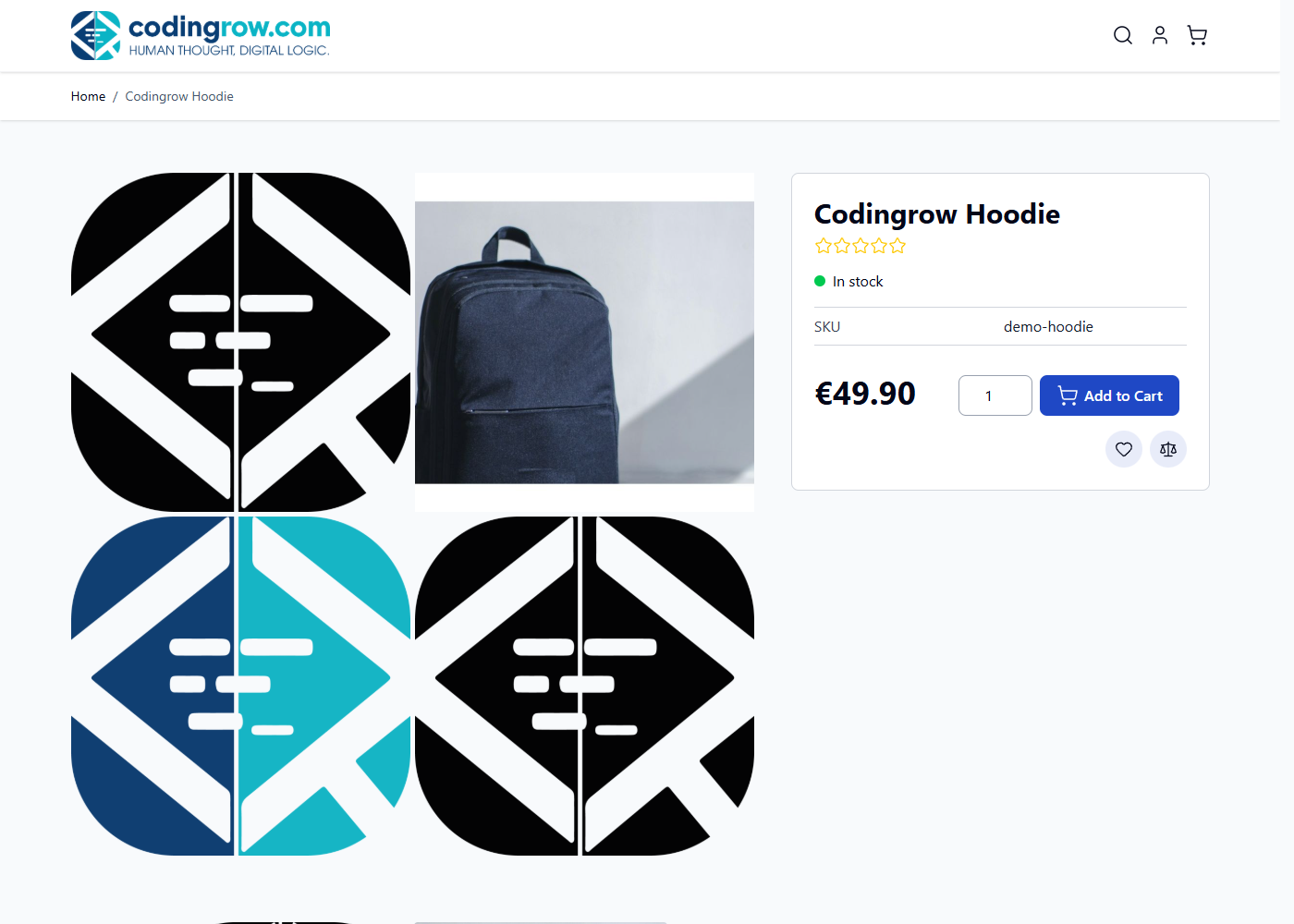
Sticky buy-box
On Hyvä: both the image column and the price/buy-box column become
position: sticky — whichever one is naturally shorter (usually the price column,
since the image+description column is normally taller) stays pinned in view while the other
scrolls past it. The description moves from its default position (below both columns) to
directly under the images, inside that same left column.
On Luma: only the price/buy-box column stays visually fixed while you
scroll, between the header and the end of the product information section — the image and
description column always scrolls normally. This is implemented in JavaScript
(transform: translateY(), recalculated on scroll) rather than CSS
position: sticky, since sticky positioning was found not to work reliably combined
with Luma's native float-based two-column layout. The description is also repositioned to sit
directly under the images (Luma's default puts it full-width below both columns).
Repeated image strip
Requires the sticky buy-box setting. Below the description, every product image is shown again at a fixed size (274×274px), wrapping naturally as the screen narrows — 3 per row on a typical desktop width, fewer per row as it gets narrower, down to 1 per row on mobile. Images only shrink below their fixed size once even a single one no longer fits the available width.
Simplified section titles
Hyvä's default theme shows "Description / Product Name" as the heading above the description tab — redundant once the product name is already prominent elsewhere on a rearranged page. This setting swaps it for a plain "Description" heading. Luma's own tabs never had this repetition, so the setting has no visible effect there.
Product SEO structured data
Independent of everything above, and not a visual change. When enabled, each product page gets a schema.org/Product JSON-LD block describing the product — name, image, brand, GTIN/EAN, and an Offer with price, currency, availability and item condition — so search engines can render rich results (price and availability in the SERP, eligibility for Google's free product listings). Every field is best-effort: whatever the product doesn't have (no brand attribute, no EAN, no price) is simply left out, never an error, and the block is emitted the same way on Hyvä and Luma, desktop and mobile.
The same setting also fills a meta description for products that don't have one of their own — built from the product's short/long description (or its name as a last resort). It never touches a product that already has a meta description (for example one set manually or populated by a feed import), so it only ever fills a gap.
Merchant listings: returns and shipping
Google reads a return policy and shipping details from the product page to show them in its free merchant listings, and Search Console reports them as missing when they are absent. Neither can be derived from the catalogue — they are commercial terms — so they are declared in configuration, under Merchant listings (returns and shipping). Both blocks are off by default and require the product structured data to be on.
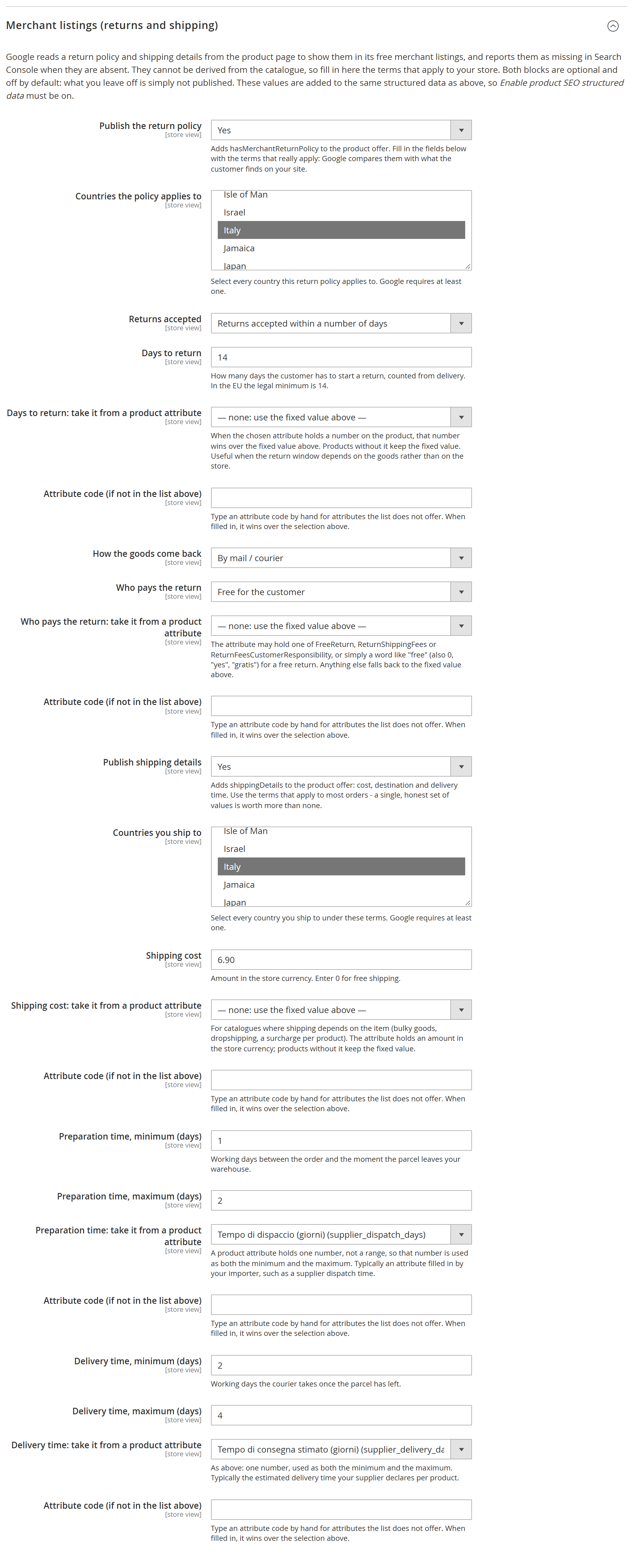
- Return policy →
hasMerchantReturnPolicy: countries (picked from Magento's own list), return window, days, how the goods come back, who pays and the fee when there is one. - Shipping details →
shippingDetails: countries you ship to, cost (0for free shipping), preparation and delivery time in working days.
Two rules are deliberate. A block whose required fields are incomplete is dropped whole rather than published half-true: Google compares what you declare with what the customer finds on your site, so a wrong declaration is worth less than a missing one. And "returns not accepted" publishes neither a return method nor who pays — there is no return to describe.
The offer also carries validFrom, the date the published price is valid from — the start of the special price when there is one, otherwise the product's creation date. That one needs no configuration.
These terms are rarely the same for the whole catalogue: preparation and delivery times differ between your own warehouse and dropshipping, shipping depends on how bulky the item is, the return window on what is being sold. And the figure usually already exists on the product, in an attribute your importer or your team fills in. So each of those fields can be pointed at a product attribute — the list includes your custom ones — with a box to type a code the list does not offer. Where the product carries a value it wins; where it does not, the fixed value stands; and a value that is not a number falls back to the fixed one instead of publishing nonsense.
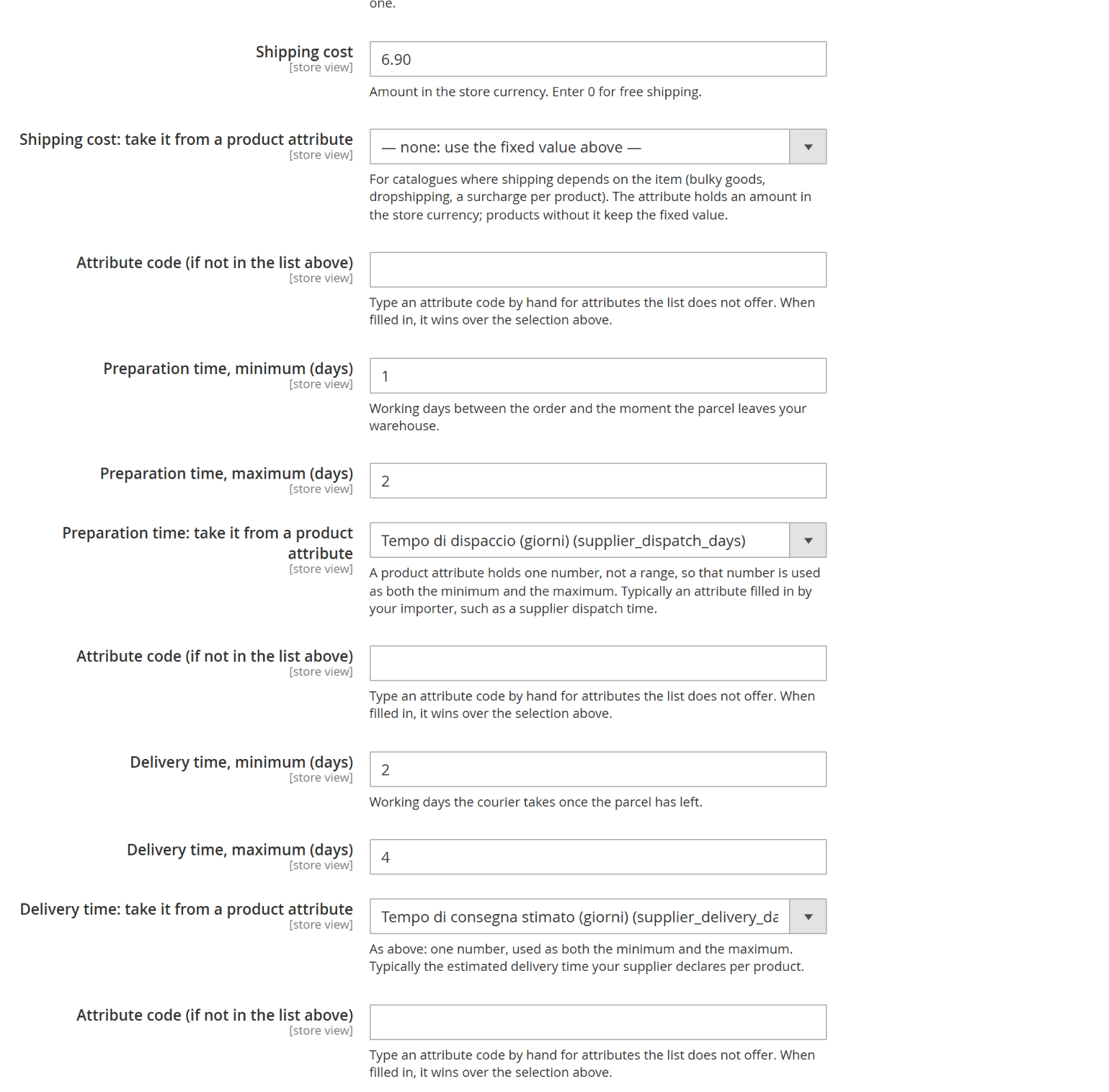
Each figure can come from a product attribute, chosen from the catalogue's own list: here the preparation and delivery times are taken from the attributes an importer fills in.
Hyvä and Luma support
The active theme is detected automatically (no configuration needed) by walking up the current theme's parent chain looking for "Hyva" or "Luma" in the theme code. On any theme that isn't a Hyvä or Luma descendant, every plugin in this module is a guaranteed no-op — the page renders exactly as it would without the module installed, never an error.
License
One license key per Magento domain, entered in Stores → Configuration → Codingrow Extensions → Product Page Pro & SEO → License → License Key. The key is validated by the module, and your store does not depend on our servers to run: a problem on our side does not stop it. Your licence covers the current version plus 1 year of updates & support: the releases published within that year stay yours forever, and you renew support (−35%) to install later ones. Moving to a new domain: your first change is free and instant from your account page, then one change a year.