 Magento 2 extension
Product Page Pro & SEO
On screens wide enough for a desktop layout, show every product image at once in a 2-column grid instead of one at a time, with a buy-box that stays in view while the page scrolls. Mobile always keeps your theme's native gallery — nothing changes there.
✓ License key delivered instantly by email after payment
✓ Instant installation via Composer
✓ First domain change included and instant (handy for staging → production)
✓ Compatible with Magento 2.4.x, with the Hyvä theme and with the default Luma theme
See it for yourself
A real product page on the same demo store, screenshotted twice: once with Product Page Pro & SEO off, once with it on. Drag the slider to compare.
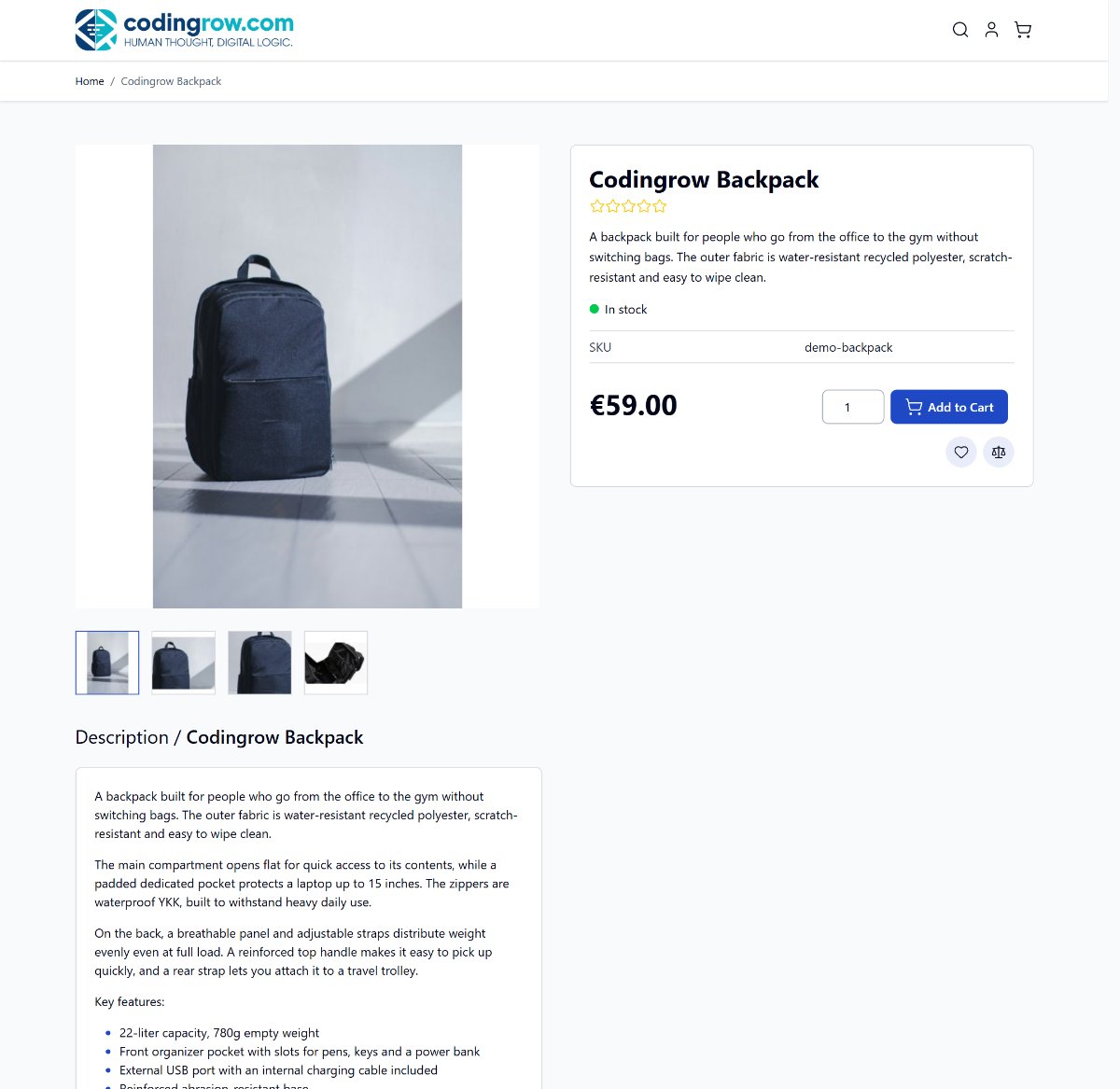
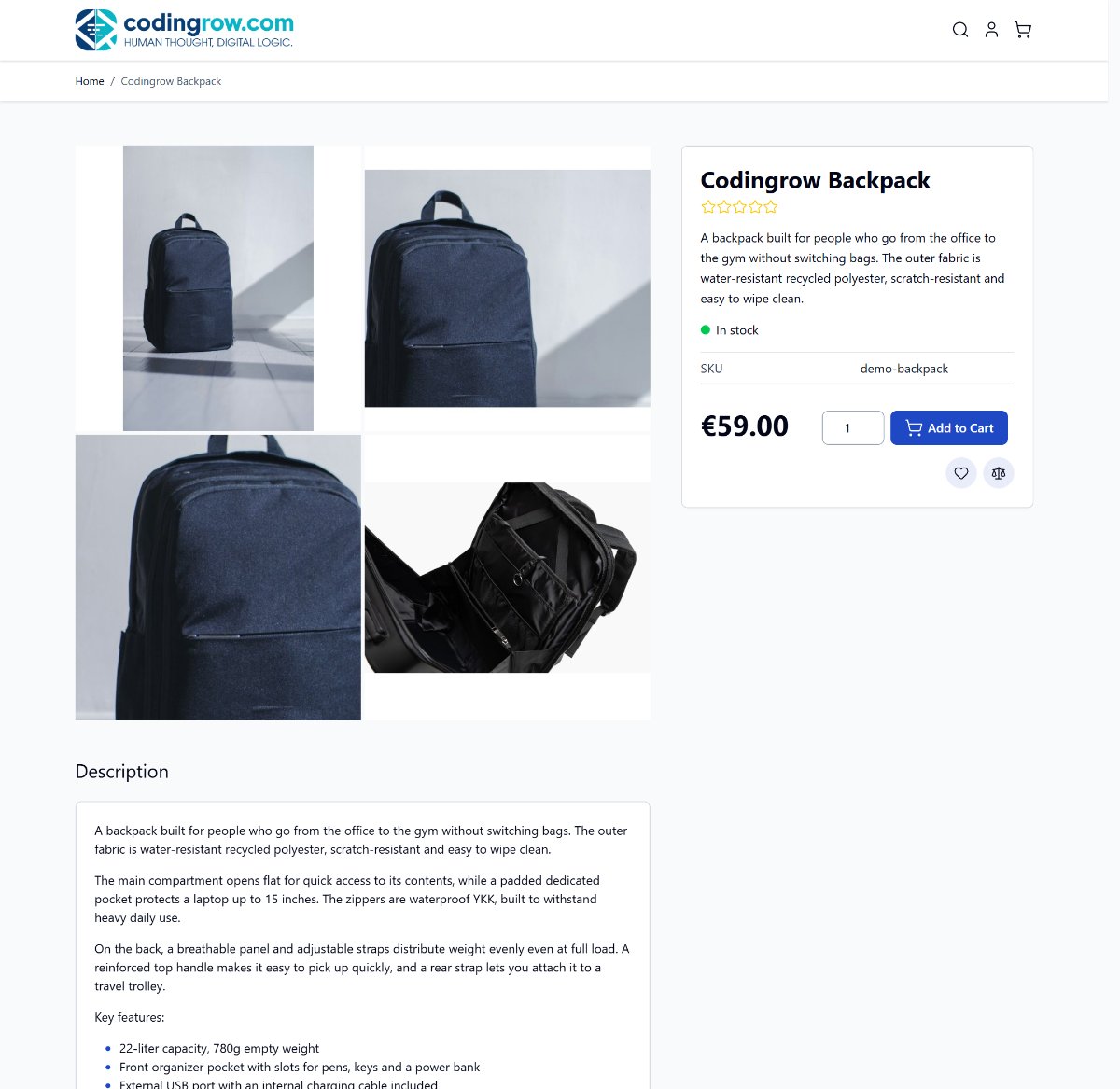 Before
After
Before
After
What it does on the product page
Product Page Pro & SEO is a suite of independent product-page upgrades for Magento 2 — switch on only what you want. On desktop it rethinks how the gallery and buy-box are laid out; behind the scenes it adds the structured data that makes your products eligible for Google rich results. Mobile is never touched, and every enhancement falls back silently to your theme's default when it's off or unlicensed.
Two-column desktop gallery
On screens 1024px and wider, every product image is shown at once in a clean 2-column grid, instead of Hyvä's single image with a thumbnail strip or Luma's one-at-a-time Fotorama slider. Shoppers take in the whole product without clicking through thumbnails — fewer clicks between them and the detail that sells. On Hyvä it reuses the theme's own gallery data (no duplicate JavaScript); on Luma it sits alongside the native Fotorama, which is never modified.
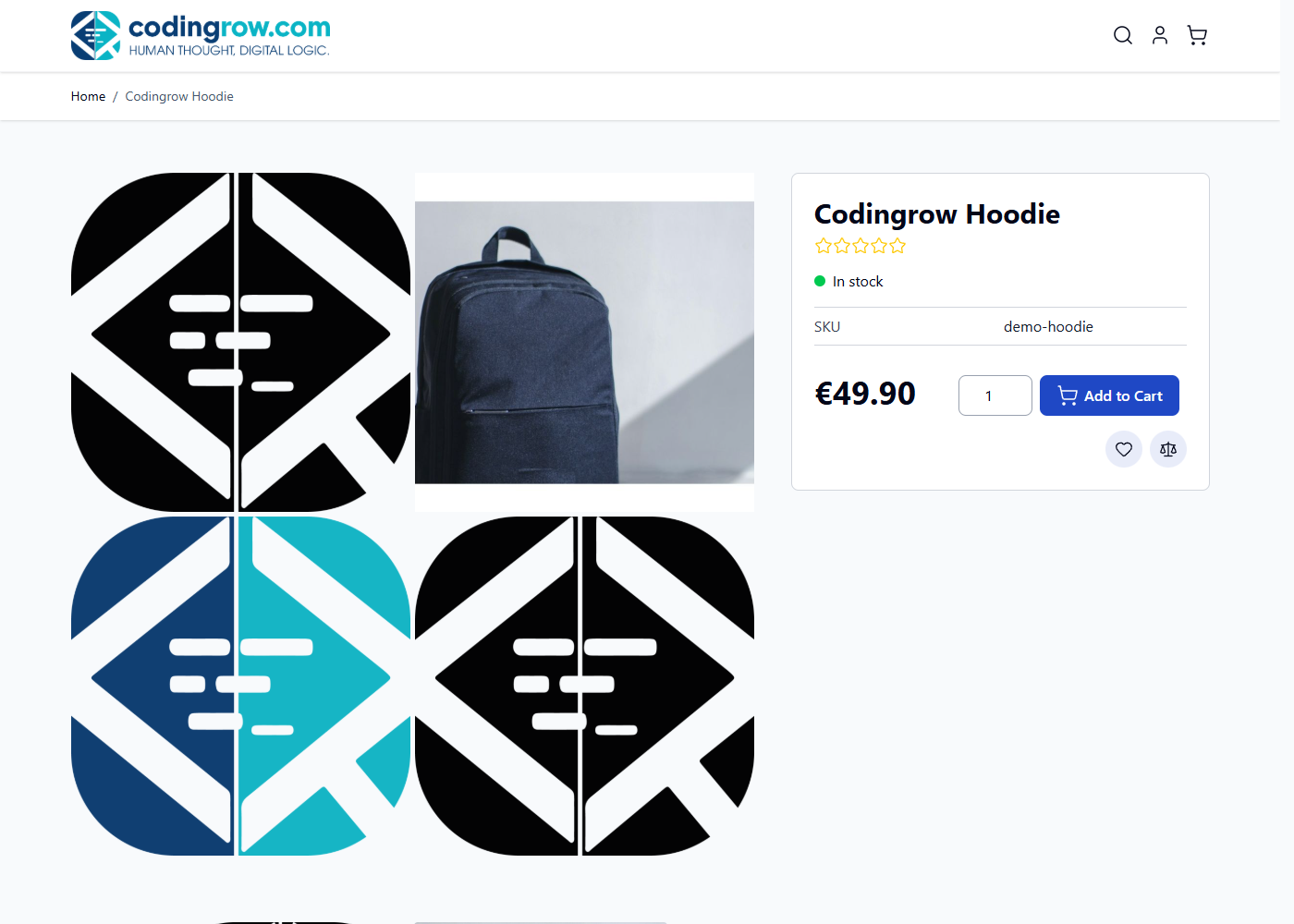
Sticky buy-box that stays in view
As the shopper scrolls through the images and the description, the price and Add to Cart column stays pinned in view — the call to action is never more than a glance away. The description moves directly under the images for a natural top-to-bottom reading flow.
Repeated image strip under the description
Below the description, all the product images appear again in a tidy wrapping strip — a second chance to show detail shots, size charts or lifestyle photos right where the shopper has just finished reading. It reflows from three per row on desktop down to one on mobile.
Simplified section titles
Drops the product name repeated next to headings like "Description" once it's already prominent on the rearranged page — a small, cleaner touch. Hyvä only; Luma's tabs never had that repetition to begin with.
SEO built into the product page
The "& SEO" in the name is real. With a single toggle, every product page emits a schema.org/Product JSON-LD block — name, image, brand, GTIN/EAN, price, currency, availability and condition — so Google can show rich results (price and availability right in the search snippet) and your products become eligible for its free product listings. It works the same on Hyvä and Luma, on desktop and mobile, and every field is best-effort: whatever a product doesn't have is simply left out, never an error.
The same setting also fills in a meta description for products that don't have one — built from the product's own short or long description — writing it straight into the page's <head>. It never overwrites a meta description you (or a feed import) already set, so it only ever closes a gap that would otherwise cost you clicks in search.
Return policy and shipping details for Google
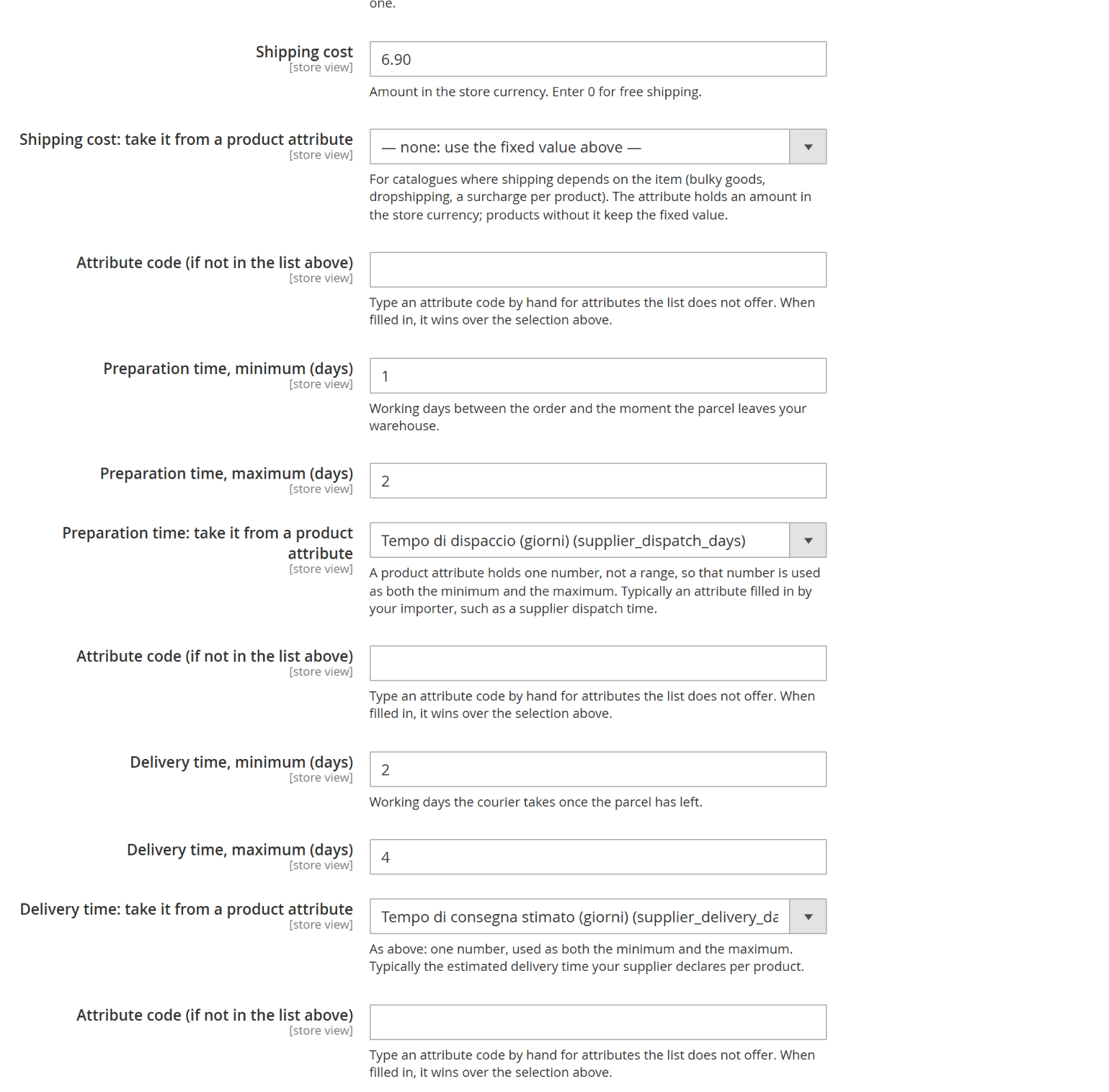
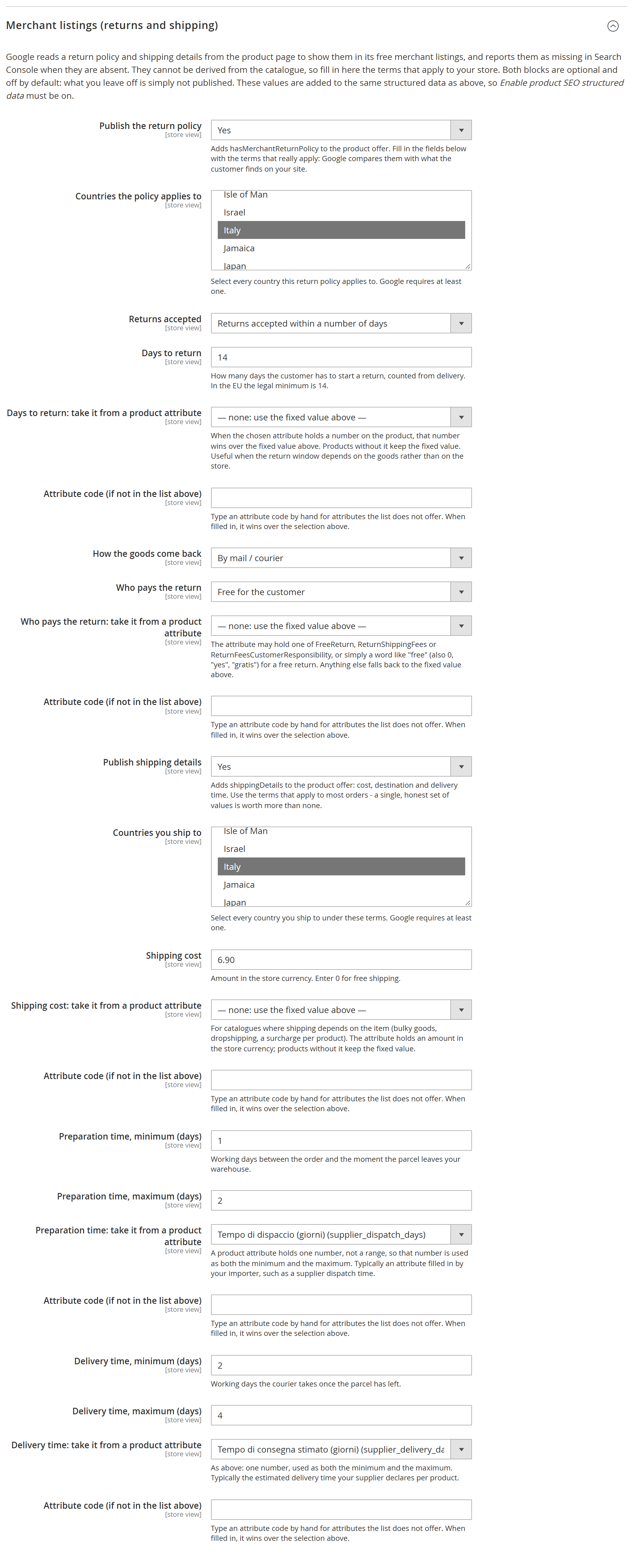
Google reads a return policy and shipping details from the product page to show them in its free merchant listings, and Search Console reports them as missing when they are not there. They cannot be derived from the catalogue — they are your commercial terms — so you declare them once: countries, return window and days, how the goods come back, who pays, shipping cost and preparation and delivery times.
Both blocks are off by default, and a block whose required fields are incomplete is left out entirely rather than published half-true: Google compares what you declare with what the customer finds on your site, so a wrong declaration is worth less than a missing one. The date the price is valid from is filled in automatically, with nothing to configure.
These terms are rarely the same for the whole catalogue: preparation and delivery times differ between your own warehouse and dropshipping, shipping depends on how bulky the item is, the return window on what is being sold. And the figure usually already exists on the product, in an attribute your importer or your team fills in. So each of those fields can be pointed at a product attribute — the list includes your custom ones — with a box to type a code the list does not offer. Where the product carries a value it wins; where it does not, the fixed value stands; and a value that is not a number falls back to the fixed one instead of publishing nonsense.
Living alongside AI Babel Enchanter
The two modules are independent and can sit on the same store: neither disables the other, and neither names the other in its own code. There is one point where they overlap, though, and it is better decided by you than left to chance.
- Only one of the two should publish the structured data. Both can emit the Product block for Google: leave both on and the same page carries two blocks, with Google choosing which one to read. The good practice is to keep one on and switch the other off.
- Where to switch it off. In Product Page Pro & SEO: General › Enable SEO structured data on product. In AI Babel Enchanter: SEO Rendering › Structured data (JSON-LD Product/Offer). Flush the cache after the change.
- Everything else coexists untouched. The two-column gallery, the sticky buy-box, the repeated image strip and the simplified titles stay with this module; the texts, translations and relations stay with Babel. Switching off one module's structured data leaves all of its other features alone.
Safe by design
- Mobile is never touched — it always keeps your theme's native gallery
- Automatic Hyvä / Luma detection — no configuration, and a guaranteed no-op on any other theme (never an error)
- No vendor files modified — everything is applied via DI plugins, so it survives Magento upgrades
- Plain CSS, no Tailwind build step — the layout works whether or not your theme scans the module
- Five independent toggles — enable only what you need, each falls back silently to the theme default when off
- No runtime dependency on our servers: a problem on our side never stops your store
Fully translated admin, in 7 languages
The System Config settings — labels, comments and the module header — are available in:
Magento automatically shows the module in whichever language each admin user has configured — no setup needed.
Requirements
Magento 2.4.x. PHP 8.1–8.5. Works with Hyvä (any child theme) and Luma (the default Magento theme) — on any other theme the module has no effect (safe no-op, same as being disabled).
Documentation
Full installation steps, configuration reference and a breakdown of how each feature behaves differently on Hyvä versus Luma.
FAQ
Will it work with my theme?
If your store runs Hyvä (any child theme) or Luma (the default Magento theme), yes — the active theme is detected automatically, no configuration needed. On any other theme the module simply does nothing: the page renders exactly as it would without it, never an error.
Does it change anything on mobile?
No. Every layout enhancement is desktop-only (1024px and up); on phones and small tablets your theme's native gallery is used exactly as before. The SEO structured data is the only part that also applies on mobile, and it's invisible to shoppers.
Is it safe for Magento upgrades?
Yes. Nothing in the Magento core or your theme's vendor files is edited. The module works through dependency-injection plugins and its own templates, so a Magento or theme update won't overwrite it and won't break it.
Do I have to enable everything?
No — the five features are independent toggles. Turn on only the ones you want (for example just the SEO structured data, or just the two-column gallery). Anything left off falls back silently to your theme's default behaviour.
How does the license work?
One license key per Magento domain. Your store does not depend on our servers to run: a problem on our side does not stop it. Your first domain change is included and immediate from your account.
What exactly does the SEO option add?
A schema.org/Product JSON-LD block on each product page (for Google rich results and free product listings) and an automatic meta description for products missing one. It never overrides a meta description you already have, and it's independent of the layout features — you can run it on its own.
Money-back guarantee
Not satisfied within 30 days of purchase? Request a refund yourself from your account area (codingrow.com/login), no questions asked. The refund is processed instantly, automatically, and the license is deactivated upon confirmation.
Changelog
Releases published within your update year are included at no extra cost — just run a normal Composer update; renew support afterwards to keep upgrading.
- A product with a range declares lowest and highest to Google, not the lowest as the only price.
- Only variants that can really be bought count.
- The grouped product gains most: before, it published no offer at all.
- Returns and shipping can come from a product attribute, not just from a fixed value.
- Return days, who pays, shipping cost, handling and delivery each point to their own attribute.
- Where the product has a value it wins, elsewhere the fixed one stays.
- Return and shipping countries are picked from a list instead of typed by hand.
- Values already configured keep working with no changes.
- New group to declare return and shipping terms for Google's merchant listings.
- Countries, return window, how goods come back, who pays, costs and times.
- Off by default; an incomplete block is dropped whole rather than published half-done.
- Fuller structured data: stars from reviews, brand, price validity.
- Up to five images, and the navigation trail on themes that do not publish it already.
- New name: Product Page Pro & SEO.
- Product structured data arrives, plus a short description for products that lack one.
- New structured data on the product page, for Google's rich results.
- A short description filled in by itself for products that lack one.
- Works on Hyvä and on Luma alike.
- It accepts the subscription key: one subscription activates this module along with the others.
- Single-module licences keep working exactly as before.
- First version: a two-column gallery on desktop and a price column that stays in view.
- A repeated image strip and simplified section titles.
- Full support for the Hyvä and Luma themes.