Installation
Requirements
Magento 2.4.x — tested on 2.4.9, compatible with previous 2.4.* releases. PHP 8.1–8.5. Compatible with both the default Luma theme and the Hyvä theme.
Setup steps
- Add the credentials you'll receive by email to
auth.jsonin your Magento project root:{ "http-basic": { "repo.codingrow.com": { "username": "...", "password": "..." } } } composer config repositories.codingrow composer https://repo.codingrow.comcomposer require codingrow/module-mmisbin/magento module:enable Codingrow_Mmisbin/magento setup:upgrade && bin/magento setup:di:compile && bin/magento cache:flush- Paste your license key into Admin → Stores → Configuration → Codingrow Extensions → MMIS → License → License Key, save, then
bin/magento cache:flush.
The whole admin interface — every label, tooltip and guide — is available in 7 languages, auto-selected per admin user:
Admin configuration
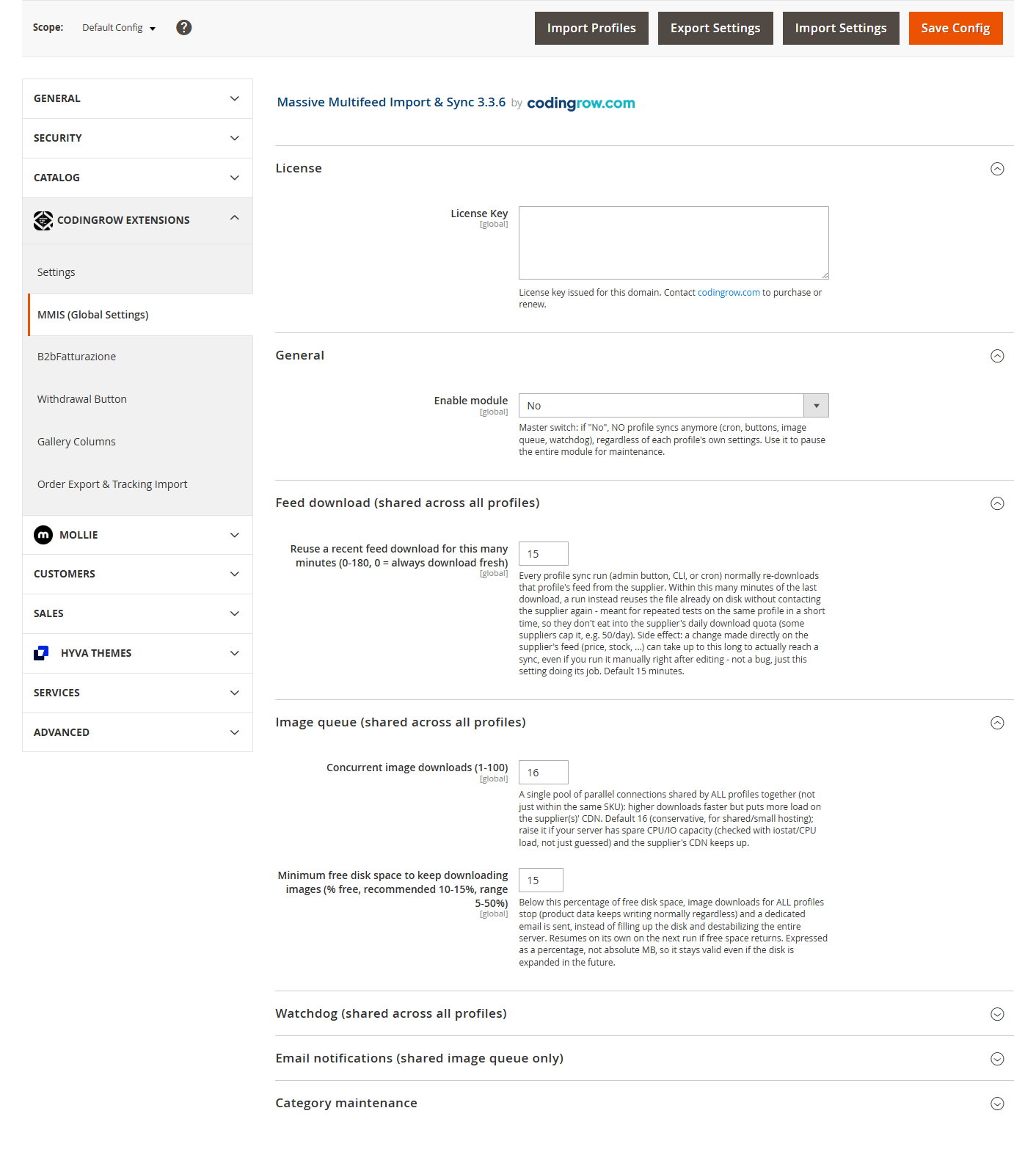
The shared, cross-profile settings live in Stores → Configuration → Codingrow Extensions → MMIS (Global Settings): module on/off, menu visibility, the shared image-queue/watchdog settings. Each import profile has its own separate Settings / Mapping / Notifications / Log tabs under the MMIS profiles list.
Uninstallation
composer remove codingrow/module-mmis then
bin/magento setup:upgrade && bin/magento setup:di:compile && bin/magento cache:flush.
Products already imported are never touched automatically — use the rollback tool first
if you also want them removed.
User guide
Import Profiles
Every supplier/feed you import from is its own Profile: own feed URL, own mapping, own schedule, own settings — completely independent from every other profile. You can run as many profiles as you have suppliers, side by side, on the same catalog, and each one only ever touches the products it created itself (never a product created manually by an operator, even if it happened to share the same SKU prefix).
Feed source & format
A profile reads its feed from one of three sources:
| Source | What you configure |
|---|---|
| URL (default) | A direct HTTP/HTTPS link. Supports .zip-compressed feeds transparently (detected by file signature, not by extension). |
| Magento file system | A path inside your Magento installation (e.g. var/import/feed.csv) — useful if the supplier drops files via SFTP into a folder you control. |
| FTP server | Host + username + password (stored encrypted) — the module connects and downloads the file itself. |
Three feed formats are supported: CSV (with configurable delimiter: comma, semicolon or tab), XML (you specify which repeating element represents one product) and JSON (array of objects).
https://codingrow.com/sample-feed.csvOpenAPI:
https://codingrow.com/sample-api.openapi.yamlColumn mapping
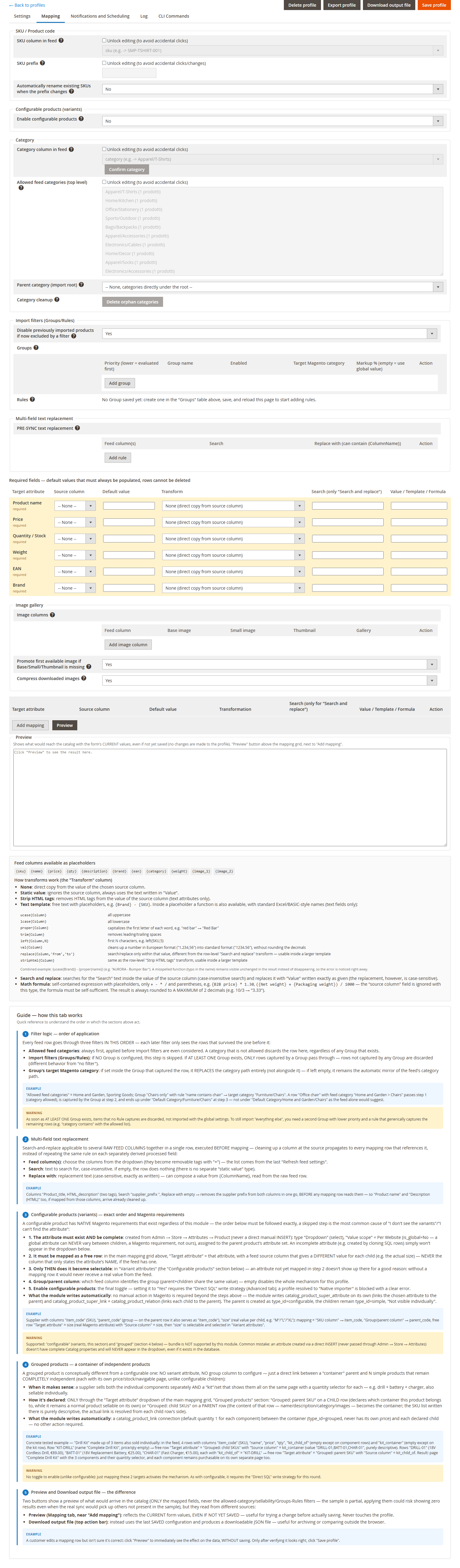
Six fields are always required (Product name, Price, Quantity/Stock, Weight, EAN, Brand) — each gets its own row with a source column, a default value, and a transformation. Beyond those six, you can add as many free mapping rows as you like, targeting any real Magento attribute (not just a fixed list of historical fields) — including custom attributes you've created yourself.
prezzo_base for
price and peso_kg for weight: map "Price" → source column prezzo_base,
"Weight" → source column peso_kg. Column names never matter, only which
column you point each row at.
Transformations & text functions
Every mapping row has a "Transform" type:
| Transform | What it does |
|---|---|
| None | Direct copy from the source column's value. |
| Static value | Ignores the source column, always uses the fixed text you type in "Value". |
| Text template | Free text with {ColumnName} placeholders — see functions below. |
| Search and replace | Case-insensitive search in the source column's value, replaced with your text (case-sensitive as typed). |
| Strip HTML tags | Removes HTML markup and decodes entities from the source column's value. Text attributes only. |
| Math formula | A self-contained expression — see Math formulas below. |
Inside a Text template, besides the plain {ColumnName} placeholder, eight
functions are available (text fields only):
| Function | Effect | Example |
|---|---|---|
ucase{Column} | ALL UPPERCASE | ucase{Brand} → "ACME" |
lcase{Column} | all lowercase | lcase{Brand} → "acme" |
proper{Column} | Capitalizes Each Word | proper{name} → "red bar" → "Red Bar" |
trim{Column} | Removes leading/trailing spaces | — |
left{Column,N} | First N characters | left{SKU,5} |
val{Column} | Normalizes a European-format number ("1.234,56") into standard format ("1234.56"), no decimal rounding | — |
replace{Column,'search','new'} | Search/replace only within that value (case-insensitive search), usable inside a larger template | replace{name,'Ref.','Reference'} |
striphtml{Column} | Removes HTML markup and decodes entities from that value, usable inside a larger template | striphtml{description} |
{ucase{Brand}} - {proper{name}}
on a row where Brand="acme" and name="red bar" produces "ACME - Red Bar".
A misspelled function name is left visible unchanged in the output instead of silently
disappearing, so a typo is always noticeable.
Math formulas
For numeric fields only (Price, Weight, Quantity, or any numeric custom attribute): a
self-contained expression using {ColumnName} placeholders, the four basic
operators (+ - * /) and parentheses — nothing else (no functions, no
comparisons). The result is always rounded to a maximum of 2 decimals.
{B2B price} * 1.30 applies a
30% markup on top of the supplier's wholesale price. ({price} + {shipping_cost}) / 1.22
adds shipping then removes 22% VAT to get a net price.
Multi-field text replacement
A search-and-replace rule that can target several raw feed columns at once, run before mapping even starts. Cleaning a column at the source propagates to every mapping row that reads it — instead of repeating the same fix on each derived field separately.
Import filters (Groups/Rules)
Every feed row passes through three filters, always in this order — a later filter only ever sees rows that survived the one before it:
- Allowed feed categories — always first. A category not on the allowed list discards the row here, before any Group is even considered.
- Groups/Rules — optional. If no Group is configured, every row from step 1 passes through untouched. If at least one Group exists, only rows captured by a Group pass — rows captured by no Group are discarded (different from "no filter at all").
- Group's target category — if set inside the Group that captured the row, it replaces the category path entirely; if left empty, the feed's own category path is used as-is.
Categories
The category tree is created automatically from each product's feed category path — no need to pre-create categories in Magento. A "Parent category" setting lets you nest an entire profile's categories under one shared root, useful when several profiles share the same catalog and you want to keep their category trees visually separate. Categories that end up empty (e.g. after a supplier discontinues a whole product line) can be cleaned up with one click or from the CLI.
Image gallery
Map any number of feed columns to image roles (base / small / thumbnail / gallery) — a single column can serve multiple roles at once. Downloaded images are optionally compressed (resized if wider than 1200px, recompressed at JPEG quality 85, kept only if the result is actually lighter) with a configurable concurrency and a disk-space watchdog that pauses downloads — never product data — if free space runs low.
Image processing is deliberately decoupled from writing product data: a product becomes visible in the catalog as soon as its data is written, with its images downloaded and compressed afterward by a separate queue — not before. This keeps the fast path fast (catalog data alone syncs at roughly 600 products/second) regardless of how many images are queued behind it; image compression itself costs roughly 20–100ms per image (10–50 images/second per worker), which would otherwise make a large first import dramatically slower if done inline.
Configurable products (variants)
Feed rows sharing the same value in a "Group/parent column" become variants of one configurable product. Any number of attributes can vary simultaneously — size, color, and a third attribute together, for example — each just needs its own mapping row with a column that gives a different value per variant.
Grouped products
Conceptually different from configurable: no variant attribute, no group column — just a direct link between a "container" parent and any number of simple products that stay completely independent (their own price, stock, and navigable page each), useful when a supplier sells both the individual components separately and a kit that shows them together with a quantity selector for each.
Stock management
Stock updates can be absolute (replace the value) or relative (add/subtract from the current quantity) — useful for suppliers whose feed reports deltas instead of totals. Backorders and "manage stock" follow your profile's configuration, not a single global setting.
Preview & output file
Two ways to see what a sync would actually write to the catalog — only the mapped fields, never the category/sellability/Group filters (the sample is partial on purpose):
| Preview | Reflects the form's current values, even unsaved — click it while editing to see the effect immediately, without touching the profile. |
|---|---|
| Download output file | Uses the last saved configuration and produces a downloadable JSON file. |
Scheduling & notifications
Each profile has its own cron schedule (from every 15 minutes to once a day, or a custom cron expression) for both the full catalog sync and a lighter stock/price-only sync. Email notifications (success/warning/critical error) are configured per profile, so different suppliers can have different alerting policies on the same store.
Product lifecycle: nothing is deleted by surprise
A product that disappears from the feed, or gets excluded by a filter, is always disabled first — never deleted — and re-enables itself automatically if it reappears in a later sync. Permanent deletion is a separate, optional setting (off by default): only a product left disabled for longer than a configurable number of days gets actually deleted, and only then.
CLI commands
Every action is also available from the command line (useful for cron, or for very large first imports run over SSH): run a profile's sync, export/import a profile's configuration, roll back everything a profile has ever imported, clean up orphaned categories, and more — each with a dry-run preview by default where destructive.