Installation
Prérequis
Magento 2.4.x — testé sur 2.4.9, compatible avec les versions 2.4.* précédentes. PHP 8.1–8.5. Compatible aussi bien avec le thème Luma par défaut qu'avec le thème Hyvä.
Étapes de configuration
- Ajoutez les identifiants reçus par e-mail à
auth.jsonà la racine du projet Magento :{ "http-basic": { "repo.codingrow.com": { "username": "...", "password": "..." } } } composer config repositories.codingrow composer https://repo.codingrow.comcomposer require codingrow/module-mmisbin/magento module:enable Codingrow_Mmisbin/magento setup:upgrade && bin/magento setup:di:compile && bin/magento cache:flush- Collez la clé de licence dans Admin → Stores → Configuration → Codingrow Extensions → MMIS → License → License Key, enregistrez, puis
bin/magento cache:flush.
Toute l'interface d'administration — chaque étiquette, infobulle et guide — est disponible en 7 langues, sélectionnées automatiquement par utilisateur admin :
Configuration admin
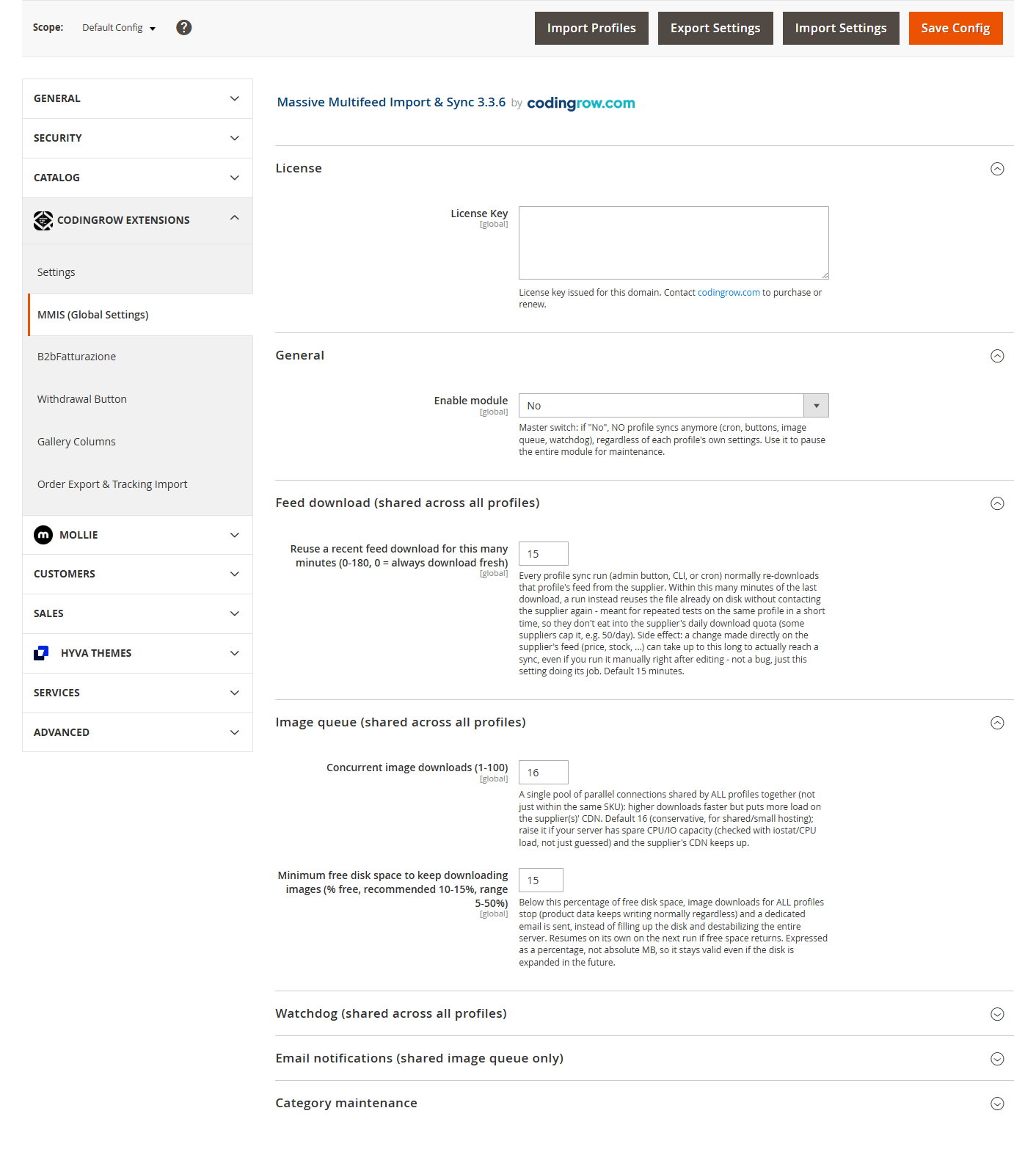
Les réglages partagés entre profils sont dans Stores → Configuration → Codingrow Extensions → MMIS (Global Settings) : activation du module, visibilité du menu, file d’images/watchdog partagés. Chaque profil d’import a ses propres onglets Réglages / Mappage / Notifications / Journal dans la liste des profils MMIS.
Désinstallation
composer remove codingrow/module-mmis puis
bin/magento setup:upgrade && bin/magento setup:di:compile && bin/magento cache:flush.
Les produits déjà importés ne sont jamais touchés automatiquement — utilisez d'abord
l'outil de retour en arrière si vous voulez aussi les supprimer.
Guide utilisateur
Profils d'import
Chaque fournisseur/flux depuis lequel vous importez est un profil à part entière : son propre flux, son propre mapping, sa propre planification, ses propres réglages — totalement indépendant de tout autre profil. Vous pouvez exécuter autant de profils que vous avez de fournisseurs, en parallèle, sur le même catalogue, et chacun ne touche que les produits qu'il a lui-même créés (jamais un produit créé manuellement par un opérateur, même s'il partage le même préfixe de SKU).
Source et format du flux
Un profil lit son propre flux depuis l'une de ces trois sources :
| Source | Ce que vous configurez |
|---|---|
| URL (par défaut) | Un lien HTTP/HTTPS direct. Prend en charge de manière transparente les flux compressés .zip (détectés par la signature du fichier, pas par l'extension). |
| Système de fichiers Magento | Un chemin dans l'installation Magento (ex. var/import/feed.csv) — utile si le fournisseur dépose des fichiers via SFTP dans un dossier que vous contrôlez. |
| Serveur FTP | Hôte + utilisateur + mot de passe (enregistré chiffré) — le module se connecte et télécharge le fichier lui-même. |
Trois formats de flux sont pris en charge : CSV (délimiteur configurable : virgule, point-virgule ou tabulation), XML (vous indiquez quel élément répété représente un produit) et JSON (tableau d'objets).
https://codingrow.com/sample-feed.csvOpenAPI:
https://codingrow.com/sample-api.openapi.yamlMapping des colonnes
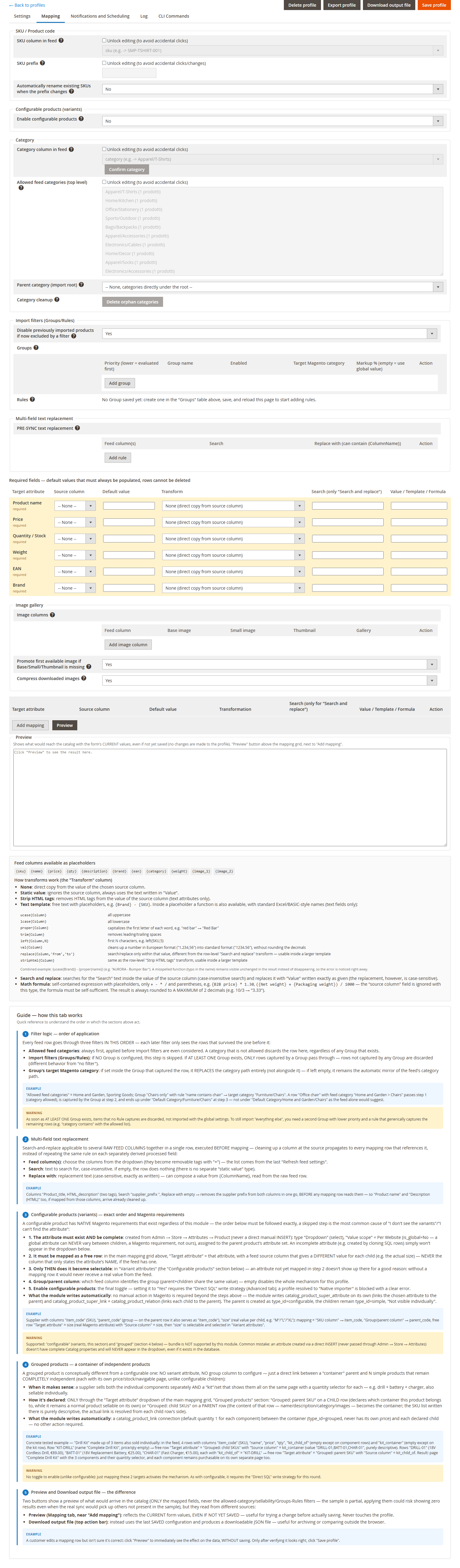
Six champs sont toujours requis (Nom du produit, Prix, Quantité/Stock, Poids, EAN, Marque) — chacun a sa propre ligne avec colonne source, valeur par défaut et transformation. Au-delà de ces six, vous pouvez ajouter autant de lignes de mapping libres que vous voulez, vers n'importe quel attribut Magento réel (pas seulement une liste fixe de champs historiques) — y compris des attributs personnalisés créés par vos soins.
prix_base pour
le prix et poids_kg pour le poids : mappez « Prix » → colonne source
prix_base, « Poids » → colonne source poids_kg. Le nom de la
colonne n'a jamais d'importance, seule compte la colonne vers laquelle pointe chaque
ligne.
Transformations et fonctions de texte
Chaque ligne de mapping a un type de « Transformation » :
| Transformation | Ce qu'elle fait |
|---|---|
| Aucune | Copie directe de la valeur de la colonne source. |
| Valeur statique | Ignore la colonne source, utilise toujours le texte fixe saisi dans « Valeur ». |
| Modèle de texte | Texte libre avec espace réservé {NomColonne} — voir les fonctions ci-dessous. |
| Rechercher et remplacer | Recherche insensible à la casse dans la valeur de la colonne source, remplacée par votre texte (exactement tel que saisi). |
| Strip HTML tags | Supprime les balises HTML et décode les entités de la valeur de la colonne source. Attributs texte uniquement. |
| Formule mathématique | Une expression autonome — voir Formules mathématiques plus bas. |
Dans un modèle de texte, en plus du simple espace réservé {NomColonne},
huit fonctions sont disponibles (uniquement pour les champs de texte) :
| Fonction | Effet | Exemple |
|---|---|---|
ucase{Colonne} | TOUT EN MAJUSCULES | ucase{Marque} → "ACME" |
lcase{Colonne} | tout en minuscules | lcase{Marque} → "acme" |
proper{Colonne} | Majuscule Initiale À Chaque Mot | proper{nom} → "barre rouge" → "Barre Rouge" |
trim{Colonne} | Supprime les espaces en début/fin | — |
left{Colonne,N} | Les N premiers caractères | left{SKU,5} |
val{Colonne} | Normalise un nombre au format européen ("1.234,56") vers le format standard ("1234.56"), sans arrondir les décimales | — |
replace{Colonne,'chercher','nouveau'} | Recherche/remplace uniquement dans cette valeur (recherche insensible à la casse), utilisable dans un modèle plus large | replace{nom,'Réf.','Référence'} |
striphtml{Colonne} | Supprime les balises HTML et décode les entités de cette valeur, utilisable dans un modèle plus large | striphtml{description} |
{ucase{Marque}} - {proper{nom}}
sur une ligne où Marque="acme" et nom="barre rouge" produit "ACME - Barre
Rouge". Un nom de fonction mal orthographié reste visible tel quel dans la
sortie au lieu de disparaître silencieusement, ainsi une faute de frappe se remarque
toujours.
Formules mathématiques
Uniquement pour les champs numériques (Prix, Poids, Quantité, ou un attribut
personnalisé numérique) : une expression autonome avec espace réservé
{NomColonne}, les quatre opérateurs de base (+ - * /) et les
parenthèses — rien d'autre (aucune fonction, aucune comparaison). Le résultat est toujours
arrondi à un maximum de 2 décimales.
{Prix B2B} * 1.30
applique une marge de 30% sur le prix de gros du fournisseur.
({prix} + {frais_livraison}) / 1.22 ajoute les frais de livraison puis
retire 22% de TVA pour obtenir un prix net.
Substitution de texte sur plusieurs champs
Une règle de rechercher-remplacer qui peut agir sur plusieurs colonnes brutes du flux simultanément, exécutée avant même que le mapping ne commence. Nettoyer une colonne à la source se répercute sur chaque ligne de mapping qui la lit — au lieu de répéter la même correction séparément sur chaque champ dérivé.
Filtres d'import (Groupes/Règles)
Chaque ligne du flux traverse trois filtres, toujours dans cet ordre — un filtre suivant ne voit que les lignes ayant survécu au précédent :
- Catégories de flux autorisées — toujours en premier. Une catégorie absente de la liste écarte la ligne ici, avant même qu'un Groupe soit pris en compte.
- Groupes/Règles — optionnel. Si aucun Groupe n'est configuré, chaque ligne ayant survécu à l'étape 1 passe inchangée. S'il existe au moins un Groupe, seules passent les lignes capturées par un Groupe — les lignes non capturées par aucun Groupe sont écartées (différent de « aucun filtre »).
- Catégorie de destination du Groupe — si définie dans le Groupe qui a capturé la ligne, elle remplace entièrement le chemin de catégorie ; si laissée vide, le chemin de catégorie du flux est utilisé tel quel.
Catégories
L'arborescence de catégories est créée automatiquement à partir du chemin de catégorie de chaque produit dans le flux — inutile de pré-créer les catégories dans Magento. Le réglage « Catégorie parente » permet d'imbriquer toute l'arborescence de catégories d'un profil sous une racine partagée, utile lorsque plusieurs profils partagent le même catalogue et que vous voulez garder leurs arborescences visuellement séparées. Les catégories qui restent vides (par ex. après qu'un fournisseur abandonne toute une gamme de produits) se nettoient en un clic ou depuis la CLI.
Galerie d'images
Mappez un nombre quelconque de colonnes du flux vers les rôles d'image (base / small / thumbnail / gallery) — une seule colonne peut servir plusieurs rôles simultanément. Les images téléchargées sont optionnellement compressées (redimensionnées si plus larges que 1200px, recompressées en JPEG qualité 85, conservées uniquement si le résultat est effectivement plus léger) avec une concurrence configurable et une surveillance de l'espace disque qui suspend les téléchargements — jamais les données produit — si l'espace libre vient à manquer.
Produits configurables (variantes)
Les lignes du flux qui partagent la même valeur dans une « colonne groupe/parent » deviennent des variantes d'un unique produit configurable. Un nombre quelconque d'attributs peut varier simultanément — taille, couleur et un troisième attribut ensemble, par exemple — chacun ayant sa propre ligne de mapping avec une colonne donnant une valeur différente pour chaque variante.
Produits groupés
Conceptuellement différent du configurable : aucun attribut de variante, aucune colonne groupe — seulement un lien direct entre un « conteneur » parent et un nombre quelconque de produits simples qui restent totalement indépendants (prix, stock et page navigable propres), utile lorsqu'un fournisseur vend à la fois les composants individuels séparément et un kit qui les présente ensemble avec un sélecteur de quantité pour chacun.
Gestion du stock
Les mises à jour de stock peuvent être absolues (remplacent la valeur) ou relatives (ajoutent/soustraient par rapport à la quantité actuelle) — utile pour les fournisseurs dont le flux indique des variations plutôt que des totaux. Le backorder et la « gestion du stock » suivent la configuration du profil, pas un réglage global unique.
Aperçu et fichier de sortie
Deux façons de voir ce qu'une sync écrirait réellement sur le catalogue — uniquement les champs mappés, jamais les filtres catégorie/vendabilité/Groupe (l'échantillon est partiel volontairement) :
| Aperçu | Reflète les valeurs actuelles du formulaire, même non enregistrées — cliquez dessus pendant la modification pour voir immédiatement l'effet, sans toucher au profil. |
|---|---|
| Télécharger le fichier de sortie | Utilise la dernière configuration enregistrée et produit un fichier JSON téléchargeable. |
Planification et notifications
Chaque profil a sa propre planification cron (de toutes les 15 minutes à une fois par jour, ou une expression cron personnalisée) à la fois pour la sync complète du catalogue et pour une sync plus légère, stock/prix uniquement. Les notifications par e-mail (succès/attention/erreur critique) se configurent par profil, afin que différents fournisseurs puissent avoir des politiques d'alerte différentes sur la même boutique.
Cycle de vie du produit : rien ne disparaît par surprise
Un produit qui disparaît du flux, ou qui est exclu par un filtre, est toujours d'abord désactivé — jamais supprimé — et se réactive automatiquement de lui-même s'il réapparaît lors d'une sync ultérieure. La suppression définitive est un réglage séparé, optionnel (désactivé par défaut) : seul un produit resté désactivé pendant plus d'un nombre configurable de jours est effectivement supprimé, et seulement alors.
Commandes CLI
Chaque action est aussi disponible en ligne de commande (utile pour cron, ou pour un premier import très volumineux via SSH) : exécuter la sync d'un profil, exporter/importer la configuration d'un profil, annuler tout ce qu'un profil a jamais importé, nettoyer les catégories orphelines et plus encore — chacune avec un aperçu dry-run par défaut lorsqu'elle est destructive.