 Magento 2 · Cookie consent · Google Consent Mode v2
The consent your tags actually receive
Most cookie banners announce the visitor's choice after the tag container has already started — and by then the first call has gone out with everything granted. This one hands the state over before the container loads, keeps a log that says which text the visitor was actually shown, and ships with 53 cookies already classified so the first screen is not an empty table.
Leave your email and you receive the credentials for our Composer repository. No key to paste: the module activates itself for your domain.
It installs switched off. Until you turn it on there is not one extra byte on your storefront.
Magento 2.4.x, PHP 8.1 to 8.5, any theme. Installed with Composer, from our repository.
Declared first, or it did not count
The consent state has one moment in which it matters: before the tag container starts. A banner that announces the choice a few lines later is announcing it to a container that has already made its first call — and that call carries the implicit default, which is "granted". With our data layer module installed, this one hands over the state so it is declared in the same script that loads the container, which is the only arrangement in which it is guaranteed to come first. Without that module, it declares the state itself.
Measured on live stores before we built this: the theme banner declared consent on source line 71 while the container started on line 45, and the first call to Google carried gcs=G111 — everything granted, before the visitor had chosen anything. With this module the same first call carries gcs=G100: everything denied, as it should be.
Granular, and you can read it
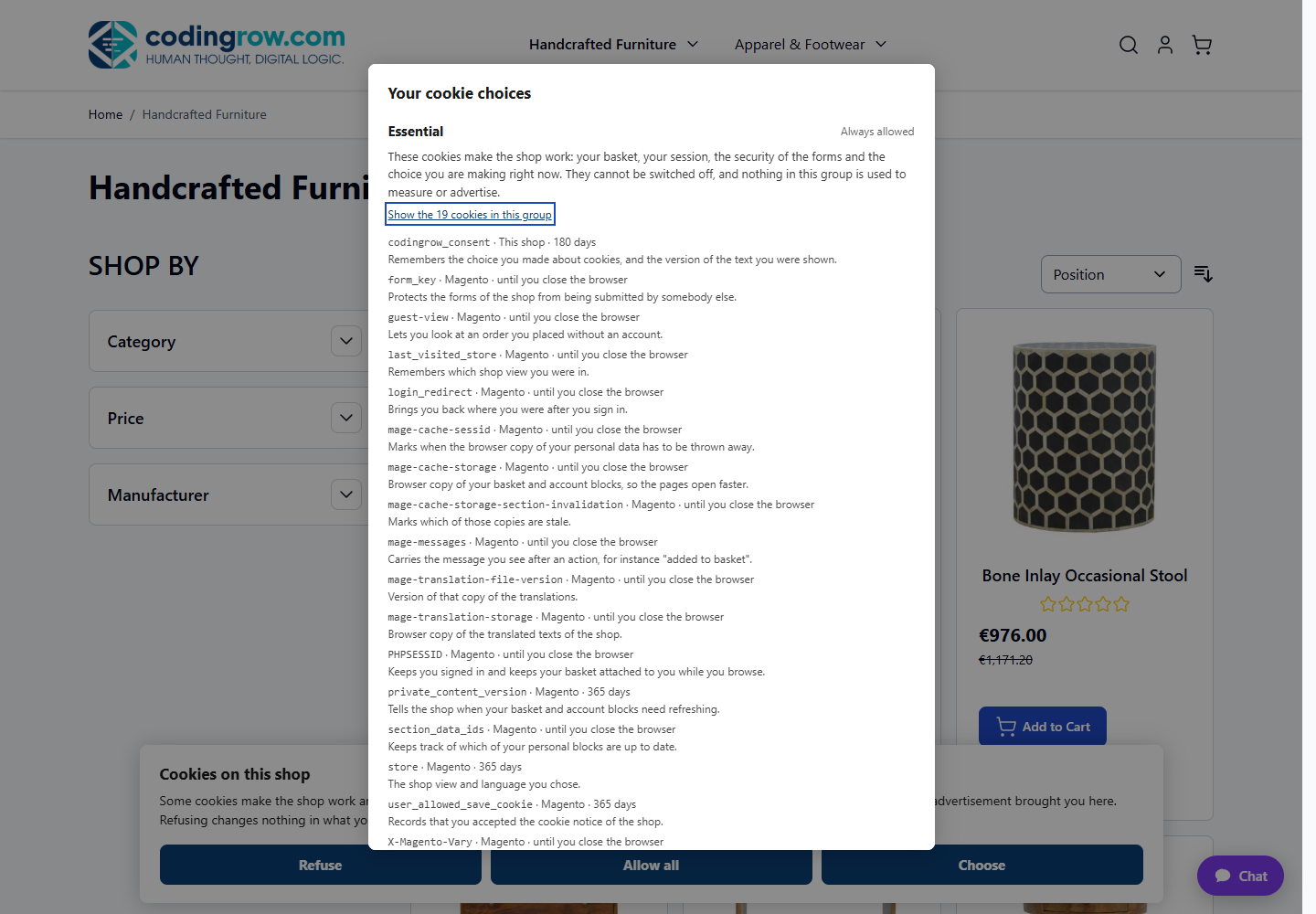
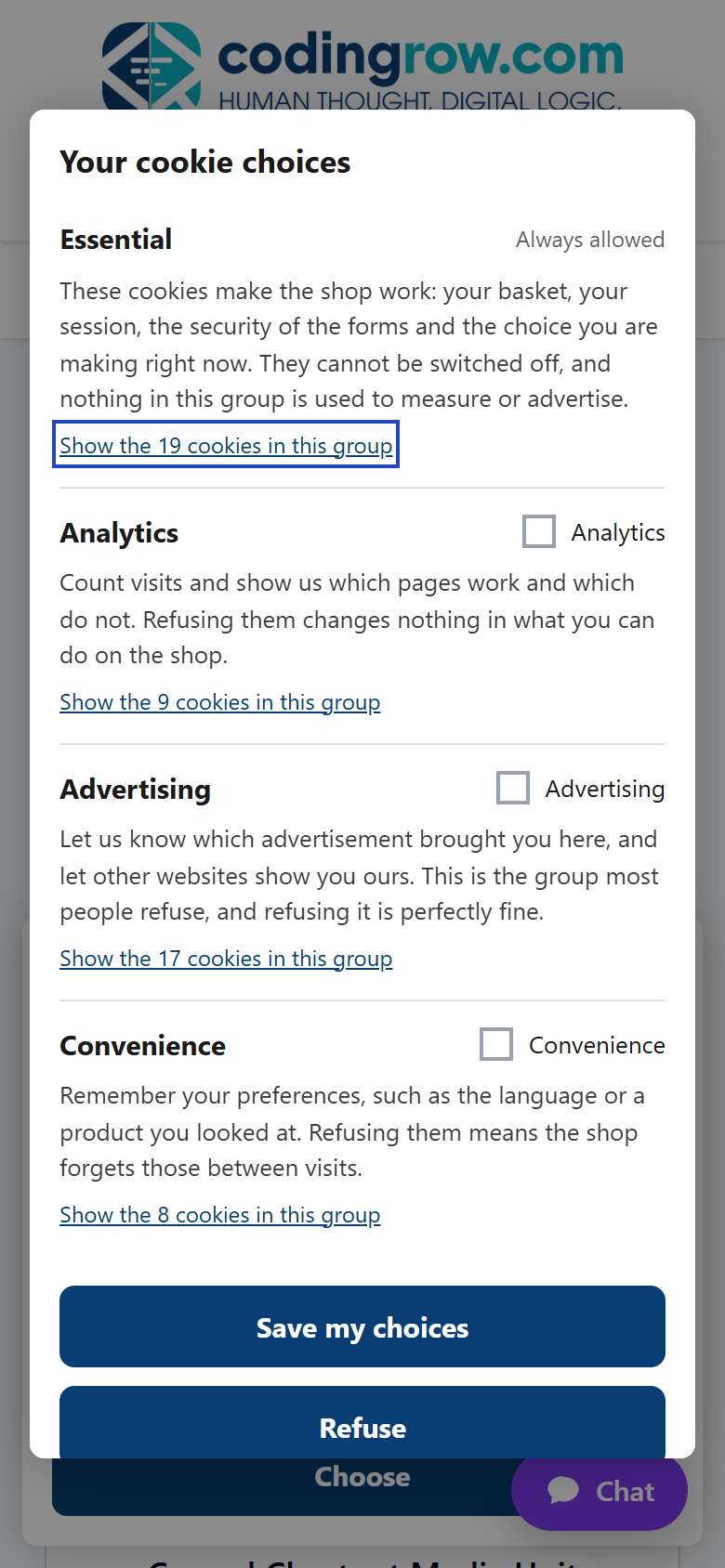
A visitor who allows analytics and refuses advertising should produce exactly that, and nothing more. Here you do not have to take our word for it: open the network panel, allow only analytics, and the request Google receives carries gcs=G101 — analytics granted, advertising denied. Allow everything and it becomes G111. Refuse and it stays G100. The visitor chooses groups in plain language; the seven platform signals are derived from them, because nobody knows what ad_user_data is and everybody knows what advertising is.
What your visitors see
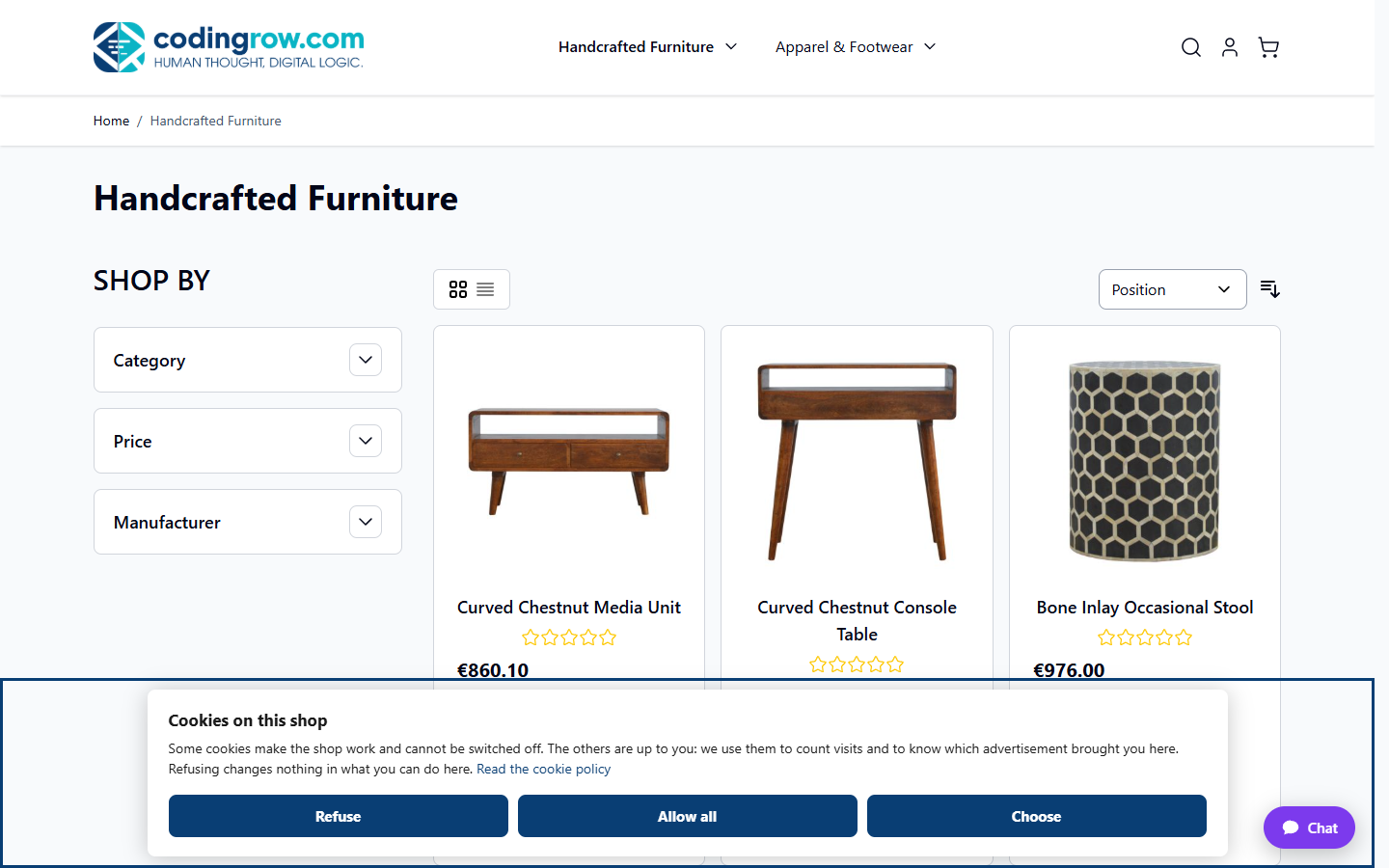
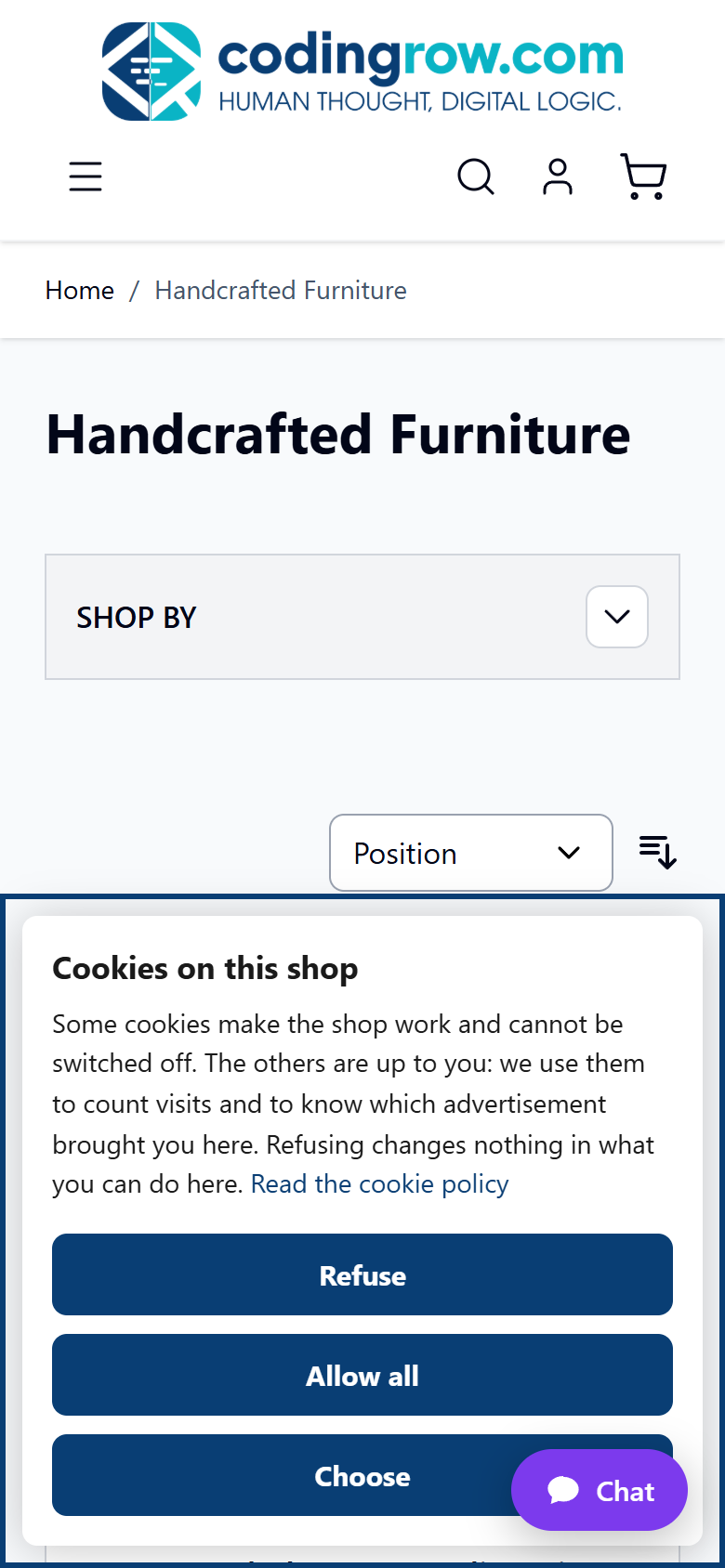
Plain HTML and CSS with a class prefix of its own: it renders the same on a modern theme, on the classic one and on a theme built in house. These are real screenshots of our own demo store, not mockups.
Refusing is as easy as accepting
This is a property of the structure, not a promise in a brochure: both buttons come out of the same loop with the same class, so there is nothing to style differently. There is no setting that hides the refusal, shrinks it, puts it behind a "learn more" or turns it into a grey link, and there will not be one. There is no X that closes the banner without recording anything, because closing is not a choice. One thing is yours to decide: whether the accept button is filled while the others are outlined. That changes the fill and nothing else.
Measured on both themes: 15488 px² per button, zero difference, same row, same font, and the same 10.75:1 text contrast whichever emphasis you pick. The banner also takes keyboard focus the moment it appears, so the first button is two Tab presses away instead of fifty.
A log that is evidence, not a counter
Counting how many people accepted proves nothing. Each row here records the groups allowed and the groups refused, what was actually sent to each platform, and a fingerprint of the exact texts that visitor was shown — so you can open a row and read, word for word, the wording they agreed to. There is a reference the visitor can quote, the address is never kept whole, and everything exports to CSV. The log never leaves your server.
This is the difference between "they accepted" and "they accepted this". Change your texts and the fingerprint changes with them: visitors are asked again, and every older row still resolves to the wording that was in front of them on the day.
53 cookies already classified, and the ones nobody told you about
The reason most cookie modules get switched off on day one is that they open on an empty table and expect you to fill in forty rows by hand. This one ships with 53 cookies and 4 groups already classified — the ones Magento writes itself, ours, and the common third-party ones — each with who writes it, how long it lasts and a plain-language description. Then the browser reports the names it sees and the catalogue does not list: they land in a queue you classify with one click.
It works: on our own demo store the detector found two payment cookies nobody had declared, on the first run. They are now in the shipped catalogue.
Cookies that are never written at all
Removing a cookie after it has been written is a cleanup. Not writing it is consent. A modern Magento theme has a first-party cookie gate built in, and this module drives it rather than reimplementing it: it declares its groups to the gate, so a cookie belonging to a group the visitor has not allowed is never written, and reopens them the moment the visitor chooses. On the classic theme, where no such gate exists, the cookies of refused groups are removed by name and by prefix — and the admin says plainly which of the two situations your theme is in, instead of letting you assume.
It does not fragment your full page cache
The visitor's choice never enters the HTML. Two visitors with opposite choices receive byte-identical pages, and the decision is taken in the browser from a single cookie of about 130 bytes. That matters more than it sounds: a consent module that writes the choice into the page either multiplies your cached variants or — worse — serves one visitor's choice to everybody else. The only case where an extra cached copy exists at all is when you configure the country rules, and then there is exactly one.
What you get
- The seven Google consent signals, each tied to a group you choose, with an initial state that denies everything a visitor could refuse.
- Texts, colours, position and groups per store view, with built-in wording already translated into seven languages — including the cookie descriptions.
- A cookie policy table generated from your own catalogue: drop it into a CMS page as a widget and it never goes stale when an extension starts writing something new.
- The Microsoft advertising tag and the session recording tag receive the state too, each in the spelling it actually expects. Both off by default.
- Global Privacy Control, if you want it: a browser that sends the signal is treated as a refusal until the visitor chooses otherwise, and an explicit choice always wins.
- Four admin tabs with a permission each, so you can give the consent log to whoever handles data requests without handing over the whole configuration.
What it does not do
This module gives you the tools to collect, apply and prove consent. It does not make you compliant — that depends on how you configure it, what you write in your policy, and your own advisor. Three limits worth knowing before you install, rather than after:
- Holding back third-party scripts is off by default, and only touches the addresses you list. Scripts written inside the page are never touched, nor is whatever an allowed script loads by itself afterwards. There are no heuristics and no built-in list of known domains applied for you.
- Showing the banner only to some countries needs your server, not us. It reads an HTTP header carrying the country, which has to be added before Magento sees the request — a delivery network in front of the store, or a geolocation database in your web server. The admin says which of three situations you are in, and until the header arrives the banner is shown to everyone.
- Cookies with a variable name are covered by the cleanup, not by the theme's gate, which compares by exact name. It is a known limit, and it is written in the catalogue next to each of them rather than left unsaid.
If the third-party script blocking is what you came for: switch it on, list your addresses, and then walk through a whole purchase on your own store — both themes if you run two, checkout included — before you leave it on. It is the one feature that can stop a shop from working, which is exactly why it ships switched off.
Your language, and your visitors' language
Every field and every explanation in the configuration is translated, and so is everything your visitors read: the banner, the preferences window, the names of the groups and the description of each of the 53 cookies that come with the module. Leave a text field empty and you get the built-in wording in the language of that store view. Each consent records which version of the texts was shown, so a translation change is visible in the log too.
The store view language is picked up automatically; English is the fallback. Seven languages: English, Italian, German, Spanish, French, Dutch and Portuguese.
Requirements
Magento 2.4.x (Open Source or Adobe Commerce), PHP 8.1 to 8.5, any theme. Our data layer module is suggested but not required: with it installed, the consent state is declared in the same script that loads your tag container. The server has to reach codingrow.com over HTTPS once a day for the automatic activation.
Changelog
What changes, version by version.
- The cookie catalogue is seeded when the module is installed on a shop for the first time: four groups and 53 cookies, as intended.
- A cookie banner that records the visitor's choice, remembers it and declares the consent state to your advertising and analytics tags before they load.
- The seven Google consent signals, each tied to a group you choose; the Microsoft advertising tag and the session recording tag optionally follow.
- A consent log that keeps the yeses and the noes, what was sent to each platform, a reference the visitor can quote and a fingerprint resolving to the exact wording shown. Exports to CSV.
- 53 cookies and 4 groups classified on install, plus a detector that reports the ones your catalogue does not list.
- A cookie policy table generated from the catalogue, as a CMS widget.
- Both buttons the same size and one click each; the banner takes keyboard focus the moment it appears.
- Global Privacy Control, country rules and third-party script blocking: all optional, all off by default.
- Interface and texts in seven languages.